
1. Introduction
Thank you for choosing the HYPER HJAC-100-EU 26000 mAh Li-ion External Battery. This high-capacity power bank is designed to provide reliable and fast charging for your electronic devices on the go. With its powerful 100W output and advanced charging technologies, you can keep your smartphones, tablets, laptops, and other compatible devices powered throughout your day. Please read this manual carefully to ensure safe and optimal use of your device.
2. Safety Information
To prevent damage to the product or injury to yourself and others, please observe the following safety precautions:
- Do not disassemble, open, or shred the battery pack.
- Do not expose the battery pack to heat or fire. Avoid storage in direct sunlight.
- Do not short-circuit the battery pack. Do not store battery packs haphazardly in a box or drawer where they may short-circuit each other or be short-circuited by other metal objects.
- Do not expose the battery pack to mechanical shock.
- In the event of a battery leaking, do not allow the liquid to come into contact with the skin or eyes. If contact has been made, wash the affected area with copious amounts of water and seek medical advice.
- Do not use any charger other than that specifically provided for use with the equipment.
- Keep the battery pack clean and dry.
- Do not leave a battery on prolonged charge when not in use.
- Dispose of the battery pack properly according to local regulations.
- Keep out of reach of children.
3. Product Features
- High Capacity: 26000 mAh Li-ion battery (100 Wh) for extended power.
- Powerful Output: Up to 100W total power output, capable of charging multiple devices.
- Simultaneous Charging: Charge up to two devices concurrently.
- Fast Charging: Equipped with Qualcomm Quick Charge technology for rapid device charging.
- Multiple Ports: Features 2x USB-A ports, including 1x USB 2.0 output and 1x USB 3.0 output.
- Advanced Safety: Integrated Multi Safety system protects your devices from overcharge, over-discharge, overcurrent, and short-circuit.
- LED Indicators: Built-in LED lights display the remaining battery level and charging status.
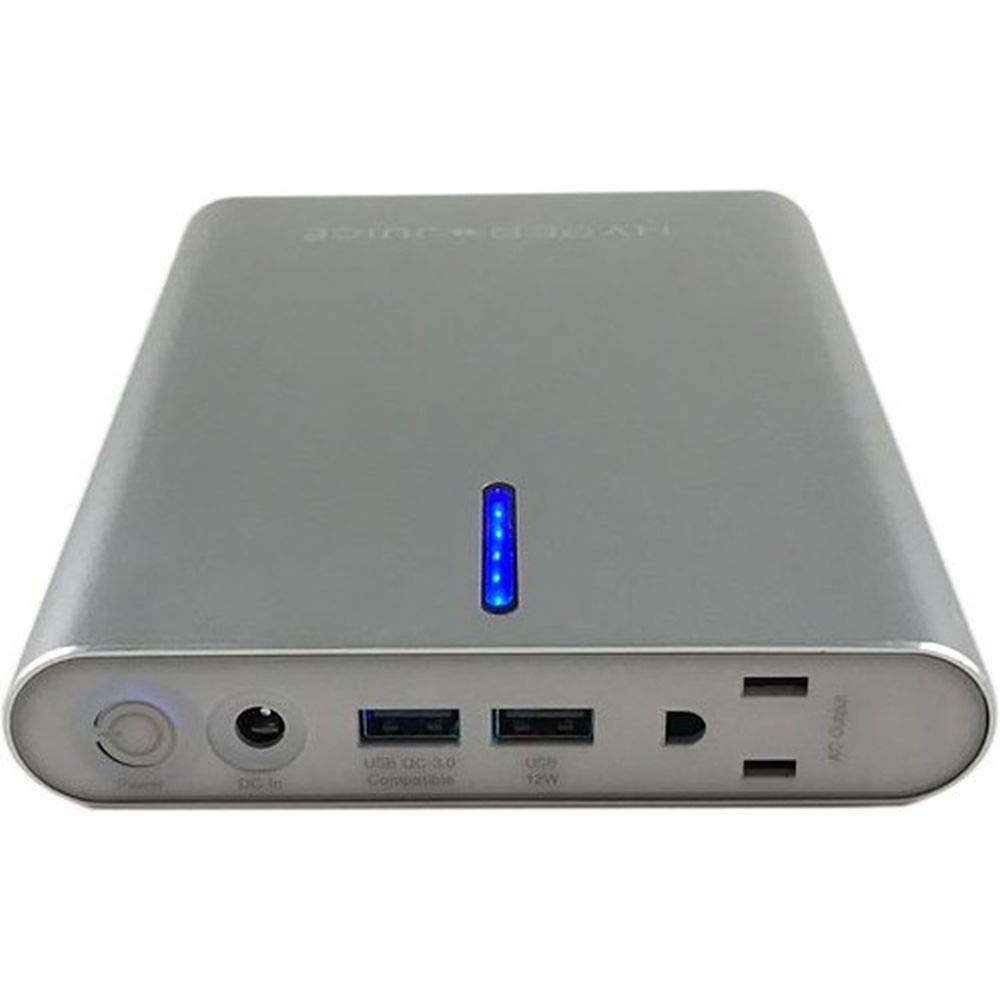
4. Setup
4.1 Initial Charging of the Power Bank
Before first use, fully charge your HYPER HJAC-100-EU external battery.
- Connect the provided charging cable to the input port of the power bank.
- Connect the other end of the charging cable to a suitable USB wall adapter (not included) or a powered USB port.
- The LED indicator lights will illuminate to show the charging progress. All LEDs will be solid when fully charged.
4.2 Checking Battery Level
Press the power button once to check the current battery level via the LED indicators.
5. Operating Instructions
5.1 Charging Your Devices
The HYPER HJAC-100-EU can charge a wide range of USB-powered devices.
- Connect your device's charging cable to one of the available USB-A output ports on the power bank.
- Connect the other end of the cable to your device.
- The power bank will automatically begin charging your device. If not, press the power button once to initiate charging.
- The LED indicators will show the power bank's remaining battery level during charging.
- You can charge up to two devices simultaneously.
Note: For optimal charging speed, use your device's original charging cable or a certified high-quality cable. The Qualcomm Quick Charge ports will automatically detect and deliver the fastest possible charge to compatible devices.
6. Maintenance
- Cleaning: Use a soft, dry cloth to clean the surface of the power bank. Do not use harsh chemicals or abrasive materials.
- Storage: Store the power bank in a cool, dry place away from direct sunlight and extreme temperatures. For long-term storage, it is recommended to charge the power bank to about 50-70% every three months to maintain battery health.
- Avoid Drops: Protect the device from drops and impacts, which can damage internal components.
7. Troubleshooting
| Problem | Possible Cause | Solution |
|---|---|---|
| Power bank not charging | Charging cable is faulty or not properly connected. Wall adapter is not working or insufficient. | Check cable connections. Try a different charging cable and/or wall adapter. Ensure the adapter provides sufficient power. |
| Device not charging from power bank | Power bank battery is depleted. Device charging cable is faulty. Device is incompatible or requires specific charging protocols. | Recharge the power bank. Try a different charging cable. Ensure your device is compatible with USB charging. Press the power button on the power bank to activate output. |
| Slow charging | Cable quality is poor. Device is not Quick Charge compatible. Multiple devices are charging simultaneously. | Use a high-quality, certified charging cable. Ensure your device supports Quick Charge for faster speeds. Charging multiple devices may distribute power, leading to slower individual charging. |
| LED indicators not working | Power bank is completely discharged. Internal fault. | Attempt to charge the power bank for an extended period. If the issue persists, contact customer support. |
8. Specifications
| Model Number | HJAC-100-EU |
| Brand | HYPER |
| Battery Capacity | 26000 mAh (100 Wh) |
| Battery Type | Lithium-ion |
| Output Ports | 2x USB-A (including 1x USB 2.0, 1x USB 3.0) |
| Total Power Output | Up to 100W |
| Special Features | Qualcomm Quick Charge, Multi Safety System, LED Indicator Lights |
| Product Dimensions (L x W x H) | 13.3 x 2.7 x 17.5 cm (5.24 x 1.06 x 6.89 inches) |
| Item Weight | 790 g (1.74 lbs) |
| Compatible Devices | Digital camera, Flashlight, Mobile phone/smartphone, Laptop/netbook, Portable speaker, Tablet |
9. Warranty and Support
For warranty information and customer support, please refer to the documentation included with your purchase or visit the official HYPER website. You may also contact HYPER customer service directly for assistance with product inquiries, troubleshooting, or warranty claims.
Manufacturer: HYPER

