1. Introduction
This manual provides comprehensive instructions for the installation, operation, and maintenance of the Codelocks CL465 Mech Narrow Stile Latch Lockset. Please read this manual thoroughly before installation and use to ensure proper function and longevity of your lockset.
2. Product Overview
The Codelocks CL465 is a mechanical narrow stile medium-duty lockset designed for internal and external aluminum doors. It features a lever handle and a key cylinder for secure access control. This lockset is suitable for doors hung on either the left or right side and is designed as a retrofit for Adams Rite 4510 lockcases or similar ANSI round cylinder styles.
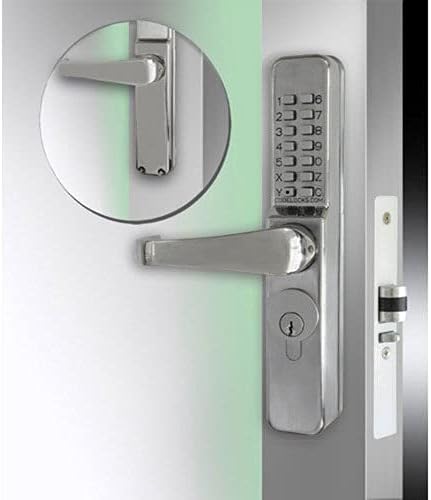
Figure 2.1: Codelocks CL465 Mech Narrow Stile Latch Lockset showing the keypad, lever handle, and key cylinder.
Key Features:
- Mechanical operation, no batteries required.
- Stainless Steel construction for durability.
- Key cylinder for override or alternative access.
- Code Free/Passage function for unrestricted access when needed.
- 13 buttons providing over 8,000 possible combinations.
- Designed for narrow stile doors.
3. Package Contents
Verify that all components are present before beginning installation:
- CL465 Lockset (Front and Rear units)
- Spindle
- Fixing Bolts
- Cams and Threaded Cylinder
- Strike Plate
- Installation Template
- User Manual (this document)
4. Setup and Installation
Installation should be performed by a qualified individual. Refer to the included Assembly Guide for detailed diagrams and step-by-step instructions.
4.1 Pre-Installation Checks
- Ensure the door thickness is compatible with the lockset.
- Confirm the lockset is suitable for your door type (internal/external aluminum doors).
- Verify door handing (left or right) for correct lever orientation.
4.2 Code Setting
The lockset is supplied with a random code commencing with the "C" clear button. To change the code:
- Remove the back plate of the lockset.
- Locate the code tumblers.
- Using a small screwdriver, rotate the colored tumblers to set your desired code. Ensure the "C" button is always part of the code.
- Replace the back plate.
Important: Always test the new code multiple times before closing the door.
4.3 Mounting the Lockset
- Prepare the door using the provided template for drilling holes.
- Install the latch mechanism into the door edge.
- Insert the spindle through the latch.
- Mount the exterior and interior lockset units, ensuring the spindle engages correctly.
- Secure the units with the provided fixing bolts.
- Install the strike plate on the door frame, aligning it with the latch.
5. Operating Instructions
5.1 Opening with Code
- Press the "C" (Clear) button to reset any previous entries.
- Enter your programmed code in any sequence.
- Rotate the lever handle to open the door.
5.2 Opening with Key
Insert the key into the key cylinder and turn to unlock the mechanism. Rotate the lever handle to open the door.
5.3 Code Free / Passage Function
The CL465 features a passage function allowing the door to be opened without a code. Consult the Assembly Guide for specific instructions on engaging and disengaging this mode, typically involving a small switch or pin on the interior unit.
5.4 Locking the Door
The lock automatically secures when the door is closed. No action is required to lock the door from the outside once the code is disengaged, or from the inside unless the passage function is active.
6. Maintenance
Regular maintenance ensures optimal performance and extends the life of your Codelocks CL465 lockset.
- Cleaning: Wipe the lockset with a soft, damp cloth. Avoid abrasive cleaners or solvents that could damage the finish.
- Lubrication: Periodically apply a small amount of silicone-based lubricant to the latch bolt and key cylinder to ensure smooth operation. Do not use oil-based lubricants.
- Inspection: Check all screws and fixings periodically to ensure they are tight. Inspect the lever handles and keypad for any signs of wear or damage.
7. Troubleshooting
| Problem | Possible Cause | Solution |
|---|---|---|
| Lever handle spins freely without opening. | Incorrect code entered or spindle not engaged. | Ensure correct code is entered after pressing 'C'. Check spindle engagement during installation. |
| Buttons are stiff or unresponsive. | Dirt accumulation or internal mechanism issue. | Clean the keypad surface. If problem persists, contact support. |
| Door does not latch properly. | Misalignment of strike plate or latch bolt. | Adjust the strike plate position. Check for obstructions around the latch bolt. |
| Key does not turn or is stiff. | Debris in cylinder or lack of lubrication. | Apply silicone-based lubricant to the key cylinder. Do not force the key. |
8. Specifications
| Attribute | Detail |
|---|---|
| Brand | Codelocks |
| Model Name | CL465 (Part Number: CL465-SS) |
| Material | Stainless Steel |
| Finish Type | Polished |
| Lock Type | Key Lock, Mechanical Code |
| Special Feature | Key Lock, Code Free/Passage Function |
| Item Dimensions (L x W x H) | 7.25 x 1.56 x 5.56 inches |
| Item Weight | 8 Pounds |
| Combinations | Over 8,000 possible combinations (13 buttons) |
| Compatibility | Retrofit for Adams Rite 4510 lockcase or similar ANSI round cylinder |
9. Warranty and Support
For warranty information and technical support, please refer to the official Codelocks website or contact their customer service department. Keep your purchase receipt as proof of purchase.
Manufacturer: Codelocks
Website: www.codelocks.com (Note: This is a generic placeholder URL, please refer to your product packaging or official documentation for the exact support contact details.)


