
1. Product Overview
The JBL Multi System 69QD9TA is a pair of 6x9 inch quadriaxial car speakers designed for high-performance audio reproduction across the full audio spectrum. These speakers are engineered for durability and are suitable for installation in original vehicle speaker locations.
Key features include:
- Quadriaxial design for comprehensive frequency reproduction.
- High performance and durability.
- Optimized for installation in standard 6x9 inch vehicle openings.
- Nominal Impedance: 4 Ohms.

Image 1.1: A pair of JBL Multi System 69QD9TA 6x9 inch car speakers, showcasing their design and grille. These speakers are designed for full-range audio reproduction in vehicles.
2. Package Contents
Please verify that all items are present in the package:
- 1 x Pair of JBL Multi System 69QD9TA 6x9 inch speakers
- 1 x Warranty Leaflet
3. Setup and Installation
Proper installation is crucial for optimal performance and safety. If you are unsure about any step, it is recommended to seek professional assistance.
- Safety First: Disconnect the vehicle's battery before beginning any electrical work to prevent short circuits and electrical hazards.
- Speaker Location: Identify the designated 6x9 inch speaker locations in your vehicle. These are typically in the rear deck or door panels.
- Remove Existing Speakers: Carefully remove any existing speakers or grilles. This may involve unscrewing fasteners and disconnecting wiring.
- Mounting the Speakers:

Image 3.1: Front view of a single JBL 69QD9TA speaker, showing the cone and tweeter arrangement. This view is important for understanding the speaker's orientation during installation.
Place the JBL 69QD9TA speakers into the openings. Ensure they fit securely. Use the provided screws or appropriate fasteners to mount the speakers firmly. Avoid overtightening, which can damage the speaker frame.
- Wiring Connections:
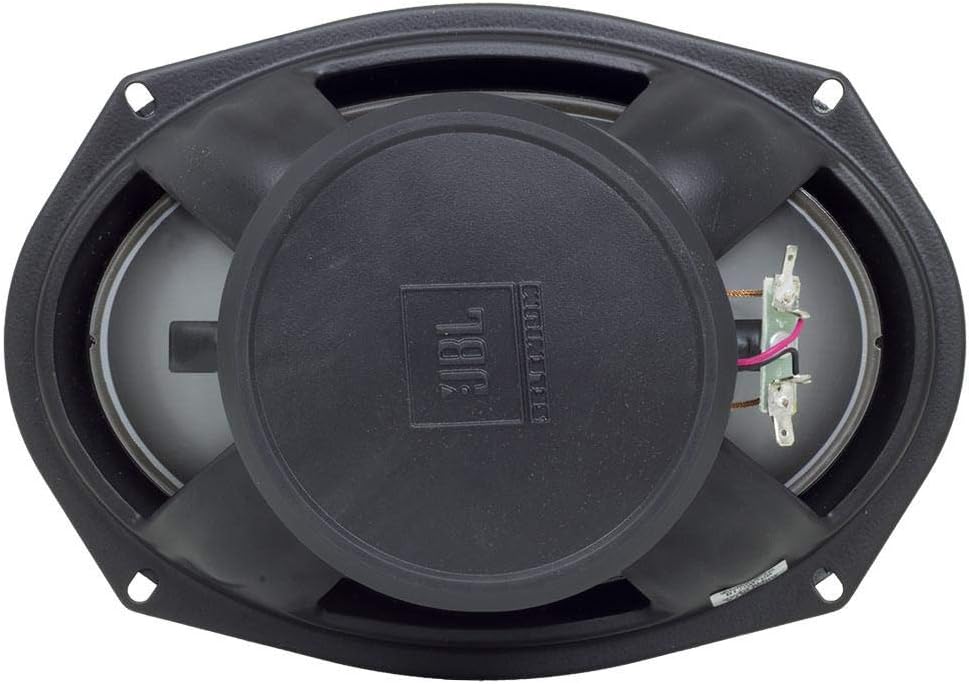
Image 3.2: Rear view of a JBL 69QD9TA speaker, highlighting the magnet structure and wiring terminals. Proper connection to these terminals is essential for speaker function.
Connect the speaker wires from your vehicle's audio system to the terminals on the back of the JBL speakers. Ensure correct polarity: positive (+) to positive and negative (-) to negative. Incorrect polarity can lead to poor sound quality.
- Test the System: Before reassembling interior panels, reconnect the vehicle's battery and test the audio system to ensure both speakers are functioning correctly and producing clear sound.
- Reassemble: Once confirmed, carefully reassemble any removed interior panels or grilles.
4. Operating Instructions
The JBL Multi System 69QD9TA speakers are passive components and operate in conjunction with your vehicle's head unit or external amplifier. No direct user operation is required for the speakers themselves.
- Audio Source: Select your desired audio source (radio, CD, Bluetooth, etc.) from your car's head unit.
- Volume Control: Adjust the volume to a comfortable listening level. Avoid excessively high volumes for prolonged periods to prevent speaker damage and hearing loss.
- Tone Controls: Use your head unit's equalizer or tone controls (bass, treble, balance, fader) to fine-tune the sound to your preference.
5. Maintenance
To ensure the longevity and optimal performance of your JBL speakers, follow these simple maintenance guidelines:
- Cleaning: Gently wipe the speaker grilles and surrounds with a soft, dry cloth to remove dust. Avoid using harsh chemicals or abrasive cleaners.
- Protection: Ensure the speakers are protected from direct exposure to water, extreme temperatures, and direct sunlight, which can degrade materials over time.
- Inspection: Periodically check the speaker mounts and wiring connections to ensure they remain secure.
6. Troubleshooting
If you encounter issues with your JBL 69QD9TA speakers, consider the following common troubleshooting steps:
- No Sound from Speakers:
- Check all wiring connections for looseness or incorrect polarity.
- Verify that the car's head unit is powered on and functioning.
- Ensure the fader/balance settings on your head unit are correctly adjusted.
- Check the amplifier (if used) for power and proper connections.
- Distorted Sound:
- Reduce the volume level on your head unit.
- Check for loose speaker mounts or vibrations.
- Inspect speaker cones for any physical damage.
- Ensure the amplifier gain (if used) is not set too high.
- One Speaker Not Working:
- Check the wiring connection for that specific speaker.
- Adjust the balance control on your head unit.
- Swap the non-working speaker with a working one (if possible and safe) to determine if the issue is with the speaker or the wiring/head unit.
If these steps do not resolve the issue, contact JBL customer support or a qualified car audio technician.
7. Specifications
Detailed technical specifications for the JBL Multi System 69QD9TA speakers:
| Feature | Specification |
|---|---|
| Model Name | 69QD9TA |
| Speaker Type | Quadriaxial |
| Speaker Size | 6x9 inches (9 inches) |
| Nominal Impedance | 4 Ohms |
| Output Power (RMS) | 200 Watts (Total for pair, 100W RMS per speaker) |
| Amplification Type | Passive |
| Mounting Type | Flush Mount |
| Product Weight | 3 Kilograms (approx. 3000 Grams) |
| Product Dimensions | 18 x 12 x 23 cm |
| Manufacturer | JBL |
8. Warranty and Support
Warranty: This product comes with a manufacturer's warranty of 12 months. Please refer to the included Warranty Leaflet for detailed terms and conditions.
Customer Support: For technical assistance, warranty claims, or further inquiries, please contact JBL customer support through their official website or authorized service centers. Keep your proof of purchase handy when contacting support.
You can visit the official JBL store for more information: JBL Official Store


