
1. Introduction
This manual provides detailed instructions for the safe and effective operation of your SENLAN 9W RGB 3-in-1 LED Pinspot Stage Light. Please read this manual thoroughly before use and retain it for future reference.
The SENLAN 9W RGB 3-in-1 LED Pinspot Stage Light is designed for various lighting applications, offering a focused beam with RGB color mixing capabilities. Its fanless design ensures quiet operation, making it suitable for environments where noise reduction is critical.
2. Safety Information
- Ensure the power supply voltage matches the product's requirements (AC90V-240V/50-60Hz).
- Do not open the device casing. There are no user-serviceable parts inside. Refer all servicing to qualified personnel.
- Avoid direct eye exposure to the light source.
- Keep the device away from water, moisture, and extreme temperatures.
- Ensure proper ventilation around the unit, although it is fanless, to prevent overheating.
- The unit contains a 1A fuse for safety. If the fuse needs replacement, ensure it is replaced with a fuse of the same type and rating.
- Mount the device securely to prevent accidental falls.
3. Package Contents
Verify that all items listed below are included in your package:
- SENLAN 9W RGB 3-in-1 LED Pinspot Stage Light
- IR Remote Controller
- Instruction Manual (this document)
4. Product Overview
4.1. Features
- Light Source: 1x 9W RGB 3-in-1 LED with large chips.
- Cooling: Aluminum housing for passive cooling; fanless design ensures silent operation.
- Beam Angle: Fixed 7-degree beam angle.
- Control: IR Remote Controller for static colors, flash, strobe, and dimming functions.
- Memory Function: Retains the last setting after power cycle.
- Power Supply: AC90V-240V/50-60Hz.
- Safety: Integrated 1A fuse for circuit protection.
4.2. Components


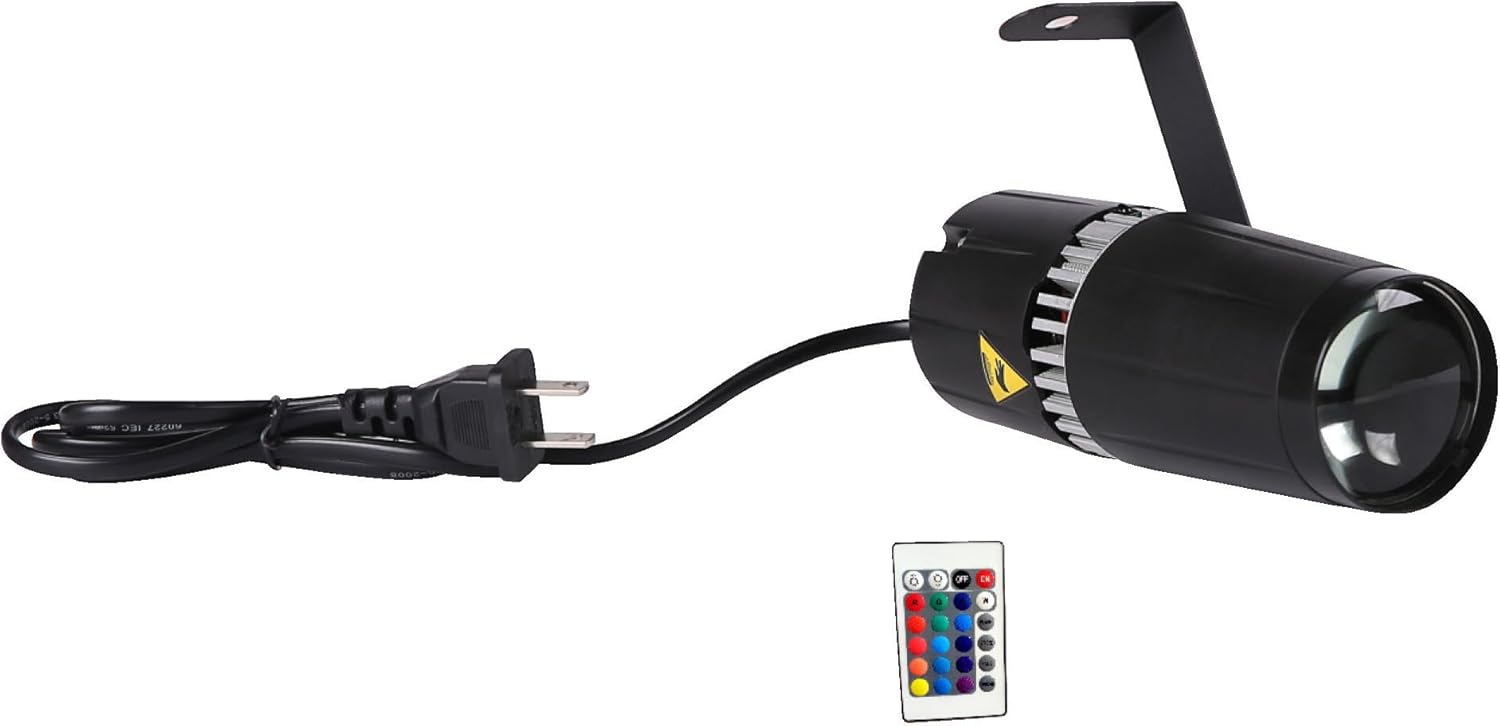
The pinspot light consists of a durable aluminum housing, a fixed lens for precise focus, and a mounting bracket for versatile installation. The rear panel includes the power input and a fuse holder. The IR remote controller allows for convenient adjustment of light settings.
5. Setup
5.1. Mounting
The pinspot light can be mounted in various positions using its integrated bracket. Ensure the mounting surface is stable and capable of supporting the device's weight. Secure the bracket using appropriate screws or clamps (not included).
- Wall Mount: Attach the bracket to a wall or vertical surface.
- Ceiling Mount: Secure the bracket to a ceiling or overhead truss.
- Floor Placement: The bracket can also serve as a stand for floor placement, allowing for angle adjustment.

5.2. Power Connection
Connect the power cord to the pinspot light's power input and then plug it into a standard AC outlet (AC90V-240V/50-60Hz). The device is ready for operation once connected.
6. Operation
The SENLAN 9W RGB 3-in-1 LED Pinspot Stage Light is controlled using the included IR remote controller.
6.1. IR Remote Controller Functions
Point the remote directly at the front of the pinspot light for optimal response.
- ON/OFF: Powers the light on or off.
- R, G, B: Selects static Red, Green, or Blue color.
- Color Buttons (other): Selects various static color combinations.
- FLASH: Activates a rapid color changing effect.
- STROBE: Activates a strobe effect with the current color.
- FADE: Activates a smooth color fading effect.
- DIM +/-: Adjusts the brightness level.
Important Note Regarding Remote: Some older versions of the remote may have issues with brightness buttons potentially affecting other functions. If you experience unexpected behavior after pressing brightness buttons, try cycling the power to the unit. For optimal performance, use the remote as intended for color and mode selection.
7. Maintenance
- Cleaning: Clean the exterior of the unit and the lens with a soft, dry cloth. Do not use abrasive cleaners or solvents.
- Fuse Replacement: The unit is equipped with a 1A fuse located at the back. If the light fails to power on, check and replace the fuse if necessary. Always replace with a fuse of the same rating (1A).
- Storage: When not in use for extended periods, store the light in a dry, dust-free environment.
8. Troubleshooting
| Problem | Possible Cause | Solution |
|---|---|---|
| Light does not turn on. | No power, faulty power cord, blown fuse. | Check power connection. Test outlet. Replace 1A fuse if blown. |
| Remote control is unresponsive. | Remote battery low, remote not aimed correctly, obstruction. | Ensure remote is aimed directly at the light's sensor. Replace remote battery. Remove obstructions. |
| Light changes color unexpectedly or remote buttons stop working. | Interference from other IR devices, or a known issue with some remote versions (especially after pressing brightness buttons). | Minimize interference from other IR devices. If remote buttons become unresponsive, disconnect power from the light for 10 seconds, then reconnect. This may reset the unit. |
| Light is not bright enough. | Dimmer setting, distance from surface. | Increase brightness using the remote. Reduce distance to the illuminated surface. |
9. Specifications
| Parameter | Value |
|---|---|
| Model | LED pin spot 9W |
| Light Source | 1x 9W RGB 3-in-1 LED |
| Power Input | AC90V-240V / 50-60Hz |
| Wattage | 9 Watts (Max 10W) |
| Color Temperature | 3000K (approximate for white light) |
| Beam Angle | 7 degrees |
| Working Modes | Static color, automatic operation (flash, strobe, fade) |
| Control | IR Remote Controller |
| Material | Aluminum |
| Product Dimensions | 160mm (L) x 65mm (W) x 50mm (H) / 6.3"L x 2.56"W x 1.97"H |
| Item Weight | 0.4 kg / 6.4 ounces |
| Fuse | 1A |
Note: Specifications are subject to change without notice for product improvement.
10. Warranty and Support
For warranty information or technical support, please refer to the retailer or contact SENLAN customer service through their official channels. Keep your purchase receipt as proof of purchase.
Legal Disclaimer: Please note that this product is a standard pinspot light and does not include a gobo feature. This design change was implemented based on customer feedback.


