
VirtuFit VIFROWSP
VirtuFit Ergometer Semi-Pro Instruction Manual
Model: VIFROWSP

The VirtuFit Ergometer Semi-Pro is a high-quality rowing machine designed for effective full-body workouts. This manual provides essential information for safe assembly, operation, maintenance, and troubleshooting.
1. Important Safety Information
Please read all instructions carefully before using the VirtuFit Ergometer Semi-Pro. Keep this manual for future reference.
- Consult a physician before starting any exercise program.
- Ensure all parts are securely assembled before each use.
- Keep children and pets away from the equipment during operation.
- Place the rowing machine on a flat, stable surface with adequate clearance around it.
- Do not exceed the maximum user weight of 150 kg (330 lbs).
- Stop exercising immediately if you feel faint, dizzy, or experience pain.
2. Setup and Assembly
The VirtuFit Ergometer Semi-Pro requires minimal assembly. Follow these general steps:
- Unpacking: Carefully remove all components from the packaging. Check against the parts list (not provided in this manual, refer to separate assembly guide if included with product) to ensure all parts are present.
- Frame Assembly: Connect the main rail to the front stabilizer and the rear support. Ensure all bolts are tightened securely.
- Seat Installation: Slide the seat onto the rail. Ensure it moves smoothly.
- Foot Pedals: Attach the foot pedals to the main frame. Adjust the foot straps to fit your shoe size.
- Console Connection: Connect any necessary cables for the LCD console.
- Final Check: Before first use, double-check all connections and moving parts for proper function and security.

Image: The seat and rail assembly, showing the smooth-gliding seat on the aluminum rail.

Image: Close-up of the adjustable foot pedal with strap, designed for secure foot placement during exercise.
3. Operating Instructions
3.1. Console Overview

Image: The LCD display console, showing various workout metrics and control buttons.
The LCD console displays key workout metrics to help you track your progress. While specific button functions may vary, common controls include:
- MODE: Toggles between different display modes (e.g., Time, Distance, Calories, Strokes).
- RESET: Clears current workout data.
- ENTER: Confirms selections or starts programs.
The display typically shows:
- TIME: Duration of your workout.
- DISTANCE: Simulated distance covered.
- CALORIES: Estimated calories burned.
- STROKES: Number of strokes performed.
- SPM (Strokes Per Minute): Your current stroke rate.
3.2. Adjusting Resistance
The VirtuFit Ergometer Semi-Pro features a magnetic resistance mechanism. Resistance levels are typically adjusted via a dial or electronic controls on the main unit or console. Refer to the console image for potential adjustment buttons. Higher numbers usually indicate greater resistance.
3.3. Proper Rowing Technique
Effective rowing involves a coordinated movement of legs, core, and arms. Follow these general guidelines:
- The Catch: Sit with knees bent, shins vertical, arms extended forward, and back straight.
- The Drive: Push off with your legs, then swing your torso back slightly, and finally pull the handle towards your abdomen.
- The Finish: Legs are extended, torso is slightly reclined, and handle is at your abdomen.
- The Recovery: Extend arms forward, then pivot torso forward, and finally bend knees to slide the seat back to the catch position.

Image: A user demonstrating the correct posture and motion while operating the VirtuFit Ergometer Semi-Pro.
4. Maintenance
Regular maintenance ensures the longevity and optimal performance of your rowing machine.
4.1. Cleaning
- Wipe down the frame and console with a damp cloth after each use to remove sweat and dust.
- Do not use abrasive cleaners or solvents, as they may damage the finish or electronic components.
4.2. Rail and Seat Maintenance
- Periodically inspect the seat rollers and the rail for any debris or wear.
- Clean the rail with a soft cloth to ensure smooth seat movement.
- If the seat movement becomes rough, a light application of silicone-based lubricant to the rail may be beneficial (avoid oil-based lubricants).
4.3. Storage
The VirtuFit Ergometer Semi-Pro is designed to be foldable for convenient storage, as indicated by its special feature. To fold:
- Ensure the machine is stable and on a flat surface.
- Locate the folding mechanism (often a pin or knob near the base of the rail).
- Release the mechanism and carefully lift the rail section upwards until it locks into a vertical position.
- Utilize the transport wheels for easy relocation.
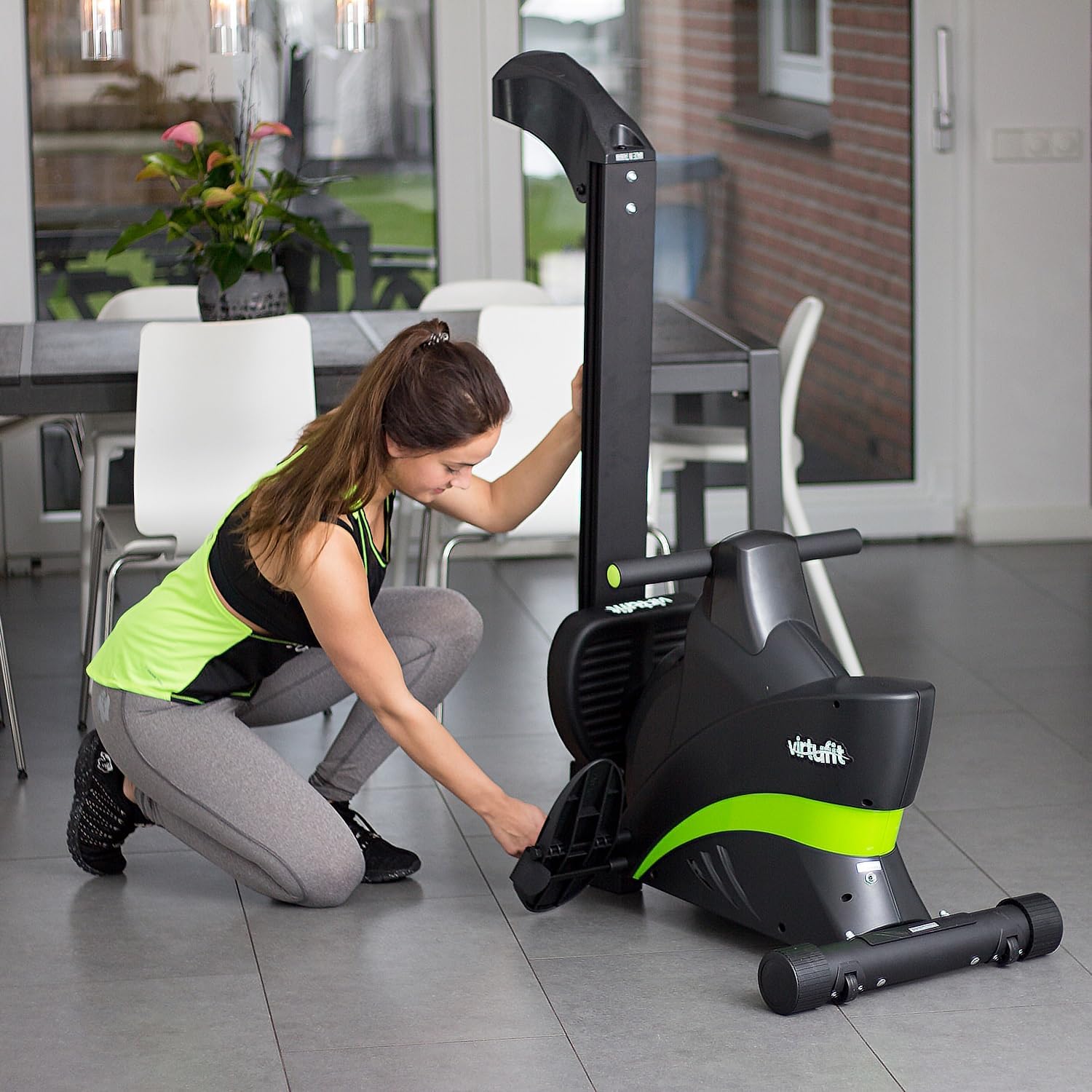
Image: A user demonstrating the folding mechanism, allowing the rowing machine to be stored vertically to save space.

Image: Close-up of the integrated transport wheels, facilitating easy movement of the folded rowing machine.
5. Troubleshooting
If you encounter issues with your VirtuFit Ergometer Semi-Pro, refer to the table below for common problems and solutions.
| Problem | Possible Cause | Solution |
|---|---|---|
| Console not displaying data. | Batteries are low or incorrectly installed. Loose cable connection. | Replace batteries. Check all cable connections to the console. |
| Seat does not slide smoothly. | Debris on the rail. Worn rollers. | Clean the rail thoroughly. Inspect rollers for damage; contact support if worn. |
| Unusual noises during operation. | Loose bolts. Friction in moving parts. | Check and tighten all assembly bolts. Apply a small amount of silicone lubricant to moving parts if necessary. |
| Resistance feels inconsistent. | Issue with magnetic resistance mechanism. | Ensure resistance dial/control is functioning correctly. If problem persists, contact customer support. |
6. Specifications
Key technical specifications for the VirtuFit Ergometer Semi-Pro:
| Feature | Detail |
|---|---|
| Brand | VirtuFit |
| Model Number | VIFROWSP |
| Resistance Mechanism | Magnetic |
| Display Type | LCD |
| Frame Material | Aluminum |
| Maximum User Weight | 150 Kilograms |
| Product Dimensions (L x W x H) | 205 x 64 x 51 cm |
| Item Weight | 34.1 Kilograms |
| Special Feature | Foldable |
7. Warranty and Support
7.1. Warranty Information
VirtuFit products are manufactured to high-quality standards. For specific warranty terms and conditions, please refer to the warranty card included with your purchase or visit the official VirtuFit website. Typically, warranty covers manufacturing defects under normal use.
7.2. Customer Support
If you have any questions, require technical assistance, or need to order replacement parts, please contact VirtuFit customer support. Contact details can usually be found on the product packaging, the official VirtuFit website, or through your retailer.
For online support and frequently asked questions, visit: www.virtufit.com/en/service/ (Example link, actual link may vary).
Related documentsVIFROWSP


Ask a question about this manual
Ask about setup, troubleshooting, compatibility, parts, safety, or missing instructions. Manuals+ will review the question and use this page’s manual context to help answer it.