
1. Introduction
This manual provides essential information for the safe and efficient operation, installation, and maintenance of your Einhell Cable Hoist TC-EH 250. Please read these instructions carefully before using the equipment. Keep this manual in a safe place for future reference.
The Einhell TC-EH 250 is designed for lifting loads up to 250 kg using a single line with a pulley, reaching a height of 5.7 meters. It features a robust 500 W motor, an emergency stop switch, an automatic brake, and an automatic end stop for enhanced safety.
2. Safety Instructions
WARNING: Failure to follow these safety instructions may result in serious injury or death. Always prioritize safety when operating the cable hoist.
2.1 General Safety
- Ensure the hoist is securely mounted to a suitable support structure capable of bearing the maximum load plus the weight of the hoist.
- Never exceed the maximum load capacity of 250 kg.
- Keep the work area clear of bystanders, especially children and pets.
- Do not operate the hoist if you are tired, under the influence of drugs, alcohol, or medication.
- Always wear appropriate personal protective equipment (PPE), including safety gloves and safety shoes.
- Inspect the hoist, wire rope, and hooks for damage before each use. Do not use if any damage is found.
- Do not use the hoist for lifting people or animals.
- Avoid sudden starts and stops when lifting or lowering loads.
- Ensure the load is balanced and securely attached to the hook.
- Do not leave a suspended load unattended.
2.2 Electrical Safety
- Ensure the power supply matches the specifications of the hoist (230 V, 50 Hz).
- Always connect the hoist to a properly grounded outlet.
- Do not operate the hoist in wet or damp conditions.
- Never pull the plug from the socket by the cable.
- If the power cable is damaged, it must be replaced by the manufacturer, its service agent, or similarly qualified persons to avoid a hazard.
3. Product Overview
The Einhell Cable Hoist TC-EH 250 consists of the main hoist unit, a 12-meter twist-free wire rope, a pulley with a load hook, and a control console.
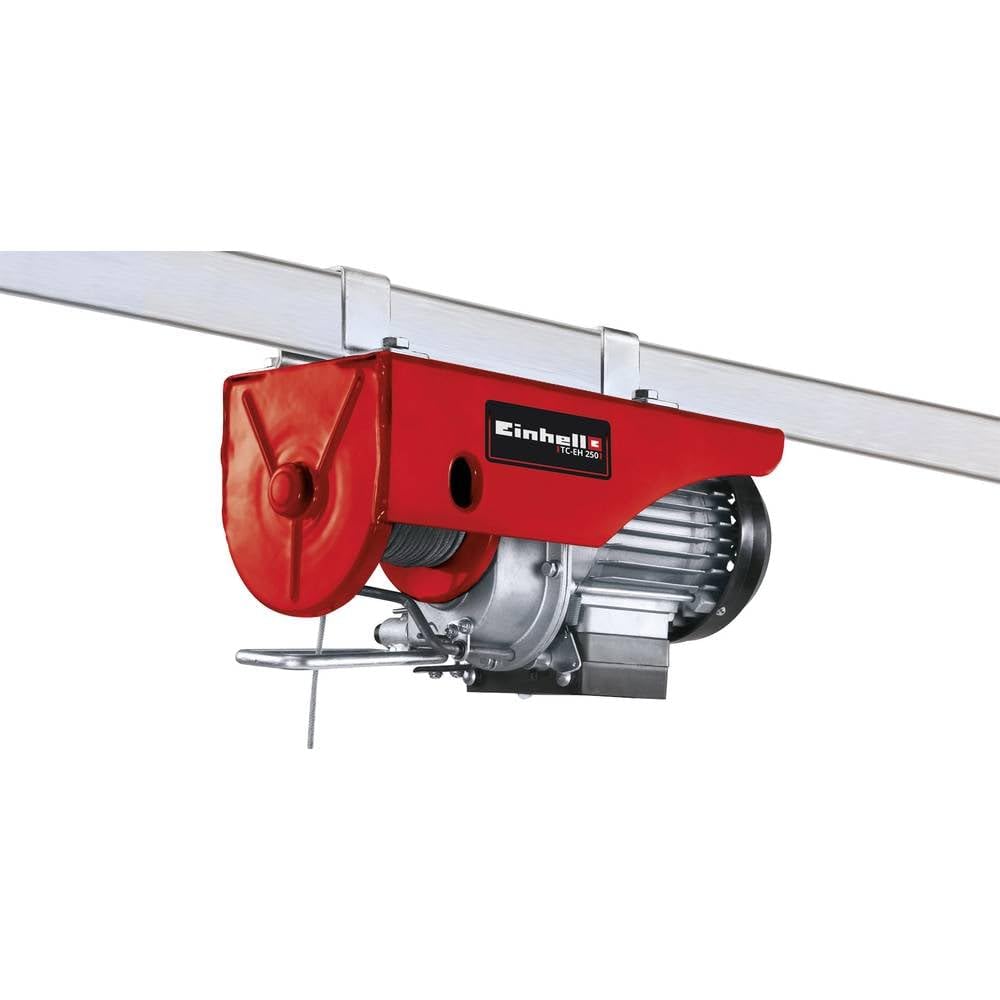
Figure 1: Einhell Cable Hoist TC-EH 250. Shows the main hoist body, the wire rope extending downwards, and the load hook with safety bar attached.
Key Components:
- Hoist Motor Unit: Houses the 500 W motor and gear system.
- Wire Rope: 12 meters long, 3 mm diameter, twist-free steel cable.
- Pulley with Load Hook: Used for single-line operation, equipped with a safety bar.
- Control Console: Features UP/DOWN buttons and an emergency stop switch.
- Mounting Brackets: For securing the hoist to a support beam.
- Automatic Brake: Secures the load in any position upon power loss or release of control buttons.
- Automatic End Stop: Prevents the hook from over-traveling at the upper and lower limits.
4. Setup and Installation
4.1 Mounting the Hoist
- Select a sturdy, level support structure (e.g., a steel beam) capable of safely supporting at least twice the maximum load capacity (500 kg).
- Attach the hoist to the support structure using the provided mounting brackets and hardware. Ensure all bolts are tightened securely.
- Verify that the hoist is level and stable before proceeding.
4.2 Electrical Connection
- Ensure the hoist's power switch is in the "OFF" position.
- Plug the power cord into a grounded 230 V, 50 Hz electrical outlet.
- Check that the power cable is not pinched or routed through areas where it could be damaged.
4.3 Wire Rope and Hook Setup
The hoist comes pre-assembled with the wire rope and pulley for single-line operation (250 kg capacity, 5.7 m lifting height). Ensure the safety bar on the load hook is functional and closes properly.
5. Operating Instructions
5.1 Pre-Operation Check
- Confirm the hoist is securely mounted.
- Inspect the wire rope for fraying, kinks, or damage.
- Check the load hook and safety bar for proper function.
- Test the emergency stop function.
- Ensure the control console buttons respond correctly.
- Verify the load does not exceed 250 kg.
5.2 Lifting a Load
- Attach the load securely to the load hook, ensuring the safety bar is closed.
- Stand clear of the load and ensure no one is in the path of the load.
- Press and hold the "UP" button on the control console to lift the load.
- Release the "UP" button to stop lifting. The automatic brake will engage to hold the load in position.
- Monitor the load's stability during lifting.
5.3 Lowering a Load
- Ensure the area below the load is clear.
- Press and hold the "DOWN" button on the control console to lower the load.
- Release the "DOWN" button to stop lowering. The automatic brake will engage.
- Lower the load slowly and carefully to its destination.
5.4 Emergency Stop
In case of an emergency or malfunction, immediately press the red "EMERGENCY STOP" button on the control console. This will cut power to the motor and engage the automatic brake. To reset, twist the emergency stop button clockwise and then resume operation.
5.5 Automatic End Stop
The hoist is equipped with an automatic end stop that prevents the hook from over-traveling at the upper and lower limits of its travel. Do not rely solely on this feature; always monitor the load's position.
6. Maintenance
Regular maintenance ensures the longevity and safe operation of your cable hoist.
6.1 Daily/Before Each Use
- Inspect the entire hoist for visible damage, loose connections, or wear.
- Check the wire rope for fraying, kinks, corrosion, or broken strands. Replace if damaged.
- Verify the load hook and safety bar operate freely and securely.
- Test the emergency stop function.
- Ensure the control console buttons respond correctly.
6.2 Periodic Maintenance (Monthly/Quarterly)
- Clean the hoist exterior to remove dust and debris.
- Check all mounting bolts for tightness.
- Inspect electrical cables for damage or insulation wear.
- Lubricate moving parts as recommended by the manufacturer (refer to specific product documentation if available, otherwise use a general-purpose lubricant sparingly).
- Check the automatic end stop mechanism for proper function.
IMPORTANT: Any repairs or replacement of critical components, especially electrical parts or the wire rope, should only be performed by qualified personnel or authorized service centers.
7. Troubleshooting
| Problem | Possible Cause | Solution |
|---|---|---|
| Hoist does not operate. | No power supply. Emergency stop engaged. Thermal switch tripped. | Check power connection and outlet. Release emergency stop button. Allow motor to cool down. |
| Motor runs but load does not move. | Overload. Brake malfunction. Wire rope jammed. | Reduce load to within capacity. Contact service for brake inspection. Inspect wire rope path for obstructions. |
| Hoist stops during operation. | Overload/Overheating. Automatic end stop activated. | Reduce load, allow motor to cool. Adjust load position, ensure hook is not at limit. |
| Unusual noise during operation. | Lack of lubrication. Worn components. Foreign object. | Lubricate as per maintenance section. Cease operation and contact service. Inspect for and remove foreign objects. |
If the problem persists after attempting these solutions, please contact Einhell customer support or an authorized service center.
8. Specifications
| Model | TC-EH 250 (2255130) |
| Power Source | Corded Electric |
| Motor Power | 500 W |
| Voltage | 230 V, 50 Hz (Standard European) |
| Max. Load Capacity (Single Line) | 250 kg |
| Max. Lifting Height (Single Line) | 5.7 m |
| Wire Rope Length | 12 m |
| Wire Rope Diameter | 3 mm |
| Material | Metal |
| Item Weight | 10.35 kg |
| Product Dimensions (D x W x H) | 14.17" x 9.45" x 5.91" (36 cm x 24 cm x 15 cm) |
| Included Components | Rope hoist, pulley with load hook |
9. Warranty and Support
9.1 Warranty Information
This Einhell Cable Hoist TC-EH 250 is covered by the manufacturer's standard warranty. Please refer to the warranty card included with your product or visit the official Einhell website for detailed terms and conditions regarding warranty coverage, duration, and claims procedures. Keep your proof of purchase for warranty validation.
9.2 Customer Support
For technical assistance, spare parts, or service inquiries, please contact Einhell customer support. Contact details can typically be found on the official Einhell website or in the packaging materials. When contacting support, please have your product model number (TC-EH 250) and serial number (if applicable) ready.
Official Website: www.einhell.com


