
1. Product Overview
This manual provides instructions for the installation, operation, and maintenance of the Parts Express Front Arm Step, Part Number A-7233244. This component is designed to provide a secure and stable step for operators accessing the cab of compatible Bobcat Skid Steer M-Series loaders.
1.1 Compatibility
The Front Arm Step (A-7233244) is compatible with the following Bobcat Skid Steer M-Series models:
- S510, S530, S550, S570, S590, S630, S650, S750, S770, S850
- T550, T590, T630, T650, T750, T770, T870
2. Safety Information
Always prioritize safety when working with heavy machinery. Failure to follow safety instructions may result in serious injury or property damage.
- Read the Bobcat Skid Steer operator's manual: Familiarize yourself with the specific safety procedures for your equipment.
- Wear appropriate personal protective equipment (PPE): This includes safety glasses, gloves, and sturdy footwear.
- Ensure the machine is off and secured: Before beginning any installation, turn off the engine, remove the key, and engage the parking brake. Lower the lift arms and tilt the bucket or attachment to the ground.
- Work on a stable, level surface: Avoid working on inclines or uneven ground.
- Use correct tools: Ensure all tools are in good condition and are the correct size for the fasteners.
- Keep work area clean: Remove any debris or obstacles that could cause a trip hazard.
3. Package Contents
Verify that all components are present and undamaged before proceeding with installation. If any parts are missing or damaged, contact your supplier immediately.
- 1x Front Arm Step (Part A-7233244)
- Note: Mounting hardware is typically reused from the existing step or purchased separately if not included. Please check your specific packaging.
4. Setup and Installation
Follow these steps carefully to install the Front Arm Step. Refer to your Bobcat Skid Steer service manual for detailed instructions specific to your machine model if necessary.
4.1 Tools Required
- Wrench set (metric or imperial, depending on existing hardware)
- Socket set with ratchet
- Torque wrench
- Safety glasses and gloves
4.2 Installation Steps
- Prepare the machine: Ensure the Bobcat Skid Steer is parked on a level surface, the engine is off, the key is removed, and the parking brake is engaged.
- Locate the existing step: Identify the current front arm step on your Bobcat Skid Steer.
- Remove the old step (if applicable): Using appropriate wrenches or sockets, carefully unbolt and remove the existing step. Retain all mounting hardware (bolts, nuts, washers) unless new hardware is provided.
- Position the new step: Align the Parts Express Front Arm Step (A-7233244) with the mounting holes on the skid steer's front arm.
- Secure the step: Insert the mounting bolts through the step and the arm, securing them with nuts and washers. Hand-tighten all fasteners initially.
- Torque fasteners: Using a torque wrench, tighten all mounting fasteners to the torque specifications provided in your Bobcat Skid Steer's service manual. Ensure the step is firmly attached and does not wobble.
- Inspect installation: Visually inspect the installed step to ensure it is correctly aligned and securely fastened.
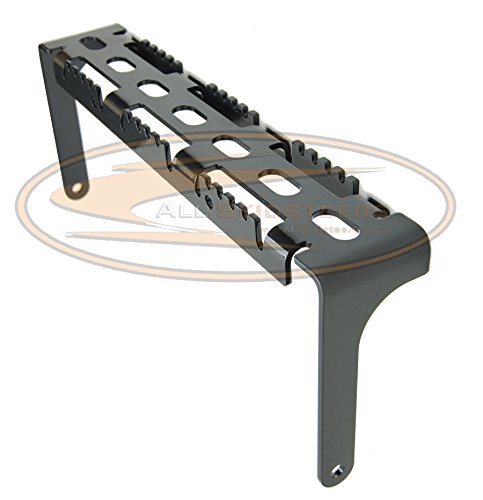
Figure 1: The Parts Express Front Arm Step (A-7233244) for Bobcat Skid Steer M-Series. This image shows the robust construction and design of the replacement step, ready for installation on compatible machinery.
5. Operation
The Front Arm Step is designed to facilitate safe entry and exit from the Bobcat Skid Steer cab. Always use the step as intended.
- Maintain three points of contact: When using the step, always maintain three points of contact (e.g., two hands and one foot, or two feet and one hand) with the machine to ensure stability.
- Check for debris: Before stepping, ensure the step surface is clear of mud, ice, oil, or other debris that could cause a slip.
- Do not jump: Avoid jumping onto or off the step. Use it deliberately and carefully.
6. Maintenance
Regular inspection and maintenance will ensure the longevity and safe operation of your Front Arm Step.
- Daily inspection: Before each use, visually inspect the step for any signs of damage, cracks, bends, or loose fasteners.
- Check fasteners: Periodically check the tightness of all mounting bolts. Re-torque to specifications if necessary.
- Clean the step: Keep the step surface clean and free of mud, dirt, and other slippery substances.
- Address damage promptly: If any damage is observed, replace the step immediately. Do not attempt to repair a damaged step, as this may compromise its structural integrity.
7. Troubleshooting
This section addresses common issues you might encounter with the Front Arm Step.
7.1 Loose Step
- Cause: Mounting bolts have loosened over time due to vibration or improper torque during installation.
- Solution: Re-torque all mounting bolts to the manufacturer's specified values. If bolts continue to loosen, consider using thread-locking compound (e.g., Loctite) on the bolt threads.
7.2 Difficulty Aligning During Installation
- Cause: Minor manufacturing tolerances or slight deformation of the mounting surface on the skid steer.
- Solution: Ensure the step is correctly oriented. Apply slight pressure or gentle manipulation to align holes. Do not force bolts, as this can strip threads or damage the step/machine. If alignment issues persist, verify the part number is correct for your specific Bobcat model.
8. Specifications
| Feature | Specification |
|---|---|
| Part Number | A-7233244 |
| Brand | Parts Express |
| Compatibility | Bobcat Skid Steer M-Series (S510, S530, S550, S570, S590, S630, S650, S750, S770, S850, T550, T590, T630, T650, T750, T770, T870) |
| Material | Heavy-duty steel (typical for such components) |
| Dimensions | Refer to product packaging or manufacturer's website for detailed dimensions. |
9. Warranty and Support
This product is typically covered by a manufacturer's warranty against defects in materials and workmanship. For specific warranty terms, duration, and claim procedures, please refer to the documentation included with your purchase or contact Parts Express directly.
For technical assistance, troubleshooting beyond this manual, or to inquire about replacement parts, please contact your authorized Parts Express dealer or visit the official Parts Express website for customer support information.
