
1. Important Safety Instructions
Please read all instructions carefully before using this appliance and retain them for future reference. Failure to follow these instructions may result in electric shock, fire, or serious injury.
- General Use: This appliance is intended for household use only. Do not use outdoors or on wet surfaces.
- Children and Pets: Keep the appliance out of reach of children and pets. Close supervision is necessary when the appliance is used by or near children.
- Power and Charging: Use only the charger supplied by the manufacturer. Do not charge the appliance if the power cord or plug is damaged. Unplug the charger from the outlet when not in use and before cleaning.
- Battery Safety: The appliance contains a Lithium-ion battery. Do not expose the battery to high temperatures or direct sunlight. Do not attempt to open, disassemble, or short-circuit the battery. Dispose of batteries responsibly according to local regulations.
- Operation: Do not pick up flammable or combustible materials (lighter fluid, gasoline, kerosene, etc.) or use in areas where they may be present. Do not pick up anything that is burning or smoking, such as cigarettes, matches, or hot ashes.
- Maintenance: Do not operate the appliance with a damaged cord or plug. If the appliance is not working as it should, has been dropped, damaged, left outdoors, or dropped into water, return it to a service center.
- Attachments: Use only manufacturer's recommended attachments.
2. Product Overview
The DOMO DO217SV is a versatile 2-in-1 stick vacuum cleaner designed for efficient cleaning of various surfaces. It features a removable handheld unit for detailed cleaning and a powerful 14.4V Li-ion battery for cordless operation.
2.1 Components

Figure 2.1: The DOMO DO217SV in its full stick vacuum configuration and with the handheld unit detached.

Figure 2.2: Another view of the DOMO DO217SV, highlighting the stick and handheld components.

Figure 2.3: The DOMO DO217SV designed to stand upright for convenient storage.

Figure 2.4: Detailed view of the vacuum's brush head, featuring integrated LED lights for improved visibility during cleaning.
2.2 Key Features
- 2-in-1 Design: Easily converts from a stick vacuum to a portable handheld vacuum.
- Cordless Operation: Powered by a 14.4V Li-ion battery for freedom of movement.
- Long Runtime: Up to 48 minutes of continuous operation on a full charge.
- Quick Charging: Fully charges in 4 to 6 hours.
- Bagless Design: Features a 0.5-liter dust tank, eliminating the need for dust bags.
- Compact Storage: Stands upright independently and has a foldable handle for easy storage.
- Included Accessories: Comes with a dust brush, crevice tool, charging station, and adapter.
3. Setup and Initial Use
3.1 Assembly
The DOMO DO217SV requires minimal assembly before first use.
- Unpack Components: Carefully remove all parts from the packaging: the main stick vacuum body, the handheld unit, the floor nozzle, the charging station, power adapter, dust brush, and crevice tool.
- Attach Floor Nozzle: Insert the floor nozzle into the bottom of the main stick vacuum body until it clicks securely into place.
- Attach Handheld Unit: Ensure the handheld unit is correctly seated and locked into the main stick vacuum body.
3.2 Initial Charging
Before first use, fully charge the vacuum cleaner for optimal battery performance.

Figure 3.1: The charging station and included accessories for the DOMO DO217SV.
- Place Charging Station: Position the charging station on a flat, stable surface near a power outlet. You may also use the included wall mount for convenient storage and charging.
- Connect Power Adapter: Plug the power adapter into the charging station, then plug the adapter into a wall outlet.
- Charge Vacuum: Place the assembled vacuum cleaner onto the charging station. Ensure the charging indicator light illuminates, indicating that charging has begun.
- Full Charge: Allow the vacuum to charge for 4 to 6 hours for a full charge. The charging indicator light will change or turn off when fully charged (refer to the specific indicator behavior in your product's quick start guide if available).
4. Operating Instructions
4.1 Using as a Stick Vacuum
- Power On: Press the power button located on the handle to turn on the vacuum cleaner.
- Select Speed: If your model has multiple speed settings, press the speed selection button to adjust suction power as needed for different surfaces.
- Start Cleaning: Guide the vacuum cleaner across the floor surface. The swivel steering and LED lights on the brush head (if applicable) will assist in cleaning hard-to-reach areas and dark spots.
- Power Off: Press the power button again to turn off the vacuum cleaner when finished.
4.2 Using as a Handheld Vacuum
- Detach Handheld Unit: Press the release button on the main body to detach the handheld vacuum unit.
- Attach Accessories: Select the appropriate accessory (dust brush or crevice tool) and attach it to the nozzle of the handheld unit.
- Power On: Press the power button on the handheld unit to turn it on.
- Clean: Use the handheld unit for cleaning furniture, car interiors, stairs, or other small areas.
- Power Off: Press the power button again to turn off the handheld unit.
- Reattach: Once finished, reattach the handheld unit to the main stick vacuum body until it clicks securely.
5. Maintenance and Care
Regular maintenance ensures optimal performance and extends the lifespan of your DOMO DO217SV vacuum cleaner.
5.1 Emptying the Dust Tank
Empty the dust tank after each use or when the MAX fill line is reached.
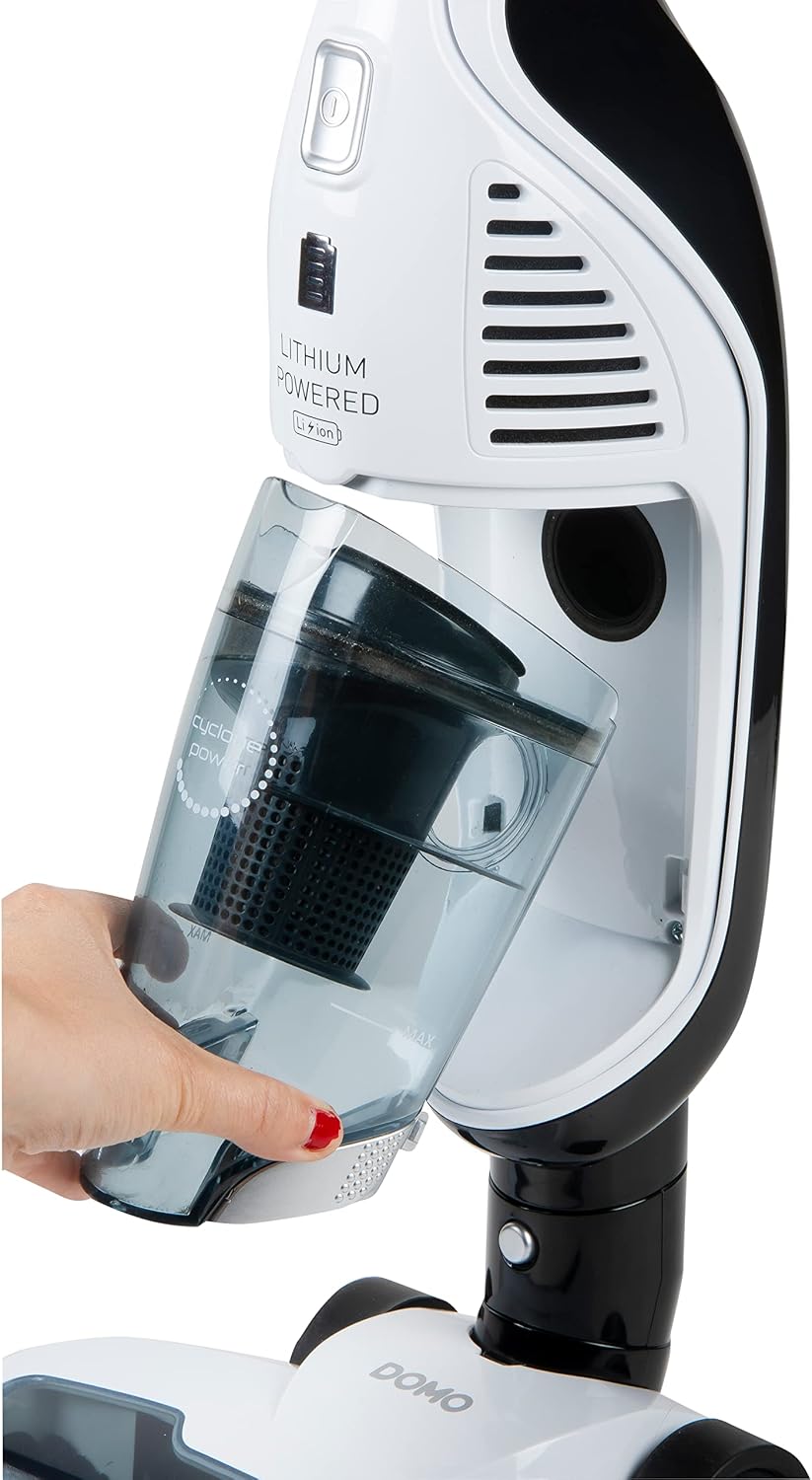
Figure 5.1: Illustration of how to remove the dustbin from the handheld unit for emptying.
- Power Off: Ensure the vacuum cleaner is turned off.
- Remove Handheld Unit: Detach the handheld unit from the stick body.
- Open Dust Tank: Locate the dust tank release button or latch and open the dust tank.
- Empty Contents: Hold the dust tank over a waste bin and empty its contents.
- Reassemble: Close the dust tank securely and reattach the handheld unit.
5.2 Cleaning the Filter
The filter should be cleaned regularly to maintain suction power. It is recommended to clean the filter after every 3-5 uses, or more frequently if vacuuming fine dust.
- Remove Filter: With the dust tank open, carefully remove the filter assembly.
- Clean Filter: Tap the filter gently over a waste bin to remove loose dust. For a more thorough cleaning, rinse the filter under cold running water.
- Dry Completely: Allow the filter to air dry completely for at least 24 hours before reinserting it into the vacuum. Do not use a hairdryer or other heating devices.
- Reinsert Filter: Once completely dry, place the filter back into the dust tank and close the tank.
5.3 Cleaning the Brush Roll
Periodically check the brush roll for tangled hair or debris and clean as necessary.

Figure 5.2: Underside of the vacuum's brush head, showing the removable brush roll for cleaning.
- Power Off: Ensure the vacuum is turned off and disconnected from the charging station.
- Access Brush Roll: Turn the floor nozzle upside down. Depending on the model, there may be a latch or screws to release the brush roll cover.
- Remove Debris: Use scissors or a small tool to cut and remove any tangled hair, threads, or debris from the brush roll.
- Reassemble: Reinsert the brush roll and secure its cover.
6. Troubleshooting
Before contacting customer support, please refer to the following table for common issues and their solutions.
| Problem | Possible Cause | Solution |
|---|---|---|
| Vacuum does not turn on. | Battery is not charged. Power button not pressed correctly. | Charge the battery fully (4-6 hours). Press the power button firmly. |
| Low suction power. | Dust tank is full. Filter is clogged. Brush roll is tangled. Nozzle or hose is blocked. | Empty the dust tank. Clean or replace the filter. Clean the brush roll. Check for and remove any blockages. |
| Short operating time. | Battery not fully charged. Battery life degrading. | Ensure the vacuum is charged for the full 4-6 hours. If battery life significantly decreases, contact customer support for battery replacement options. |
| Charging indicator not lighting up. | Power adapter not connected. Vacuum not correctly placed on charging station. Faulty power outlet. | Ensure power adapter is securely plugged into both the station and the wall outlet. Re-seat the vacuum on the charging station. Try a different power outlet. |
7. Technical Specifications
| Feature | Specification |
|---|---|
| Model Number | DO217SV |
| Brand | Domo |
| Type | 2-in-1 Stick and Handheld Vacuum Cleaner |
| Power Source | Battery Powered |
| Battery Type | 14.4V Lithium-ion |
| Power (Watts) | 100 W |
| Max Suction Power (KPA) | 4 KPA |
| Dust Tank Capacity | 0.5 Liters |
| Charging Time | 4 to 6 hours |
| Runtime | Up to 48 minutes |
| Noise Level | 80 dB |
| Dimensions (L x W x H) | 26 x 17.5 x 116.5 cm |
| Weight | 2.86 Kilograms |
| Included Accessories | Dust brush, Crevice tool, Charging station, Adapter, Wall mount |
8. Warranty and Support
This DOMO appliance is covered by a manufacturer's warranty, subject to the terms and conditions provided at the time of purchase. Please retain your proof of purchase for warranty claims.
For technical assistance, spare parts, or warranty inquiries, please contact your local DOMO service center or the retailer from whom you purchased the product. Do not attempt to repair the appliance yourself.
For more information, visit the official Domo website or refer to the contact details provided in your product packaging.


