
EXTEL 081735
EXTEL diBi Flash Wireless Doorbell User Manual
Model: 081735
1. Introduction
Thank you for choosing the EXTEL diBi Flash Wireless Doorbell. This manual provides essential information for the proper installation, operation, and maintenance of your new doorbell system. Please read these instructions carefully before use and retain them for future reference.
The EXTEL diBi Flash Wireless Doorbell offers a reliable solution for visitor alerts, featuring a wireless range of up to 200 meters, a distinctive flash function, and customizable ringtones. Its low power alert system ensures you are always informed when batteries require attention.

Image 1.1: The EXTEL diBi Flash Wireless Doorbell system, showing both the receiver unit and the external call button.
2. Package Contents
Please verify that all components are present in your package:
- 1 x Flash Bell (Receiver Unit) - Batteries not included
- 1 x Call Button (Transmitter Unit) - Battery included
- 1 x Rain Cover for Call Button
3. Safety Information
To ensure safe operation and prevent damage, please observe the following safety precautions:
- Do not expose the units to extreme temperatures, direct sunlight, or excessive moisture.
- Keep the device away from water and other liquids.
- Do not attempt to open or repair the units yourself. Refer all servicing to qualified personnel.
- Dispose of batteries according to local regulations. Do not mix old and new batteries, or different types of batteries.
- Keep batteries out of reach of children.
4. Setup and Installation
4.1. Call Button (Transmitter) Installation
- Prepare the Call Button: The call button comes with a battery pre-installed. Ensure any protective tabs are removed to activate the battery.
- Mount the Rain Cover: Position the rain cover in your desired location near your entrance. Mark the screw holes.
- Secure the Rain Cover: Drill pilot holes if necessary and secure the rain cover to the wall using appropriate screws (not included).
- Insert Call Button: Place the call button inside the mounted rain cover, ensuring it is securely fitted and protected from the elements.

Image 4.1: The external call button, designed for outdoor installation with its protective rain cover.
4.2. Flash Bell (Receiver) Installation
- Insert Batteries: Open the battery compartment on the back of the flash bell receiver. Insert the required batteries (not included) according to the polarity markings. Close the compartment securely.
- Position the Receiver: Place the receiver unit in a central location within your home, ensuring it is within the 200-meter wireless range of the call button. Avoid placing it near large metal objects or other electronic devices that may interfere with the signal.
- Test the Connection: Press the call button outside. The flash bell should ring and flash. If it does not, refer to the Troubleshooting section.

Image 4.2: The internal flash bell receiver unit, showing its speaker grille and control buttons.
5. Operating Instructions
The EXTEL diBi Flash Wireless Doorbell is designed for simple operation.
5.1. Ringtone Selection
The receiver unit offers 6 distinct ringtones. To change the ringtone:
- Locate the music note button (♫) on the top of the receiver unit.
- Press this button repeatedly to cycle through the available ringtones. Stop when you hear your preferred melody.
If you have multiple transmitters, you can customize a unique ringtone for each to easily distinguish which entrance a visitor is at.
5.2. Volume Adjustment
To adjust the volume of the doorbell chime:
- Locate the volume button (speaker icon with sound waves) on the top of the receiver unit.
- Press this button to cycle through the available volume levels (e.g., high, medium, low, mute).
5.3. Flash Function
In addition to the audible chime, the flash bell receiver is equipped with a visual alert. When the call button is pressed, the receiver will emit a white flash light, providing an additional notification, especially useful in noisy environments or for individuals with hearing impairments.
5.4. Low Power Alert
The system includes a low power alert feature. When the batteries in either the call button or the flash bell receiver are running low, the unit will provide an indication (e.g., a specific light pattern or sound) to inform you that battery replacement is needed. This ensures continuous operation and prevents missed visitors.
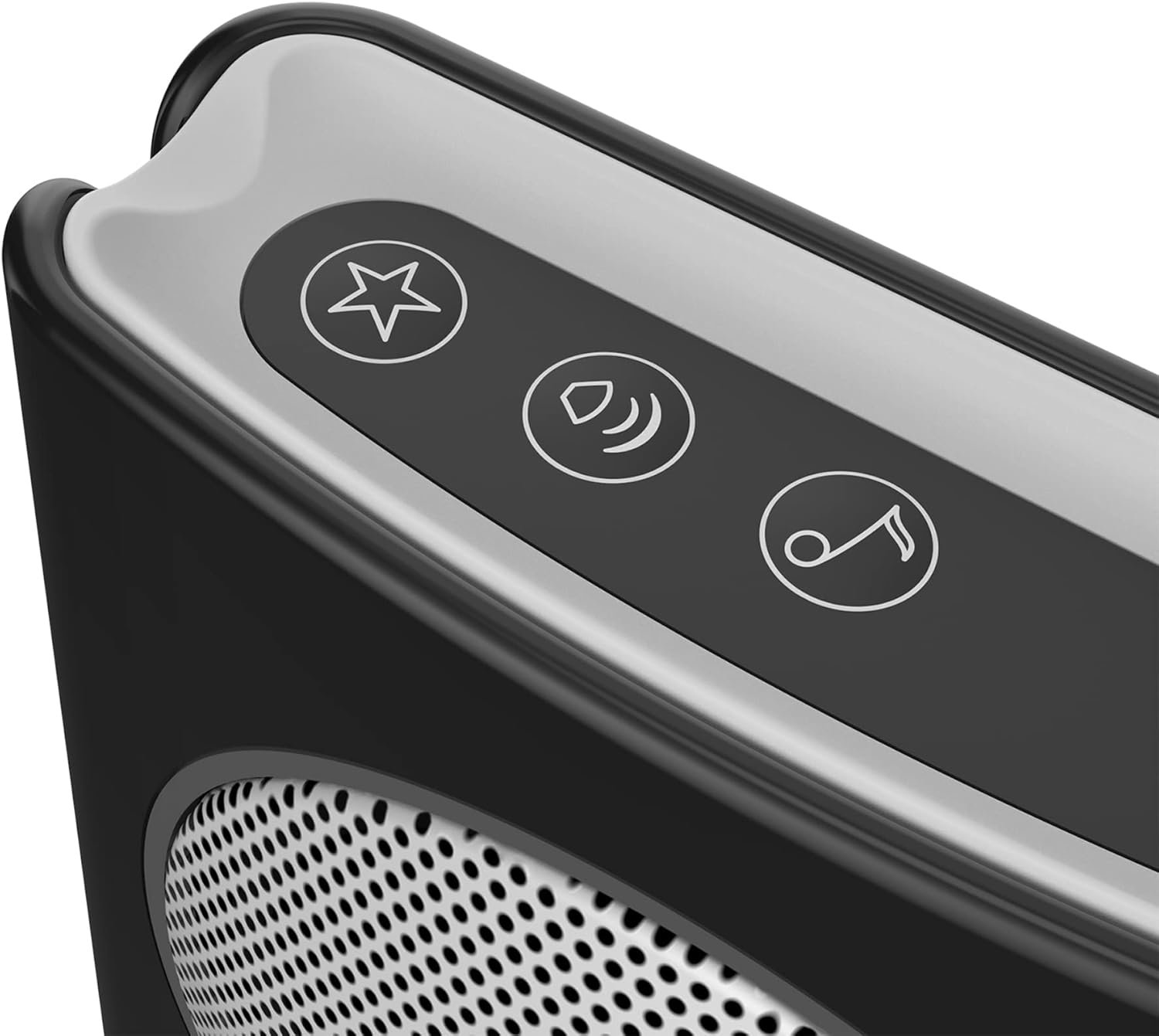
Image 5.1: Detail of the control buttons on the receiver unit for adjusting ringtone and volume.
6. Maintenance
6.1. Battery Replacement
When the low power alert is activated, replace the batteries promptly.
- Call Button: Open the call button casing (refer to installation steps in Section 4.1). Replace the existing battery with a new, equivalent lithium battery. Ensure correct polarity.
- Flash Bell Receiver: Open the battery compartment on the back of the receiver. Replace the existing batteries with new, equivalent batteries. Ensure correct polarity.
Always use the recommended battery type and dispose of old batteries responsibly.
6.2. Cleaning
To clean the doorbell units, use a soft, dry cloth. Do not use abrasive cleaners, solvents, or harsh chemicals, as these can damage the surface or internal components. The call button's rain cover should be periodically checked for debris and cleaned to ensure proper button function.
7. Troubleshooting
If you encounter issues with your EXTEL diBi Flash Wireless Doorbell, please consult the following table:
| Problem | Possible Cause | Solution |
|---|---|---|
| Doorbell does not ring or flash. |
|
|
| Short operating range. |
|
|
| Doorbell rings intermittently. |
|
|
8. Specifications
- Model Number: 081735
- Brand: EXTEL
- Wireless Range: Up to 200 meters (open field)
- Power Source (Receiver): Battery Powered (Batteries not included)
- Power Source (Call Button): Battery Powered (Battery included)
- Battery Cell Type: Lithium (for call button)
- Number of Ringtones: 6
- Dimensions (Product): 4 x 9 x 9 cm
- Weight (Product): 180 g
- Included Components: 1 Flash Bell, 1 Call Button, 1 Rain Cover
9. Warranty and Support
For warranty information and technical support, please refer to the warranty card included with your product or contact your retailer. You may also visit the official EXTEL website for further assistance and contact details.
Please retain your proof of purchase for any warranty claims.
Related documents081735


Ask a question about this manual
Ask about setup, troubleshooting, compatibility, parts, safety, or missing instructions. Manuals+ will review the question and use this page’s manual context to help answer it.