1. Introduction
This manual provides comprehensive instructions for the KERUI Wireless Remote Control (Model RC527), designed to enhance the functionality of your KERUI Home Alarm System. This remote control offers convenient wireless operation for arming, disarming, and managing your security system from a distance. It is crucial to note that this remote control functions exclusively as an accessory to a compatible KERUI alarm system and cannot operate independently.

Image 1.1: The KERUI Wireless Remote Control, a compact white device with four red buttons and a metal keychain clasp.
2. Product Features
- Wireless Operation: High-performance portable remote control with excellent transmission range.
- Extended Range: Effective transmission distance of up to 80 meters (approximately 260 feet) in open areas.
- Four-Button Design: Equipped with dedicated buttons for Arm, Disarm, Stay Arm, and SOS functions.
- System Integration: Functions as an accessory, requiring connection to a KERUI home alarm system.
- Battery Powered: Operates on a single 12V 23A Alkaline battery (included).
- Durable Construction: Features professional optimized circuit design and widened, wear-resistant keys to prevent misuse.

Image 2.1: An exploded view diagram highlighting key features of the remote control, including the internal 12V 23A battery, wear-resistant button design, added stainless steel clasp, and the lengthened wireless signal pole.
3. Package Contents
Upon opening the package, please verify that all the following items are present:
- 1 x KERUI Wireless Remote Control (Model RC527)
- 1 x 12V 23A Alkaline Battery (pre-installed or included separately)
4. Specifications
| Parameter | Value |
|---|---|
| Model Number | RC527 |
| Operating Frequency | 433MHz |
| Power Supply | 1 x 12V 23A Alkaline battery |
| Transmission Current | ≤ 15mA |
| Transmission Time | ≥ 1s |
| Transmission Distance | 80m (No Obstacle) |
| Operational Temperature | -10℃ to 55℃ |
| Humidity | ≤ 90% |
| Material | ABS |
| Product Dimensions | 5 x 2.4 x 0.5 inches (12.7 x 6.1 x 1.3 cm) |
| Item Weight | 2 pounds (approx. 0.9 kg) |

Image 4.1: A visual representation of the remote control's dimensions, indicating a length of 6.1 cm, width of 3.8 cm, and thickness of 1.5 cm.
5. Setup and Installation
The KERUI Wireless Remote Control is designed for simple integration with your existing KERUI Home Alarm System. It operates wirelessly and does not require physical wiring to the control panel.
5.1 Battery Installation
The remote control comes with a 12V 23A Alkaline battery. If the battery is not pre-installed or needs replacement, follow these steps:
- Locate the battery compartment on the back of the remote control.
- Carefully open the compartment cover.
- Insert the 12V 23A battery, ensuring the correct polarity (+ and -) as indicated inside the compartment.
- Close the battery compartment cover securely.
5.2 Pairing with Alarm System
To enable the remote control to operate your alarm system, it must be paired. The pairing process typically involves putting your KERUI Home Alarm System into a learning or pairing mode and then activating a button on the remote control. Refer to your specific KERUI Home Alarm System's manual for detailed instructions on how to add new wireless accessories or remote controls. Ensure your alarm system supports 433MHz frequency accessories.
6. Operating Instructions
The remote control features four distinct buttons for various alarm system functions:
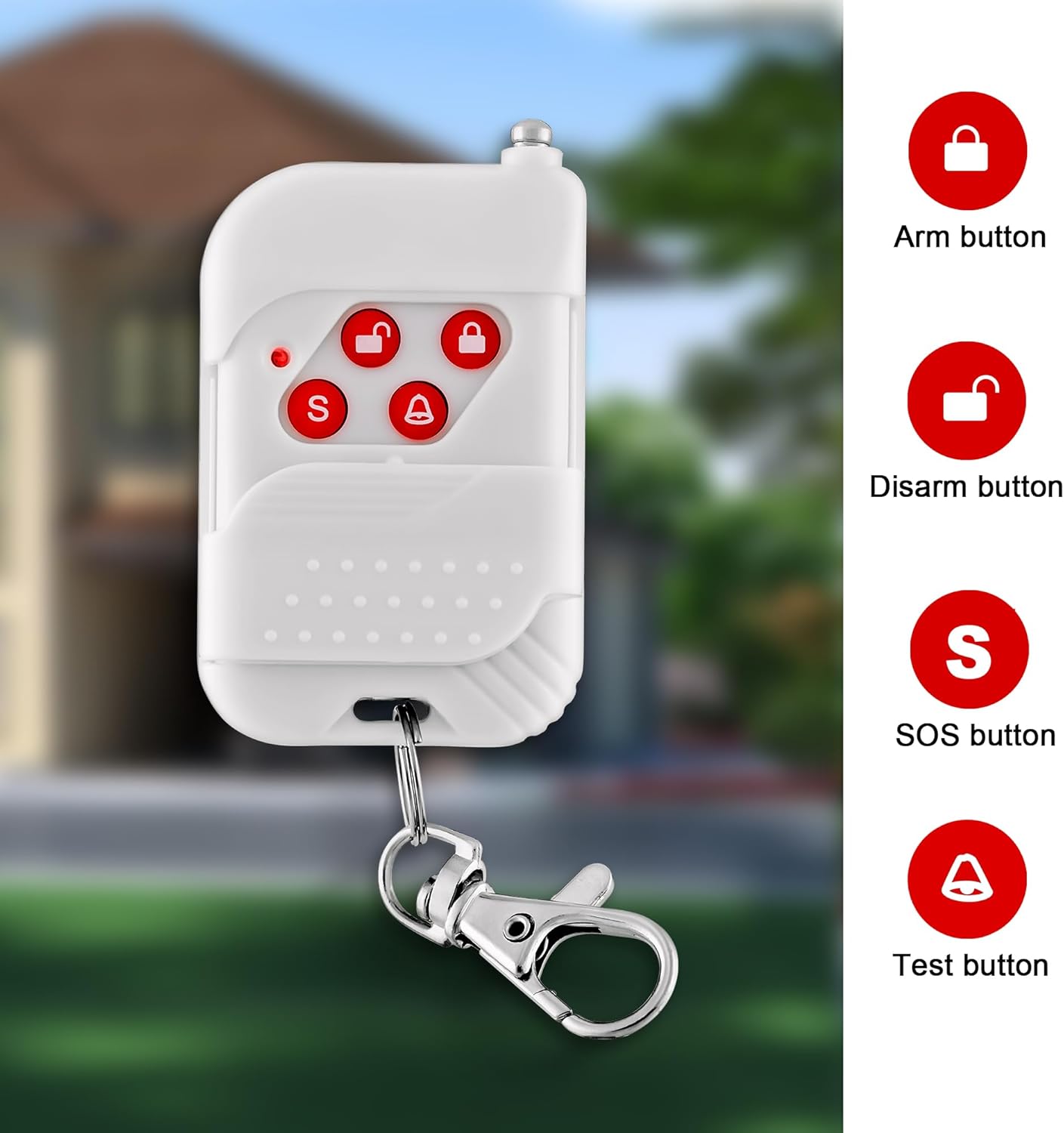
Image 6.1: A visual guide to the remote control's buttons, indicating the Arm (closed padlock), Disarm (open padlock), SOS (S), and Test (bell) functions.
- Arm Button (Closed Padlock Icon): Press this button to arm your alarm system. This typically activates all sensors and sets the system to full protection mode.
- Disarm Button (Open Padlock Icon): Press this button to disarm your alarm system. This deactivates all sensors, allowing you to enter or exit your premises without triggering the alarm.
- SOS Button (S Icon): In case of an emergency, press this button to trigger an immediate panic alarm. This function is designed for urgent situations and will activate the alarm regardless of the system's armed status.
- Stay Arm Button (Bell Icon): This button is typically used for 'home arm' or 'stay arm' mode, where perimeter sensors are armed while interior sensors are disarmed, allowing movement within the property. (Note: The image labels this as 'Test button', but product features indicate 'Stay arm'. Functionality may vary slightly based on the specific alarm system model.)
6.1 Operating Range
The remote control offers a wireless transmission distance of up to 80 meters (approximately 260 feet) in an open, obstacle-free environment. Factors such as walls, electronic interference, and other obstructions can reduce the effective range.

Image 6.2: A graphic depicting the remote control's effective range, showing it can control a door alarm from a distance of up to 300 feet (approximately 91 meters) from a house.
7. Maintenance
7.1 Battery Replacement
When the remote control's range decreases significantly or it becomes unresponsive, the battery may need replacement. Follow the battery installation steps in Section 5.1 to replace the 12V 23A Alkaline battery.
7.2 Cleaning
To clean the remote control, use a soft, dry cloth. Avoid using abrasive cleaners, solvents, or excessive moisture, as these can damage the device.
7.3 Storage
Store the remote control in a dry place, away from direct sunlight and extreme temperatures. If storing for an extended period, consider removing the battery to prevent leakage.
8. Troubleshooting
- Remote control not responding:
- Check the battery. Replace it if necessary (refer to Section 7.1).
- Ensure you are within the effective operating range of 80 meters (260 feet) from your alarm system.
- Verify that the remote control is properly paired with your KERUI Home Alarm System (refer to Section 5.2).
- Limited operating range:
- Replace the battery.
- Ensure there are no significant obstructions (thick walls, metal objects) between the remote control and the alarm system.
- Minimize electronic interference from other wireless devices.
- Remote control buttons not performing expected function:
- Confirm that your specific KERUI Home Alarm System model supports all four functions (Arm, Disarm, Stay Arm, SOS) via remote control.
- Re-pair the remote control with your alarm system.
- Compatibility issues:
- This remote control is designed to work specifically with KERUI Home Alarm Systems. It may not be compatible with alarm systems from other brands or older KERUI models.
- Ensure your alarm system operates on the 433MHz frequency.