
Introduction
Thank you for choosing the BESTEK 200W Cigarette Lighter Splitter. This device is designed to expand your vehicle's power capabilities, providing three 12V/24V cigarette lighter sockets and four 2.4A USB-A charging ports. It allows for simultaneous powering and charging of multiple electronic devices in your car, such as dash cams, GPS units, tablets, and smartphones. Please read this manual carefully before use to ensure proper operation and safety.
Safety Information
- Ensure the total wattage of all connected devices does not exceed 200W to prevent overload.
- Only use the device with 12V or 24V DC vehicle power outlets.
- Do not disassemble or modify the device.
- Keep the device away from water, moisture, and extreme temperatures.
- Always unplug the device from the car's cigarette lighter socket when not in use or when leaving the vehicle for extended periods.
- Avoid placing the device in a position that obstructs driving visibility or interferes with vehicle controls.
Product Overview
The BESTEK Cigarette Lighter Splitter is designed for convenience and safety, offering multiple power options for your vehicle. It features three 12V/24V DC sockets and four 2.4A USB-A ports, along with an LED voltage display and a master power switch.

Image: Overview of the BESTEK Cigarette Lighter Splitter, highlighting its components including the cigarette lighter plug, three lighter sockets, four USB ports, LED display, and power switch.
Key Features:
- 3 Cigarette Lighter Sockets: Provides up to 200W total power for various 12V/24V vehicle appliances.
- 4 USB-A Charging Ports: Each port delivers up to 2.4A, with built-in Smart IC technology for optimal charging speed for your devices.
- LED Voltage Display: Monitors your car battery's voltage in real-time.
- Independent Power Switch: Allows you to turn the unit on/off without plugging/unplugging, reducing wear and tear.
- Advanced Safety Protections: Includes surge protection, USB intelligent identification, overload protection, over-voltage protection, over-current protection, and short circuit protection. Features a built-in 10A replaceable fuse.

Image: Visual representation of the all-around protection features, including surge, USB intelligent identification, overload, over-voltage, over-current, and short circuit protection.
Compatibility:
This splitter is compatible with a wide range of devices, including dash cams, GPS navigators, car refrigerators, portable air compressors, and various mobile devices like smartphones and tablets.

Image: Examples of wide compatibilities, showing the splitter can charge various appliances, mobile devices, and electric tools.
Setup
- Insert into Vehicle Socket: Plug the BESTEK Cigarette Lighter Splitter's main plug firmly into your vehicle's 12V or 24V cigarette lighter socket.
- Secure Placement: Place the splitter unit in a stable location within your vehicle, ensuring it does not interfere with driving or vehicle controls. The long cable provides flexibility for placement.
- Power On: Press the power switch on the splitter unit to turn it on. The LED display will illuminate, showing the current vehicle battery voltage.

Image: The BESTEK Cigarette Lighter Splitter positioned in a car's center console, demonstrating its use with a smartphone and tablet.
Operating Instructions
- Using Cigarette Lighter Sockets: Open the protective caps of the desired 12V/24V sockets. Insert the plugs of your compatible devices (e.g., dash cam, GPS, car vacuum cleaner) into the sockets. Ensure a secure connection.
- Using USB Charging Ports: Connect your USB-powered devices (e.g., smartphone, tablet, MP3 player) to any of the four USB-A ports using appropriate USB cables. The Smart IC technology will automatically detect your device and deliver the fastest possible charging speed.
- Monitoring Voltage: The integrated LED display shows your car battery's voltage. This helps you monitor the battery status, especially when the vehicle engine is off.
- Power Control: Use the master power switch to turn the entire unit on or off. This is useful for conserving car battery power when devices are not in use or when leaving the vehicle.

Image: The splitter actively charging two smartphones via its USB ports, illustrating its quick charge capability.
Video: An official product video demonstrating the features and usage of the BESTEK 3-Socket Cigarette Lighter Adapter.
Maintenance
- Cleaning: Wipe the device with a dry, soft cloth. Do not use liquid cleaners or solvents.
- Fuse Replacement: The main cigarette lighter plug contains a replaceable 10A fuse to protect against overcurrent. If the device stops working, the fuse may need replacement. To replace, carefully unscrew the tip of the main plug, remove the old fuse, and insert a new 10A fuse. Ensure the new fuse is correctly seated before reassembling.
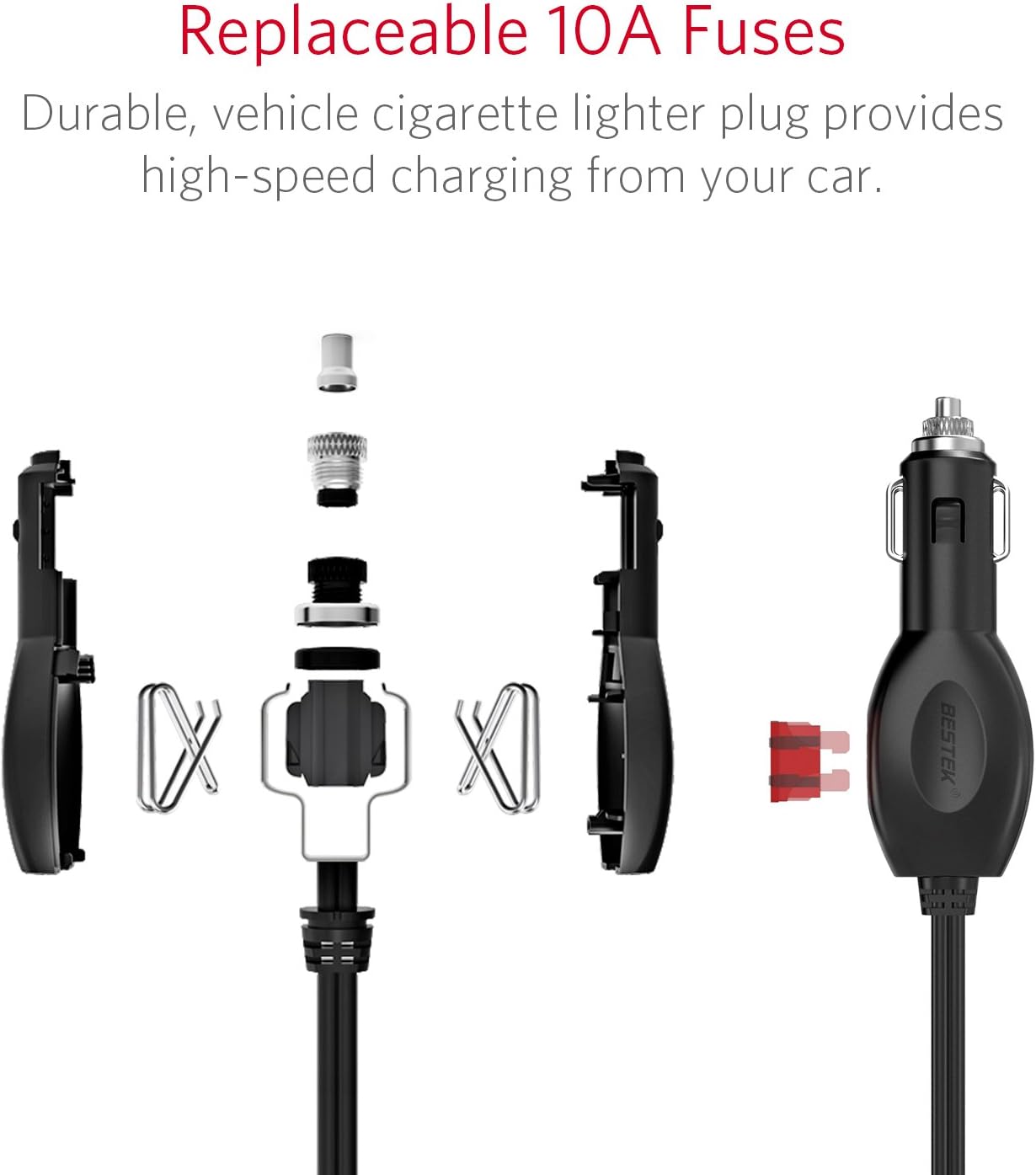
Image: Detailed diagram illustrating the components of the main cigarette lighter plug and the process for replacing the 10A fuse.
Troubleshooting
| Problem | Possible Cause | Solution |
|---|---|---|
| Device not powering on / No LED display | 1. Main plug not fully inserted. 2. Vehicle's cigarette lighter socket is faulty. 3. Internal fuse blown. | 1. Ensure the main plug is firmly seated. 2. Test the vehicle socket with another device. 3. Check and replace the 10A fuse in the main plug (refer to Maintenance section). |
| Devices not charging via USB ports | 1. USB cable is faulty. 2. Device is not compatible or requires higher power. 3. Splitter is off. | 1. Try a different USB cable. 2. Ensure your device is compatible and within the 2.4A per port limit. 3. Turn on the splitter using the power switch. |
| Cigarette lighter plugs feel loose | Inconsistent plug size or wear. | Ensure plugs are pushed in firmly. If issues persist with multiple devices, contact support. |
| Device or connected appliances overheating | Total wattage exceeds 200W. | Unplug some devices to reduce the load. Ensure proper ventilation around the splitter. |
Specifications
| Feature | Specification |
|---|---|
| Brand | BESTEK |
| Model Number | MRS203BU-BRUV |
| Input Voltage | 12V / 24V DC |
| Total Power Output | 200W (Max) |
| Cigarette Lighter Sockets | 3 |
| USB Ports | 4 (2.4A each, Smart IC) |
| Output Current (Total USB) | 6A (Max) |
| Safety Fuse | 10A (Replaceable) |
| Material | Plastic |
| Color | White |
Warranty and Support
This BESTEK product comes with an 18-month warranty from the date of purchase. If you encounter any issues with your Cigarette Lighter Splitter, or if it arrives broken or does not meet your expectations, please contact our customer service team directly.
Our dedicated customer service is available 7 days a week, 24 hours a day, to assist you with any questions or concerns. Please refer to the contact information provided with your product packaging or visit the official BESTEK website for support details.


