
1. Product Overview
The Seville Classics AIRLIFT Pro S3 Electric Adjustable Standing Desk is designed for professional-grade use in various workspaces, including business, school, or home environments. This desk promotes active work habits by allowing seamless transitions between sitting and standing positions, contributing to improved well-being and productivity.
Key features include:
- Quiet Dual Motors: Enables smooth and rapid height adjustments from 25.6 inches to 51.4 inches at 1.5 inches per second.
- Solid Single-Piece Top: A 54" x 28" solid wood top provides a smooth, spacious work surface. It is CARB Phase 2 compliant for safety.
- LED Display Height Controller: Features a digital controller with an LED display and four memory settings for convenient, consistent height adjustments.
- Professional-Grade Design: Tested and certified to ANSI/BIFMA X5.5 safety standards, ETL certified, and CARB Phase 2 compliant for durability and performance in commercial settings.
- Ergonomic Features: Sloped desk top edges offer extra legroom when the desk is in a lowered position.
- Durable Construction: Industrial-strength steel frame ensures stability and longevity.

Figure 1: The AIRLIFT Pro S3 desk in a standing configuration, demonstrating ergonomic use.
2. Setup and Assembly
The AIRLIFT Pro S3 desk is designed for simple assembly. It typically ships in two separate boxes: one for the desktop and one for the adjustable base. Pre-installed anchors on the desktop facilitate an easier installation process.
2.1 Unboxing and Preparation
- Carefully unpack all components and verify against the included parts list.
- Ensure you have adequate space for assembly. It is recommended to assemble the desk upside down on a soft surface (e.g., a blanket or towel) to protect the desktop finish.
- The base is heavy (approximately 76 lbs); assistance may be required for lifting and positioning.
2.2 Assembly Steps
- Attach the support beam to the legs.
- Secure the feet to the bottom of the legs.
- Mount the assembled frame to the underside of the desktop using the pre-installed anchors.
- Connect the control panel and power cables.
- Carefully flip the desk upright and place it in its desired location.
- Install the screw-in leveling feet to ensure stable operation on uneven surfaces.

Figure 2: Desk components indicating pre-assembly and easy setup.
3. Operating Instructions
The AIRLIFT Pro S3 desk features an intuitive digital controller for height adjustment and memory settings.
3.1 Adjusting Desk Height
- Use the Up and Down arrow buttons on the controller to raise or lower the desk. The LED display will show the current height.
- The desk adjusts smoothly and quietly at 1.5 inches per second.
3.2 Using Memory Settings
The controller allows you to store up to four preferred height settings for quick recall.
- Adjust the desk to your desired height.
- Press the M button. The LED display will flash.
- Within 3 seconds, press one of the numbered memory buttons (1, 2, 3, or 4) to save the current height to that position.
- To recall a saved height, simply press the corresponding numbered memory button. The desk will automatically move to the saved position.

Figure 3: Digital control panel for height adjustment and memory settings.

Figure 4: Desk height range from 25.6" to 51.4".
4. Maintenance and Care
Proper maintenance ensures the longevity and optimal performance of your AIRLIFT Pro S3 desk.
- Cleaning: The MDF wood top with laminate finish is spill-proof and easy to clean. Use a soft, damp cloth with mild soap for general cleaning. Avoid harsh chemicals or abrasive cleaners.
- Spill Prevention: Always use coasters when placing hot or cold drinks on the desktop to prevent potential damage or marks.
- Weight Capacity: Do not exceed the maximum weight capacity of 264 lbs. Overloading can damage the motors and frame.
- Cable Management: Regularly check and organize cables to prevent tangles and ensure smooth operation during height adjustments.
- Inspection: Periodically inspect all screws and connections to ensure they are tight. Retighten if necessary.
5. Troubleshooting
If you encounter any issues with your desk, refer to the following common troubleshooting steps:
- Desk Not Moving: Check if the power cord is securely plugged into both the desk and a working electrical outlet. Ensure no objects are obstructing the desk's movement.
- Error Code on Display: If an error code appears, try unplugging the desk from the power source for 10-15 seconds, then plug it back in. This often resets the system. If the error persists, consult the warranty information for support.
- Uneven Movement: Verify that the leveling feet are properly adjusted and the desk is on a flat surface. Ensure the weight on the desk is evenly distributed and within the specified capacity.
- Memory Settings Not Working: Re-program the memory settings by following the steps in Section 3.2.
6. Specifications
| Feature | Specification |
|---|---|
| Brand | Seville Classics |
| Model Number | OFFK65826 |
| Product Dimensions | 54" W x 28" D x (25.6" to 51.4" H) |
| Height Adjustment Range | 25.6" to 51.4" |
| Height Adjustment Speed | 1.5 inches per second |
| Weight Capacity | 264 lbs |
| Top Material | MDF Wood with Laminate Finish |
| Base Material | Industrial-strength Alloy Steel |
| Motors | Dual Electric Motors |
| Memory Settings | 4 programmable settings |
| Certifications | ANSI/BIFMA X5.5, ETL Certified, CARB Phase 2 Compliant |
| Item Weight | 120 lbs |
| UPC | 017641658262 |
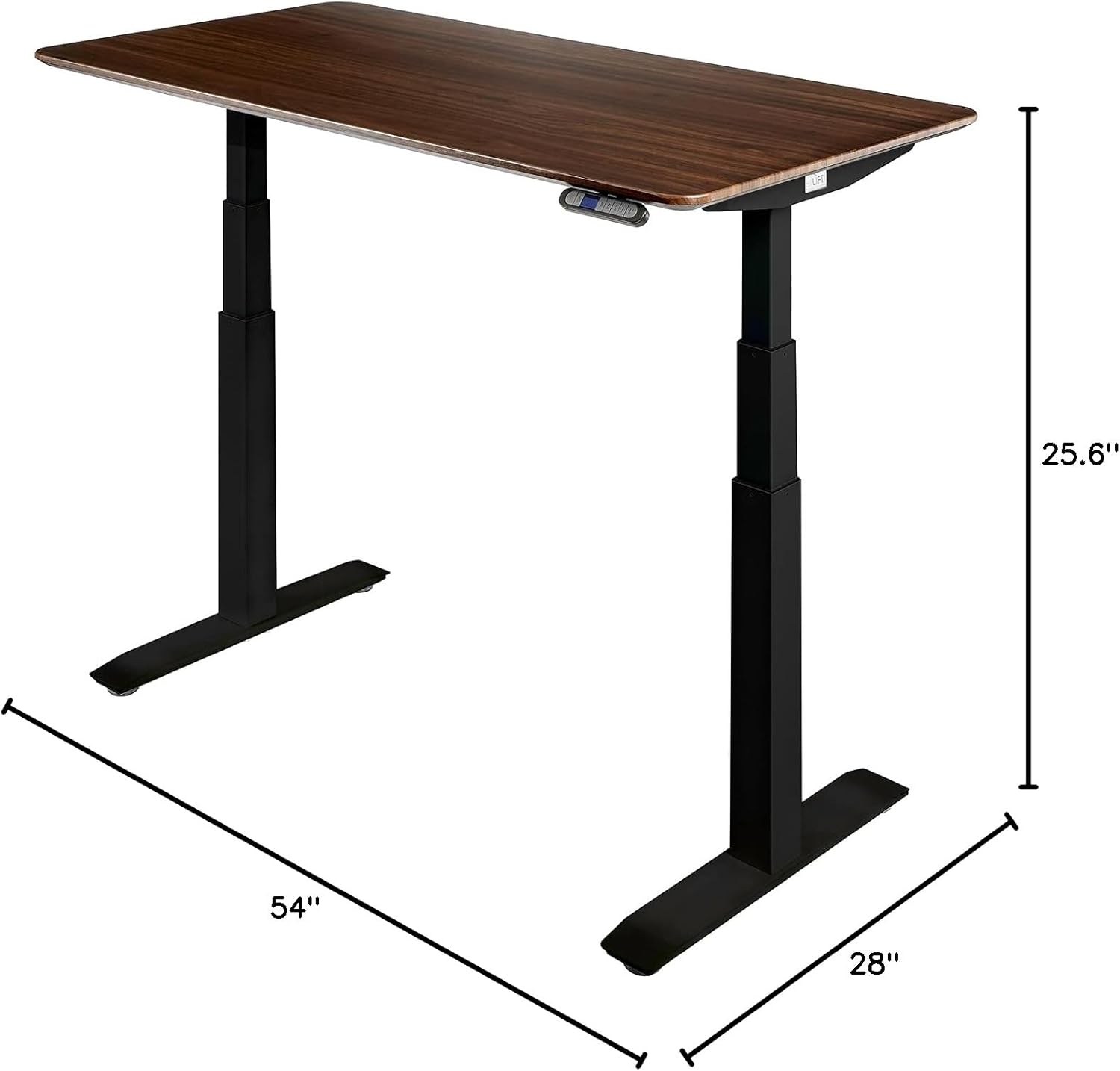
Figure 5: Desk dimensions.
7. Warranty and Support
Seville Classics provides comprehensive coverage for your AIRLIFT Pro S3 Electric Adjustable Standing Desk.
- 7-Year Non-Electronic Component Warranty: Seville Classics, Inc. warrants to the original retail purchaser that if this product proves to be defective in material or workmanship, non-electronic parts will be replaced for a period of seven years from the date of original purchase.
- 2-Year Electronic Component Warranty: Seville Classics, Inc. warrants to the original retail purchaser that if this product proves to be defective in material or workmanship, affected electronic part(s) will be replaced for a period of two years from the date of original purchase.
For customer support or warranty claims, please refer to the contact information provided at the point of purchase or visit the official Seville Classics website.

Figure 6: Customer Support information.


