
Introduction
The Wekity Automatic Toothbrush Holder and Toothpaste Dispenser is designed to streamline your daily oral hygiene routine. This innovative device features dual automatic toothpaste dispensers, a holder for up to five toothbrushes, and an integrated electronic watch to assist with brushing time. It promotes hygiene by keeping toothbrushes covered and dispenses a consistent amount of toothpaste, reducing waste and mess.
Product Features
- Automatic Toothpaste Dispensing: Utilizes a vacuum pump to dispense a precise amount of toothpaste, minimizing waste and ensuring hygienic use.
- Dual Dispenser Design: Features two separate toothpaste extruders, allowing for the use of different toothpastes (e.g., morning/evening, adult/child) simultaneously.
- Hygienic Toothbrush Storage: Includes a dust-proof cover and five slots to keep toothbrushes protected from airborne particles and prevent mold growth.
- Integrated Electronic Watch: An exclusive electronic watch helps users monitor brushing time, encouraging thorough and scientific brushing habits.
- Easy Installation: Designed for wall mounting with strong adhesive, suitable for smooth surfaces.
- Detachable for Cleaning: Components are easily detachable for convenient and thorough cleaning.

Image: Overview of the Wekity Toothbrush Holder highlighting its automatic dispensing, dual combination, double button, and electronic watch functions. Shows two toothpaste tubes inserted, five toothbrushes hanging, and the digital clock displaying '7:06'.
Setup Instructions
Follow these steps for proper installation and initial setup of your Wekity Toothbrush Holder.
- Prepare the Surface: Clean the desired wall surface thoroughly. Ensure it is smooth, dry, and free from dust or grease. This product is suitable for smooth tiles or mirrors. Do not install on rough or uneven surfaces like stucco walls.
- Attach Adhesive Plates: Tear off the protective film from the back of the adhesive plates. Carefully press the plates onto the cleaned wall surface, ensuring firm contact and discharging any air bubbles.
- Mount the Main Body: Align the main body of the toothbrush holder with the installed adhesive plates and securely buckle it into place.
- Insert Toothpaste: Open the cap of your toothpaste tube. Rotate and screw the toothpaste tube firmly into the dispenser's insertion opening. Repeat for the second dispenser if using two tubes.
- Prime the Dispenser: To exhaust internal air and ensure proper function, push a toothbrush into the dispenser's push slot to its furthest point and hold. Simultaneously, use your other hand to gently squeeze the toothpaste tube until a small amount of toothpaste flows out through the dispenser's exit. This primes the vacuum pump.
- Store Toothbrushes: Open the lid of the toothbrush holder and place your toothbrushes into the designated slots. Close the lid to keep them dust-free.
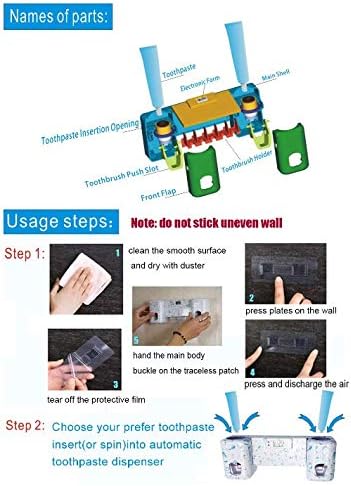
Image: Detailed visual guide for installing the Wekity Toothbrush Holder, showing surface preparation, adhesive application, main body attachment, toothpaste insertion, and priming the dispenser.

Image: Illustrates suitable installation surfaces (smooth tiles, mirrors) with a green checkmark and unsuitable surfaces (rough stucco walls) with a red cross.
Video: Demonstrates the installation process of the Wekity Toothbrush Holder, including attaching the adhesive, mounting the unit, inserting toothpaste, and priming the dispenser. Duration: 0:57.
Operating Instructions
Using your Wekity Toothbrush Holder and Toothpaste Dispenser is straightforward.
- Dispensing Toothpaste: Place your toothbrush head into the dispenser's exit slot and gently push it inward. The internal mechanism will automatically dispense a suitable amount of toothpaste onto your brush.
- Electronic Watch: The integrated electronic watch displays the time, which can be used to monitor your brushing duration.
- Toothbrush Storage: After use, place your toothbrush in one of the five designated slots. The holder features separate areas for adult and child toothbrushes for convenience.

Image: Illustrates the process of exhausting internal air from the toothpaste dispenser, pushing the toothbrush into the slot for dispensing, and highlights the separate toothbrush placement areas for children and adults.
Maintenance and Cleaning
Regular cleaning ensures optimal performance and hygiene of your Wekity Toothbrush Holder.
- Detachable Design: Each part of the dispenser and holder can be detached for thorough cleaning.
- Disassembly: To disassemble, locate the 'PUSH' buttons on both sides of the unit and press them to open the covers and access internal components.
- Cleaning: Wash all detached parts with water and a mild detergent. Ensure all toothpaste residue is removed, especially from the dispenser mechanism.
- Reassembly: After cleaning and drying, reassemble the components by aligning them and snapping them back into place.
Image: Shows how to disassemble the Wekity Toothbrush Holder by pressing the 'PUSH' buttons on the sides to open for cleaning.
Troubleshooting
If you encounter any issues with your Wekity Toothbrush Holder, refer to the following common solutions:
- Toothpaste Not Dispensing:
- Ensure the toothpaste tube is fully and securely screwed into the dispenser.
- Re-prime the dispenser by pushing a toothbrush to the furthest point and gently squeezing the toothpaste tube until flow begins.
- Check for dried toothpaste blocking the dispenser exit. Clean the dispenser mechanism if necessary.
- Unit Falling Off Wall:
- Verify that the installation surface is smooth, clean, and dry. Rough or porous surfaces will not provide adequate adhesion.
- Ensure the adhesive plates were pressed firmly to remove all air bubbles during installation.
- If the adhesive has lost its strength, consider replacing the adhesive strips or using screws for a more permanent mount if suitable for your wall type.
- Electronic Watch Not Functioning:
- Check if the battery needs replacement. The product specifications indicate 1 Lithium Ion battery is required.
- Ensure the battery is inserted correctly with the correct polarity.
- Mildew or Residue Buildup:
- Increase the frequency of cleaning the detachable parts of the holder and dispenser.
- Ensure toothbrushes are shaken dry before placing them in the holder to minimize moisture buildup.
Specifications
| Feature | Detail |
|---|---|
| Brand | Wekity |
| Model Number | 8541790669 |
| Material | Polymer Materials |
| Color | White |
| Product Dimensions (L x W x H) | 3.94" x 2.36" x 3.15" |
| Mounting Type | Wall Mount |
| Finish Type | Glossy |
| Special Feature | Automatic Toothpaste Dispenser, Electronic Watch |
| Number of Items | 1 |
| Item Weight | 9.6 ounces |
| Batteries Required | 1 Lithium Ion battery (for electronic watch) |
Warranty and Support
For information regarding product warranty, returns, or customer support, please refer to the retailer's policy where the product was purchased. Wekity is committed to customer satisfaction.