
1. Introduction
Thank you for choosing the SURKER SK-5807 Mini Hair Clipper. This professional, portable, and rechargeable hair clipper is designed for precise trimming of facial hair, body hair, and nose/ear hair. Please read this manual carefully before use to ensure safe and optimal performance of your device. Keep this manual for future reference.
2. Important Safety Instructions
To reduce the risk of electric shock, injury, or fire, always follow these basic safety precautions:
- Do not immerse the appliance in water or use it near water.
- Do not use the appliance if it is damaged or if the charging cable is frayed.
- Keep the appliance away from children.
- Unplug the appliance before cleaning.
- Use only the provided charging cable and accessories.
- Do not attempt to disassemble or repair the appliance yourself. Contact qualified service personnel.
- Ensure your hands are dry when handling the appliance or charger.
3. Package Contents
Verify that all items are present in your package:
- SURKER SK-5807 Mini Hair Clipper Unit
- Adjustable Guide Comb
- Charging Cable
- Cleaning Brush
- Lubricating Oil
- 1 x AA Rechargeable Battery (pre-installed or separate)

Image: The SURKER SK-5807 Mini Hair Clipper shown with its included accessories: charging cable, cleaning brush, lubricating oil, and an adjustable guide comb.
4. Product Overview
Familiarize yourself with the components of your SURKER SK-5807 Mini Hair Clipper:
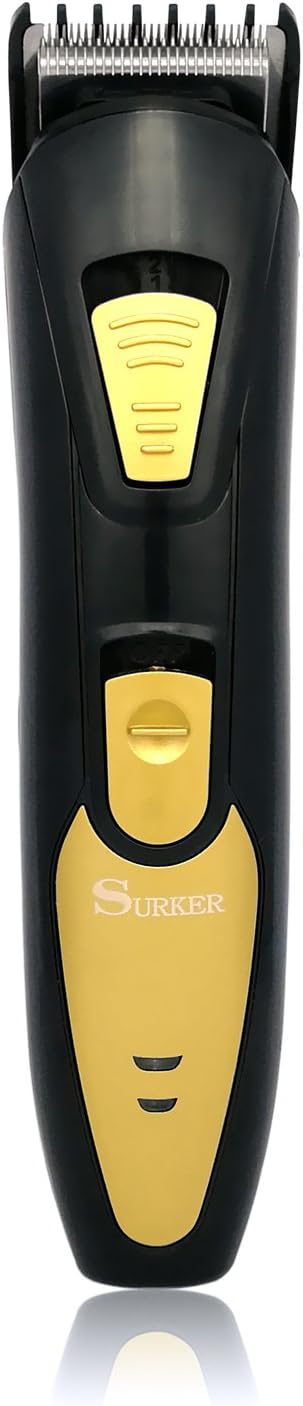
Image: Front view of the SURKER SK-5807 Mini Hair Clipper, highlighting the blade, power switch, and ergonomic design.
- Precision Blade: Stainless steel blade for efficient and precise trimming.
- Power Switch: Slide switch to turn the clipper ON or OFF.
- Adjustable Comb Release Button: Used to attach or detach the guide comb.
- Battery Compartment: Located at the bottom, houses the AA rechargeable battery.
- Charging Port: For connecting the charging cable.
5. Setup
5.1 Battery Installation
- Ensure the clipper is turned OFF.
- Open the battery compartment cover at the bottom of the clipper.
- Insert the provided AA rechargeable battery, ensuring correct polarity (+/-).
- Close the battery compartment cover securely.

Image: Detail showing the battery compartment with an AA rechargeable battery and the adjustable guide comb mechanism.
5.2 Initial Charging
Before first use, fully charge the clipper for optimal battery life.
- Connect the charging cable to the clipper's charging port.
- Plug the other end of the charging cable into a suitable power outlet.
- Allow the clipper to charge until fully charged. The charging indicator (if present) will show completion.
- Unplug the charger once charging is complete.
5.3 Attaching the Adjustable Guide Comb
- Ensure the clipper is turned OFF.
- Align the guide comb with the clipper head.
- Gently push the comb onto the blade until it clicks into place.
- To adjust the trimming length (0.3-1.5 cm), slide the comb adjustment mechanism.
- To remove, press the comb release button and slide the comb off.
6. Operating Instructions
6.1 Basic Operation
- Ensure the clipper is charged and the desired guide comb is attached (or no comb for closest trim).
- Slide the power switch to the 'ON' position.
- Hold the clipper at a comfortable angle against the skin.
- Move the clipper slowly and steadily against the direction of hair growth for best results.
- After use, slide the power switch to the 'OFF' position.
6.2 Trimming Tips
- For facial hair, trim against the grain for a closer cut.
- For body hair, use the adjustable comb to achieve desired length.
- For nose and ear hair, use the clipper without a comb and carefully trim visible hairs. Do not insert the blade deeply into nasal passages or ear canals.
- Always ensure skin is clean and dry before trimming.
7. Maintenance and Cleaning
Regular cleaning and maintenance will prolong the life of your clipper.
7.1 Cleaning the Blades
- Ensure the clipper is turned OFF and unplugged.
- Remove the guide comb.
- Use the provided cleaning brush to brush away any loose hairs from the blades and the clipper head.
- For a more thorough clean, the blade assembly can be carefully detached (refer to product diagrams if available for specific instructions).
- Do not rinse the entire clipper under water unless explicitly stated as waterproof. Clean blades with a damp cloth if necessary, then dry thoroughly.
7.2 Oiling the Blades
After every few uses, or if the clipper feels sluggish, apply a small drop of lubricating oil to the blades.
- Apply 1-2 drops of the provided lubricating oil onto the blades.
- Turn the clipper ON for a few seconds to allow the oil to distribute evenly.
- Wipe off any excess oil with a soft cloth.
7.3 Storage
Store the clipper in a cool, dry place, away from direct sunlight and moisture. Ensure it is turned OFF before storing.
8. Troubleshooting
If you encounter issues with your clipper, refer to the following common problems and solutions:
| Problem | Possible Cause | Solution |
|---|---|---|
| Clipper does not turn on. | Battery is discharged or incorrectly installed. | Charge the battery fully. Check battery polarity and ensure it is properly seated. |
| Clipper runs slowly or pulls hair. | Blades are dirty, dull, or not oiled. | Clean the blades thoroughly. Apply lubricating oil. If blades are dull, consider replacement (contact support). |
| Clipper is not charging. | Charging cable or adapter is faulty. | Ensure the charging cable is securely connected. Try a different compatible power outlet. |
9. Specifications
Detailed technical specifications for the SURKER SK-5807 Mini Hair Clipper:
- Brand: SURKER
- Model: SK-5807E
- Power Source: Battery-Powered (Rechargeable)
- Blade Material: Stainless Steel
- Battery Type: 1 x AA Rechargeable Battery (included)
- Recommended Uses: Trimming facial hair, body hair, nose and ear hair
- Adjustable Comb Length: 0.3 - 1.5 cm
- Product Dimensions: Approximately 16 cm (Length) x 3.7 cm (Blade Width)
- UPC: 729792893118

Image: Diagram illustrating the dimensions of the SURKER SK-5807 Mini Hair Clipper, showing a length of 16 cm and a blade width of 3.7 cm.
10. Warranty and Support
For warranty information, technical support, or service inquiries, please contact the manufacturer or your retailer. Keep your proof of purchase for warranty claims.