
Introduction
The REMAX RB-T9 HD Voice Bluetooth Headset is designed for clear, hands-free communication and audio playback. Featuring Bluetooth 4.1 connectivity, a lightweight design, and a long-lasting battery, it is suitable for various activities including business calls, meetings, travel, and sports.
Package Contents
Please verify that all items listed below are included in your package:
- 1 x REMAX RB-T9 Bluetooth Headset
- 1 x USB Charging Cable
- 1 x User Manual
- 1 x Ear Hook Accessories
- 1 x Certificate
- 1 x Warranty Card
- 1 x Crystal Acrylic Packaging
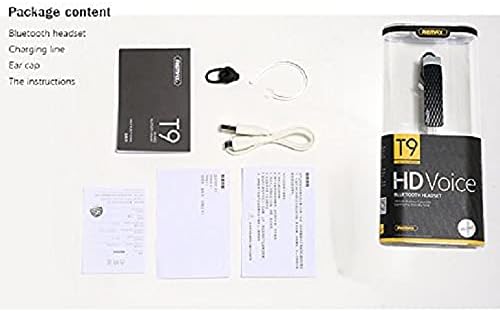
Image: The package contents of the RB-T9 headset, showing the headset, USB charging cable, user manual, and ear hook accessories neatly arranged.
Safety Information
To ensure safe and proper operation, please read the following safety guidelines:
- Do not expose the device to extreme temperatures, humidity, or corrosive substances.
- Avoid dropping or subjecting the device to strong impacts.
- Do not attempt to disassemble or repair the device yourself. Refer to qualified service personnel.
- Keep the device away from children and pets.
- Dispose of the device and its battery responsibly according to local regulations.
Setup
Charging the Headset
Before first use, fully charge the headset. Connect the provided USB charging cable to the headset's charging port and the other end to a USB power source (e.g., computer USB port, wall adapter). The indicator light will show charging status and turn off or change color when fully charged.
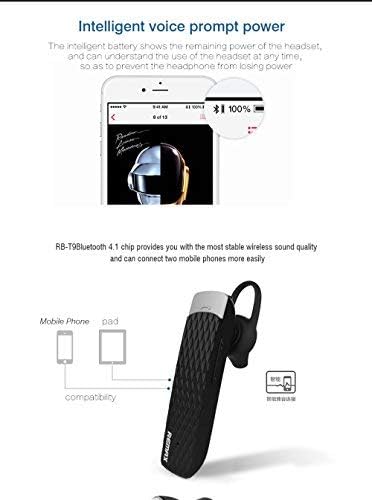
Image: An illustration demonstrating the headset's compatibility with mobile phones and tablets, along with a visual representation of the intelligent battery display on a smartphone screen.
Pairing with a Device
- Ensure the headset is charged and turned off.
- Press and hold the Multi-function button on the headset until the indicator light flashes red and blue alternately, indicating pairing mode.
- On your device (smartphone, tablet, etc.), enable Bluetooth and search for available devices.
- Select "RB-T9" from the list of found devices.
- Once connected, the indicator light on the headset will flash blue slowly or turn off, and a voice prompt will confirm the connection.
The headset supports multi-point connection, allowing it to be connected to two mobile phones simultaneously.
Operating Instructions
Wearing the Headset
The RB-T9 headset is designed for comfortable wear with an ear hook. Adjust the ear hook to fit securely around your ear.

Image: A man wearing the RB-T9 headset, illustrating the secure and comfortable fit of the silicone ear caps and ear hook design.
Basic Functions
- Power On/Off: Press and hold the Multi-function button.
- Answer/End Call: Press the Multi-function button once during an incoming call or active call.
- Reject Call: Press and hold the Multi-function button during an incoming call.
- Play/Pause Music: Press the Multi-function button once during music playback.
- Volume Control: Use the Volume Up (+) and Volume Down (-) buttons.
- Next Track: Press and hold the Volume Up (+) button.
- Previous Track: Press and hold the Volume Down (-) button.
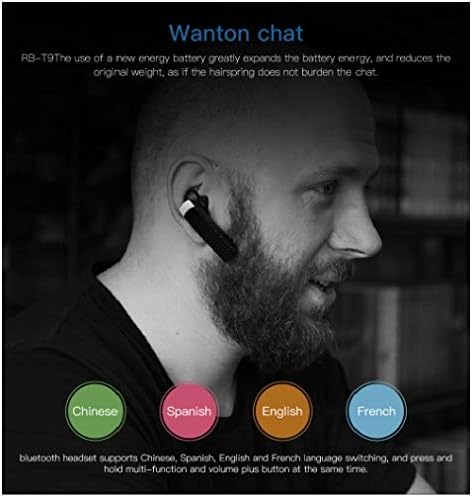
Image: A user wearing the RB-T9 headset, highlighting its multi-language support for voice prompts, including Chinese, Spanish, English, and French.
Language Switching
The headset supports voice prompts in multiple languages. To switch languages, press and hold the Multi-function button and the Volume Up (+) button simultaneously.
Maintenance
To maintain the performance and longevity of your RB-T9 headset:
- Clean the headset regularly with a soft, dry cloth.
- Avoid using harsh chemicals or abrasive cleaners.
- Store the headset in a cool, dry place when not in use.
- Do not expose the headset to direct sunlight or high temperatures for extended periods.
Troubleshooting
| Problem | Possible Cause | Solution |
|---|---|---|
| Headset does not power on. | Low battery. | Charge the headset fully. |
| Cannot pair with device. | Headset not in pairing mode; Bluetooth off on device; device too far. | Ensure headset is in pairing mode (flashing red/blue); enable Bluetooth on device; keep devices within 10 meters. |
| No sound or poor sound quality. | Volume too low; headset not connected; interference. | Increase volume on headset and device; re-pair the headset; move away from sources of interference. |
| Call quality is poor. | Weak signal; microphone obstructed. | Move to an area with better signal; ensure microphone is not covered. |
Specifications

Image: A technical diagram detailing the product's appearance, dimensions (21.8mm x 14.3mm x 58mm), and key parameters such as Bluetooth version (4.1), working frequency band, charging voltage, working voltage, and battery specification.
| Feature | Detail |
|---|---|
| Model | RB-T9 |
| Bluetooth Version | Bluetooth 4.1 |
| Connectivity Technology | Wireless (Bluetooth) |
| Headphone Form Factor | In-Ear |
| Noise Control | Active Noise Cancellation |
| Material | Plastic |
| Color | Black |
| Product Dimensions | 21.8 x 14.3 x 58 mm |
| Item Weight | 9.07 g |
| Standby Time | 180 hours |
| Talk Time | 6 hours |
| Music Playback Time | 5 hours |
| Battery Capacity | 100mAh Li-ion battery (approx. 401136 polymer lithium battery) |

Image: The RB-T9 headset displayed against a natural green background, emphasizing its capability of providing up to 6 hours of continuous call time.
Warranty and Support
Your REMAX RB-T9 HD Voice Bluetooth Headset comes with a warranty card included in the package. Please refer to the warranty card for specific terms and conditions regarding coverage and duration.
For technical support or warranty claims, please contact your retailer or the authorized REMAX service center. Keep your purchase receipt and warranty card for future reference.


