
Introduction
The Rollz Motion is an innovative 2-in-1 mobility device designed to provide both walking assistance as a rollator and comfortable transport as a chair. This versatile equipment allows users to maintain independence and mobility, offering the flexibility to switch between modes as needed for extended outings or periods of rest.
This manual provides essential information for the safe and effective use, setup, and maintenance of your Rollz Motion device.
Key Features
- 2-in-1 Functionality: Seamlessly transforms from a rollator to a transport chair.
- Stable and Safe Design: Features ergonomic, height-adjustable hand grips and innovative drum brakes for secure stopping.
- Easy Maneuverability: Equipped with maneuverable front wheels and a curb assistant for navigating obstacles.
- Compact Folding: Folds into a compact size for easy storage and transport without tools.
- Comfortable Use: Large rear wheels with soft tires and foam handles ensure a comfortable experience in both modes.
- High Weight Capacity: Supports users up to 275 pounds (125 kg).
Setup and Assembly
Before first use, ensure all components are present and securely attached. The Rollz Motion comes largely pre-assembled, but some adjustments and attachments are required.
- Unfolding the Frame: Carefully unfold the main frame until it locks into place. Ensure all locking mechanisms are engaged.
- Adjusting Handle Height: Locate the height adjustment pins on the hand grips. Press the pins and slide the handles up or down to a comfortable height. The handles should be at wrist level when standing upright with arms relaxed. Ensure both handles are at the same height and securely locked.
- Attaching Transport Chair Package: If using as a transport chair, attach the transport chair package, which includes the backrest and footrests. Follow the specific instructions provided with the package for secure attachment.
- Brake Check: Test the drum brakes by engaging them and attempting to push the device. The wheels should lock securely. Adjust brake tension if necessary according to the separate brake adjustment instructions.

Figure 1: Rollz Motion in rollator configuration, highlighting its design and components.
Operating Instructions
Rollator Mode
- Walking: Push the rollator forward slightly, then step into the frame. Maintain an upright posture, walking between the hand grips.
- Braking: Squeeze the brake levers to slow down or stop. For parking, push the brake levers down until they lock into place. Ensure brakes are fully engaged before sitting.
- Sitting: Engage the parking brakes. Turn around so your back is to the seat. Slowly lower yourself onto the seat. Do not use the seat as a means to stand up.
- Navigating Curbs: Use the curb assistant by gently tilting the rollator back using the foot pedal to lift the front wheels over small obstacles.
Transport Chair Mode
To convert the Rollz Motion from rollator to transport chair:
- Ensure the device is on a flat, stable surface and parking brakes are engaged.
- Remove the backrest if it's in the rollator position.
- Rotate the handles forward to become the push handles for the transport chair.
- Attach the footrests to the designated points on the front of the frame.
- Ensure the seat is in the correct orientation for sitting.
- Once converted, the user can sit while a caregiver pushes the chair. The user cannot self-propel in this mode.
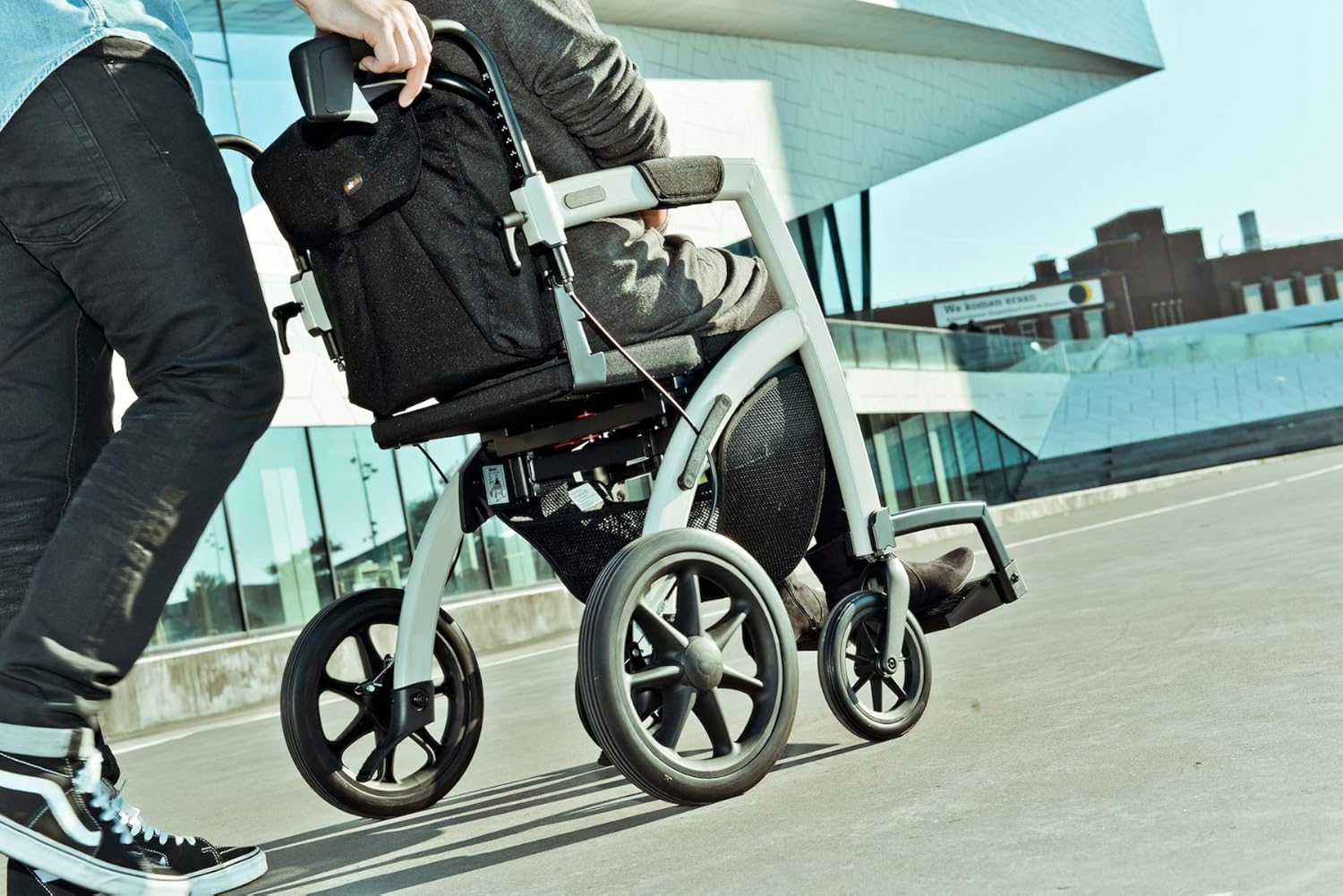
Figure 2: Rollz Motion in transport chair configuration, being used outdoors.
Maintenance
Regular maintenance ensures the longevity and safe operation of your Rollz Motion.
- Cleaning: Wipe down the frame and components with a damp cloth and mild detergent. Avoid abrasive cleaners.
- Brakes: Periodically check the brake function. Ensure they engage smoothly and hold securely. If brakes feel loose or too tight, consult a qualified technician for adjustment.
- Wheels: Inspect wheels for wear and tear. Ensure they rotate freely and are free of debris.
- Fasteners: Regularly check all screws, bolts, and locking mechanisms to ensure they are tight and secure. Do not overtighten.
- Storage: Store the device in a dry, clean place away from extreme temperatures.
Troubleshooting
This section addresses common issues you might encounter with your Rollz Motion.
| Problem | Possible Cause | Solution |
|---|---|---|
| Brakes not holding or too loose | Cable tension too low; worn brake pads | Adjust brake cable tension. If pads are worn, contact customer support for replacement. |
| Difficulty folding/unfolding | Locking mechanisms not fully disengaged/engaged; debris in joints | Ensure all levers are correctly positioned. Check for and remove any obstructions. |
| Wheels not rolling smoothly | Debris in wheel bearings; loose axle | Clean wheels and axles. Check axle tightness. |
If you encounter issues not listed here or if solutions do not resolve the problem, please contact Rollz customer support.
Specifications
| Feature | Detail |
|---|---|
| Product Type | 2-in-1 Rollator and Transport Chair |
| Model Number | 2343_14748 |
| Weight (Rollz Motion) | 23.7 lb (10.6 kg) |
| Weight (Transport Chair Package) | 8.16 lb (3.7 kg) |
| Weight Capacity | 275 lb (125 kg) |
| Seat Height | 21.5” (55 cm) |
| Handle Height Range | 34 - 39” (86 - 99 cm) |
| Seat Size (Walker) | 16.5 x 8” (42 x 20.3 cm) |
| Seat Size (Transport Chair) | 16.5 x 15” (42 x 38 cm) |
| Overall Width | 25.5” (65 cm) |
| Overall Length | 24.8” (63 cm) |
| Depth Folded | 11.5” (29.2 cm) |
| Front Wheel Diameter | 8” (20.3 cm) |
| Rear Wheel Diameter | 12” (30.5 cm) |
| Color | Island Blue |
| Material | Foam (for handles/seat) |
Warranty and Support
Specific warranty details are typically provided with your purchase documentation. Please refer to the warranty card or contact your retailer for information regarding coverage and terms.
For technical support, spare parts, or further assistance, please contact Rollz International BV directly or your authorized dealer. Contact information is usually available on the manufacturer's website or in your product packaging.

