
Introduction
This manual provides comprehensive instructions for the assembly, operation, and maintenance of your Ameriwood Home Chicago Electric Fireplace TV Console. This unit is designed to accommodate flat-screen televisions up to 50 inches and weighing up to 70 lbs. It features an integrated 18-inch electric fireplace insert that provides both heat and realistic flame effects, along with storage compartments behind two glass doors.
Please read this manual thoroughly before assembly and operation to ensure safe and proper use of your product. Keep this manual for future reference.

Image: Front view of the Ameriwood Home Chicago Electric Fireplace TV Console, showcasing the central fireplace insert and side storage cabinets.
Important Safety Information
WARNING: Failure to follow these safety instructions could result in fire, electric shock, or personal injury.
- Read all instructions before using this appliance.
- This product is intended for indoor use only.
- Do not operate any fireplace with a damaged cord or plug, or if the heater has malfunctioned, been dropped, or damaged in any manner.
- Keep combustible materials, such as furniture, pillows, bedding, papers, clothes, and curtains at least 3 feet (0.9 m) from the front of the heater and away from the sides and rear.
- Always unplug the fireplace when not in use.
- Do not run cord under carpeting. Do not cover cord with throw rugs, runners, or similar coverings. Arrange cord away from traffic area and where it will not be tripped over.
- To prevent a possible electrical shock, do not immerse the fireplace or cord in water or other liquids.
- This product contains engineered wood which may contain formaldehyde. Ensure adequate ventilation during and after assembly.
- Assembly requires two adults. Do not attempt to assemble alone.
- Ensure the TV console is placed on a flat, level surface to prevent tipping.
Package Contents
Before beginning assembly, ensure all parts are present and undamaged. If any parts are missing or damaged, do not proceed with assembly. Contact customer service for assistance.
- TV Console Panels (top, bottom, sides, shelves, back panel, door frames)
- Hardware Pack (screws, dowels, cam locks, hinges, handles, etc.)
- Electric Fireplace Insert
- Glass Doors (2)
- Instruction Manual
Tools Required (Not Included): Phillips head screwdriver, hammer.
Setup and Assembly
Assembly of the Ameriwood Home Chicago Electric Fireplace TV Console requires two adults. Follow the included step-by-step assembly instructions carefully. Ensure you have ample space and all necessary tools before beginning.
- Unpack and Identify Parts: Carefully remove all components from the packaging. Lay them out on a soft, clean surface to prevent scratches. Verify all parts against the parts list in the separate assembly guide.
- Assemble the Main Frame: Begin by attaching the side panels to the base and top panels using the provided hardware (dowels, cam locks, screws). Ensure all connections are secure.
- Install Shelves: Insert the fixed and adjustable shelves into their designated slots or attach with hardware.
- Attach Back Panel: Secure the back panel to the console frame. This adds stability to the unit.
- Install Glass Doors: Attach the hinges to the glass doors and then to the console frame. Adjust hinges as needed to ensure doors close properly and are aligned. Attach door handles.
- Insert Electric Fireplace: Carefully slide the electric fireplace insert into the central opening of the console. Ensure it fits snugly and is flush with the console's front.
- Positioning: Once fully assembled, carefully move the console to its desired location. Ensure it is on a stable, level surface and away from heat sources or direct sunlight.

Image: The assembled TV console with a television placed on top, demonstrating its intended use in a living room setting.

Image: A detailed diagram illustrating the dimensions of the TV console and the weight limits for the top surface and internal shelves.
Operating Instructions
Electric Fireplace Operation
The electric fireplace insert provides both visual flame effects and supplemental heat. It operates on a standard 120V outlet.
- Power Connection: Plug the fireplace power cord into a standard 120V electrical outlet. Ensure the outlet is not overloaded with other appliances.
- Main Power Switch: Locate the main power switch on the fireplace unit, typically on the front or side panel. Turn it to the "ON" position.
- Flame Effect: The flame effect can be operated independently of the heat function. Press the flame button (often labeled with a flame icon) to activate the realistic LED flame display.
- Heat Function: To activate the heater, press the heat button (often labeled with a heat icon or "I/O" for power and a separate heat switch). The heater can warm rooms up to 400 square feet.
- Adjusting Settings: Some models may have additional controls for flame brightness or heat intensity. Refer to the specific fireplace insert's manual for detailed adjustment options.
- Turning Off: To turn off the heat, press the heat button again. To turn off the flame effect, press the flame button. For complete power off, switch the main power switch to "OFF" and unplug the unit when not in use for extended periods.
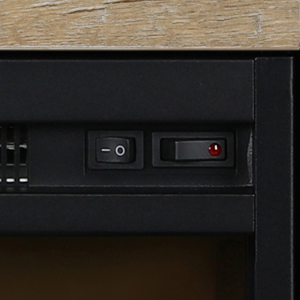
Image: Close-up view of the control panel on the electric fireplace insert, showing the power and heat switches.
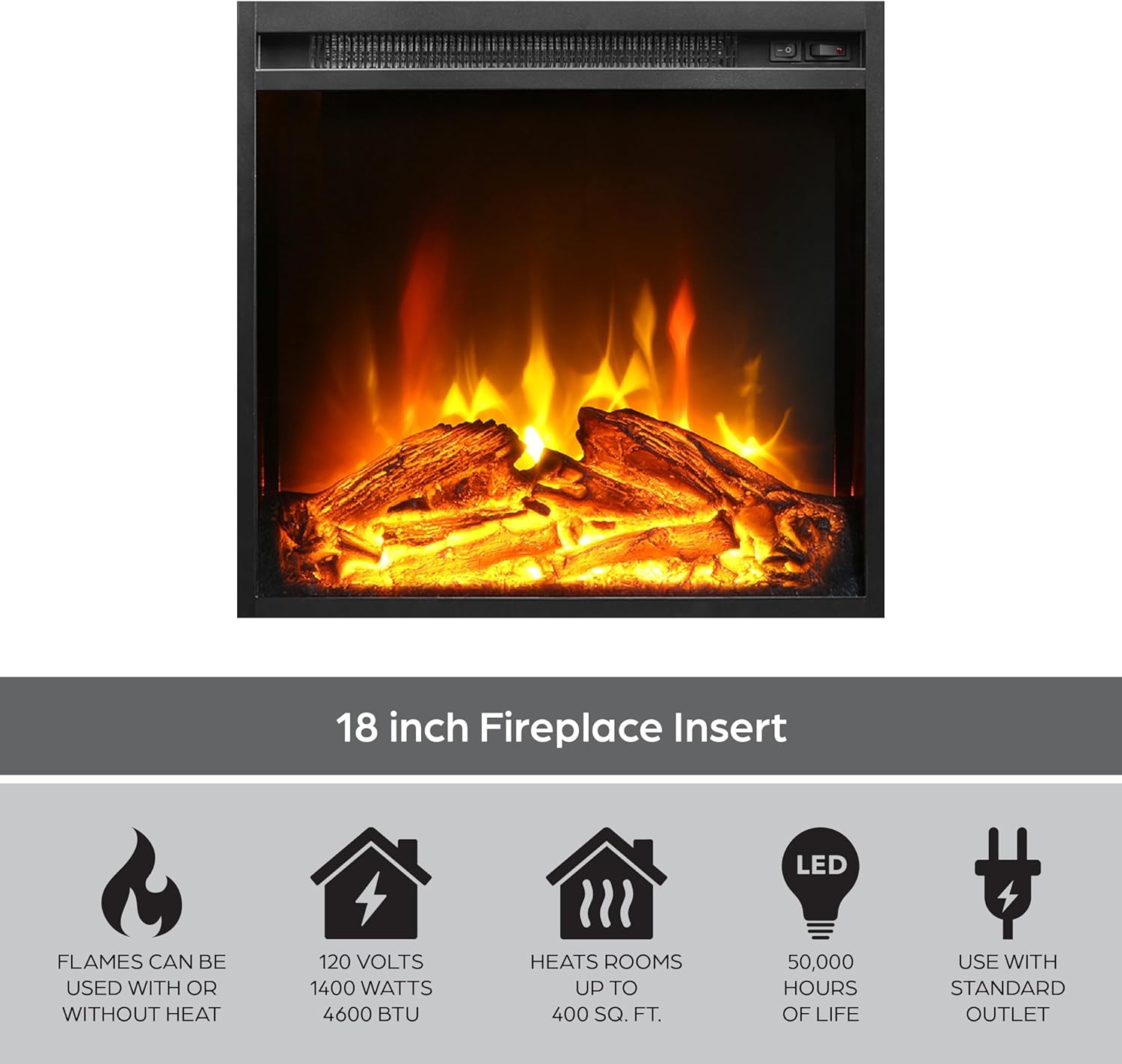
Image: A detailed view of the electric fireplace insert, displaying the realistic glowing log set and simulated flames.
TV Console Use
- TV Placement: Place your flat-screen TV centrally on the top surface of the console. Ensure the TV's base is fully supported. The console supports TVs up to 50 inches and 70 lbs.
- Storage: Utilize the open top shelf for media devices such as cable boxes or gaming consoles (supports up to 30 lbs). The two shelves behind the glass doors provide additional enclosed storage for media, books, or decorative items (each shelf supports up to 20 lbs).
- Cable Management: The console features cutouts in the back panel for easy cable routing, helping to keep wires organized and out of sight.

Image: An open glass door on the TV console, showing the interior storage shelf and the construction details.
Maintenance
- Cleaning the Console: Wipe the console surfaces with a dry, soft cloth. Avoid using abrasive cleaners or harsh chemicals, as these can damage the laminated finish.
- Cleaning the Fireplace Insert: Ensure the fireplace is unplugged and cool before cleaning. Wipe the exterior surfaces with a dry or slightly damp cloth. Do not spray water directly onto the unit.
- Dusting: Regularly dust the console and fireplace vents to ensure proper airflow and prevent dust buildup.
- Cord Inspection: Periodically inspect the power cord for any signs of damage or fraying. If damage is found, discontinue use and contact customer service.
Troubleshooting
| Problem | Possible Cause | Solution |
|---|---|---|
| Fireplace does not turn on. | No power to the unit; main power switch is off; circuit breaker tripped. | Ensure the power cord is securely plugged into a working 120V outlet. Check that the main power switch on the fireplace is in the "ON" position. Reset the household circuit breaker if it has tripped. |
| No heat, but flames are visible. | Heat function is not activated; thermostat setting is too low (if applicable). | Press the heat button to activate the heating element. If your model has a thermostat, ensure it is set to a desired temperature. |
| Flames are not visible. | Flame effect is not activated; LED light source issue. | Press the flame button to activate the flame effect. If the issue persists, contact customer support. |
| Console appears unstable. | Uneven floor; loose assembly hardware. | Ensure the console is on a level surface. Check and tighten all assembly hardware. |
Specifications
- Model: Chicago Electric Fireplace TV Console
- Brand: Ameriwood Home
- Dimensions (Assembled): 47.3 inches (W) x 15.9 inches (D) x 31.8 inches (H)
- Item Weight: Approximately 95 lbs
- Material: Engineered Wood (Laminated MDF and Particleboard)
- TV Size Capacity: Up to 50 inches
- TV Weight Capacity: Up to 70 lbs
- Top Shelf Weight Capacity: Up to 30 lbs
- Adjustable Shelf Weight Capacity (each): Up to 20 lbs
- Fireplace Insert Size: 18 inches
- Power Source: Corded Electric
- Voltage: 120V
- Wattage: 1400 Watts
- BTU Output: 4600 BTU
- Heating Area: Up to 400 sq. ft.
- LED Life: Up to 50,000 hours
- Assembly Required: Yes (2 adults recommended)
Warranty and Support
This Ameriwood Home product is covered by a 1-year limited warranty from the date of purchase. This warranty covers manufacturing defects in materials and workmanship under normal use.
For warranty claims, missing parts, or technical assistance, please contact Ameriwood Home customer service. Please have your model number and proof of purchase available when contacting support.
Manufacturer: Ameriwood Home
Contact Information: Refer to the original packaging or the Ameriwood Home official website for the most current customer service contact details.


