
1. Overview
The LAVA HD2605 Outdoor HD TV Antenna is designed to provide high-definition television reception for free over-the-air broadcasts. This remote-controlled, rotating antenna offers a long reception range, making it suitable for both urban and rural areas. It supports 4K Ultra HD and Full HD 1080P signals, allowing users to access local news, weather, sports, and entertainment channels without monthly fees. The antenna features a built-in low noise amplifier and a 360-degree motorized rotation for optimal signal acquisition.

Image: The LAVA HD2605 antenna, remote control, and control box, highlighting 4K Ultra HD and Full HD 1080P compatibility, NextGenTV compatibility, and 70-150 miles range.
2. What's in the Box
Before beginning installation, please ensure all components are present:
- Main Antenna Unit (with VHF dipole and reflectors)
- Director Elements (for UHF reception)
- 360° Motorized Rotator
- Control Box (Power Supply Unit)
- Remote Control
- AC/AC Adapter (UL Listed)
- Coaxial Cable (RG6, typically 60ft)
- Mounting Hardware (screws, nuts, bolts, cable clips)
- J-Pole Mount (optional, may be included in kit)
- 4-Way Coaxial Splitter (optional, may be included in kit)
- User Manual

Image: Included accessories such as coaxial cable, cable clips, and a 4-way splitter.
3. Installation
Follow these steps to assemble and install your LAVA HD2605 antenna. For a visual guide, please refer to the assembly video below.
3.1. Antenna Assembly
- Unpack Components: Carefully remove all parts from the packaging.
- Assemble Director Elements: Attach the 8 pieces of director elements to the main antenna unit. Ensure they are securely fastened.
- Fix VHF Dipole and Reflectors: Spread out the antenna's VHF dipole and reflectors. Secure them in their operational position.
- Attach Motor Bolster: Fix the motor bolster to the main antenna unit using the provided M5*25MM screws.
- Connect Coaxial Cable to Antenna: Connect the 18-meter coaxial cable to the F connector on the main antenna. Ensure the waterproof cap is securely placed over the connection.
- Attach J-Pole Mount: Secure the J-pole mount to the antenna's base using the appropriate screws.
Video: Detailed assembly instructions for the LAVA HD2605 Outdoor HD TV Antenna, demonstrating how to unpack, assemble elements, attach the motor, and connect the coaxial cable.
3.2. Antenna Placement
For optimal reception, install the antenna in an elevated outdoor location, such as a roof or mast, with a clear line of sight to broadcast towers. Avoid obstructions like large buildings or trees.
3.3. Connecting to TV
- Connect Coaxial Cable to Control Box: Connect the coaxial cable from the antenna to the 'ANT IN' port on the control box.
- Connect Control Box to TV: Use another coaxial cable to connect the 'TV OUT' port on the control box to the 'ANTENNA IN' or 'CABLE IN' port on your television.
- Power the Control Box: Plug the UL Listed AC/AC adapter into the control box and then into a standard electrical outlet. The power indicator light on the control box should illuminate.
- Connect Multiple TVs (Optional): If using a splitter, connect the control box output to the 'IN' port of the splitter. Then, connect individual coaxial cables from the splitter's 'OUT' ports to each television.

Image: Diagram illustrating the connection of the LAVA HD2605 antenna to two televisions via the control box.
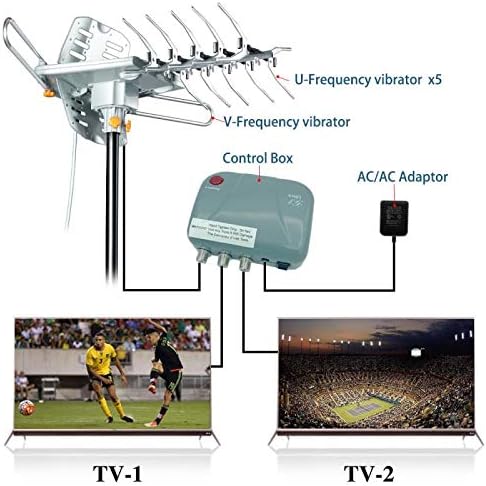
Image: Diagram illustrating the connection of the LAVA HD2605 antenna to multiple televisions using a splitter and power inserter.
4. Operating Instructions
4.1. Channel Scan
- Set TV Input: On your television, select the input source as 'Antenna' or 'Air'.
- Perform Auto Scan: Access your TV's menu and navigate to the 'Channel Setup' or 'Auto Program' section. Select 'Auto Scan' to search for available channels. This process may take several minutes.
4.2. Antenna Rotation
Use the provided remote control to rotate the antenna 360 degrees. This allows you to fine-tune the antenna's direction to receive signals from different broadcast towers. Press the left or right arrow buttons on the remote to rotate the antenna. Observe the signal strength on your TV while rotating to find the best reception for each channel.
4.3. Gain Control
The control box features an adjustable gain control. If local signals are too strong, lowering the signal level may improve reception quality. Adjust the knob on the control box as needed.
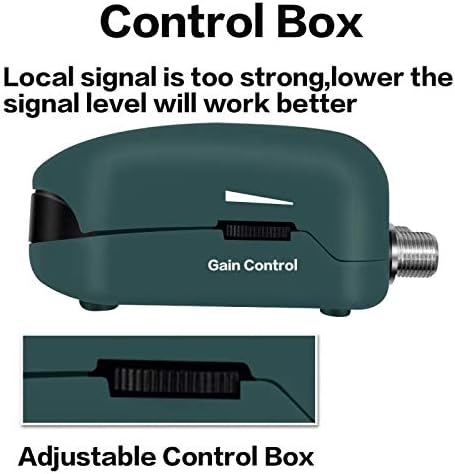
Image: Close-up view of the control box, showing the adjustable gain control feature.
5. Maintenance
- Regular Inspection: Periodically inspect the antenna, mounting hardware, and coaxial cables for any signs of wear, damage, or corrosion.
- Cleanliness: Keep the antenna free from dirt, dust, and debris. A soft, damp cloth can be used for cleaning. Avoid harsh chemicals.
- Cable Management: Ensure coaxial cables are properly secured and not exposed to excessive tension or sharp bends, which can degrade signal quality.
- Weather Protection: While designed for outdoor use, extreme weather conditions (heavy storms, hail) can potentially cause damage. Consider checking the antenna after severe weather.
6. Troubleshooting
| Problem | Possible Cause | Solution |
|---|---|---|
| No signal or poor picture quality | Incorrect antenna direction, loose cable connections, obstructions, weak signal area. | Perform antenna rotation using the remote. Check all cable connections. Ensure clear line of sight to broadcast towers. Re-scan for channels on your TV. Adjust gain control on the control box. |
| Remote control not working | Dead batteries, remote out of range, IR sensor blocked. | Replace remote batteries. Ensure direct line of sight between remote and control box. Move closer to the control box. |
| Antenna not rotating | Power issue, motor malfunction, obstruction. | Check if the control box is powered on. Inspect the motor for any physical obstructions. If the issue persists, contact customer support. |
| Few channels found after scan | Antenna not optimally positioned, TV not set to 'Air' input. | Rotate the antenna and perform multiple channel scans. Ensure your TV's input is correctly set to 'Antenna' or 'Air'. Consider a higher mounting location. |
7. Specifications
- Product Dimensions: 12 x 16 x 5 inches
- Item Weight: 5.39 pounds
- Manufacturer: LAVA
- Item Model Number: HD-2605KIT
- Antenna Type: Radio, Television
- Brand: Lava
- Color: Grey, Silver, White
- Number of Channels: 45 (typical, varies by location)
- Impedance: 75 Ohms
- Maximum Range: 150 Miles
- UPC: 840449110911
8. Warranty & Support
LAVA stands by the quality of its products. For specific warranty details, please refer to the documentation included with your purchase or visit the official LAVA website. For technical support, troubleshooting assistance, or to inquire about replacement parts, please contact LAVA customer service through their official channels. Keep your purchase receipt for warranty claims.