
1. Introduction
This manual provides essential instructions for the safe and efficient operation of your Onida 6.2 kg Fully-Automatic Top Loading Washing Machine, model T62CG. Please read this manual thoroughly before using the appliance and retain it for future reference. Proper installation, usage, and maintenance will ensure optimal performance and longevity of your washing machine.
2. Safety Information
Always adhere to the following safety precautions to prevent injury or damage to the appliance.
- Ensure the washing machine is connected to a grounded power outlet.
- Do not operate the machine with a damaged power cord or plug.
- Keep children and pets away from the appliance during operation.
- Do not wash items that are soiled with flammable substances.
- Unplug the machine before cleaning or performing any maintenance.
- Do not attempt to repair the machine yourself. Contact qualified service personnel.
- Ensure the water inlet and drain hoses are securely connected to prevent leaks.
3. Product Overview
Familiarize yourself with the main components of your Onida T62CG washing machine.
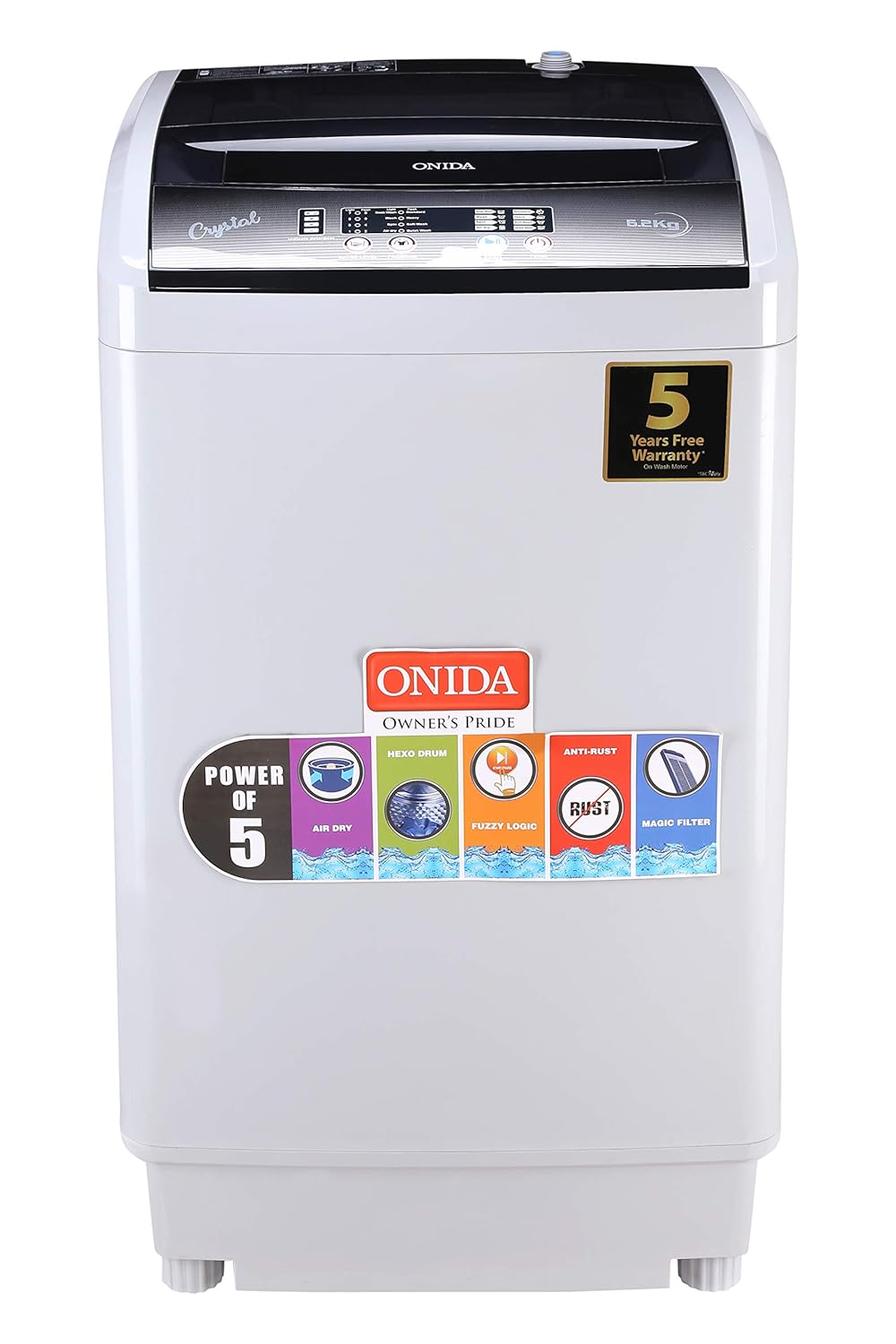
Figure 3.1: Front view of the Onida T62CG washing machine, showcasing its top-loading design and control panel.

Figure 3.2: Top view of the washing machine, illustrating the lid and the control panel layout.
Key Features:
- Fuzzy Logic: This intelligent feature automatically detects the laundry load and optimizes washing conditions such as water level and wash time for efficient cleaning.
- Magic Filter: Designed to effectively collect lint and other particles from the wash water, ensuring cleaner clothes and preventing drain clogs.
- Top-Loading Design: Provides convenient access for loading and unloading laundry.
- 6.2 kg Capacity: Suitable for small to medium-sized households.
4. Setup and Installation
Follow these steps for proper installation of your washing machine.
4.1 Unpacking
Carefully remove all packaging materials. Ensure all included components are present:
- 1 N Washing Machine
- 1 N Inlet Hose
- 1 N Drain Hose
- 1 N Drain Hose Clip
- 1 N User Manual (this document)
- 1 N Bottom Cover
4.2 Location and Leveling
Place the washing machine on a firm, level surface. Adjust the leveling feet at the bottom of the machine until it is stable and does not wobble. Ensure there is adequate space around the machine for ventilation and access.
4.3 Water Supply Connection
- Connect one end of the inlet hose to the water inlet valve at the back of the washing machine.
- Connect the other end of the inlet hose to a cold water tap. Ensure connections are tight to prevent leaks.
- Turn on the water supply and check for any leaks.

Figure 4.1: Rear view of the washing machine, highlighting the water inlet and drain hose connections.
4.4 Drain Hose Installation
- Securely attach the drain hose to the drain outlet at the back of the machine.
- Guide the drain hose into a standpipe or laundry tub. Ensure the end of the hose is positioned correctly to prevent backflow and is not submerged in water. Use the provided drain hose clip if necessary to secure its position.
4.5 Power Connection
Plug the power cord into a dedicated, grounded electrical outlet. Do not use extension cords or adapters.
5. Operating Instructions
This section details how to operate your washing machine for various laundry needs.
5.1 Control Panel
The control panel allows you to select wash programs and settings.

Figure 5.1: Detailed view of the control panel, showing buttons for power, start/pause, water level, and program selection.
- Power Button: Turns the machine on or off.
- Start/Pause Button: Initiates or temporarily stops a wash cycle.
- Water Level: Allows manual adjustment of water level if not using Fuzzy Logic.
- Program Selector: Choose from various wash programs (e.g., Standard, Delicate, Quick Wash).
5.2 Loading Laundry
Open the lid and place clothes loosely into the wash drum. Do not overload the machine, as this can affect washing performance and cause damage. For optimal results, ensure clothes are evenly distributed.
5.3 Adding Detergent
Add the recommended amount of detergent to the detergent dispenser. Refer to your detergent packaging for appropriate dosage based on load size and water hardness.
5.4 Selecting a Wash Program
- Press the Power button to turn on the machine.
- Use the Program Selector to choose the desired wash cycle. The machine offers 12 standard cycles.
- Standard: For daily laundry with normal soil levels.
- Quick Wash: For lightly soiled items or small loads requiring a faster cycle.
- Delicate: For fragile garments.
- Fuzzy Logic: The machine automatically determines the optimal wash settings.
- Adjust the Water Level if desired, or allow Fuzzy Logic to set it automatically.
- Press the Start/Pause button to begin the wash cycle.
6. Maintenance
Regular maintenance ensures the longevity and efficient operation of your washing machine.
6.1 Cleaning the Magic Filter
The Magic Filter should be cleaned regularly (e.g., after every 2-3 washes) to maintain optimal performance.
- Open the lid and locate the Magic Filter inside the wash drum.
- Gently pull out the filter.
- Open the filter casing and remove any accumulated lint or debris.
- Rinse the filter under running water.
- Reassemble the filter and reinsert it into its position in the wash drum until it clicks securely.
6.2 Cleaning the Exterior
Wipe the exterior of the machine with a soft, damp cloth. Do not use abrasive cleaners or solvents, as these can damage the finish.
6.3 Cleaning the Wash Drum
Periodically run a tub clean cycle (if available) or a hot wash cycle with no laundry and a washing machine cleaner to remove detergent residue and prevent odors.
6.4 Water Inlet Filter
Check the water inlet filter periodically for blockages. If clogged, turn off the water supply, disconnect the inlet hose, and clean the filter screen with a brush.
7. Troubleshooting
Refer to this section for solutions to common issues you might encounter.
| Problem | Possible Cause | Solution |
|---|---|---|
| Machine does not start | Power cord unplugged, lid not closed properly, power outage. | Check power connection, ensure lid is fully closed, check household power supply. |
| No water filling | Water tap off, inlet hose kinked, water inlet filter clogged. | Turn on water tap, straighten hose, clean inlet filter. |
| Machine not draining | Drain hose kinked or blocked, drain pump filter clogged. | Straighten drain hose, check for blockages, clean drain pump filter (refer to service manual if unsure). |
| Excessive vibration/noise | Machine not level, load unbalanced, transit bolts not removed (if applicable). | Adjust leveling feet, redistribute laundry, ensure transit bolts are removed during installation. |
| Clothes not clean | Overloading, insufficient detergent, incorrect program selection, Magic Filter clogged. | Reduce load size, use correct detergent amount, select appropriate program, clean Magic Filter. |
If the problem persists after attempting these solutions, please contact customer support.
8. Specifications
Technical details for the Onida T62CG Washing Machine.
| Feature | Detail |
|---|---|
| Brand | Onida |
| Model | T62CG |
| Capacity | 6.2 Kilograms |
| Maximum Rotational Speed | 700 RPM |
| Noise Level (Washing) | 62 Decibels |
| Noise Level (Spinning) | 72 dB |
| Installation Type | Freestanding |
| Form Factor | Top-Loading |
| Special Features | Fuzzy Logic, Magic Filter |
| Colour | Grey |
| Control Console | Fully Automatic |
| Number of Standard Cycles | 12 |
| Material | Plastic |
| Item Weight | 27 kg |
| Item Dimensions (LxWxH) | 52 x 53 x 90 Centimeters |
| Included Components | 1 N washing machine, 1 N inlet hose, 1 N drain hose, 1 N Drain hose clip, 1 N user manual, 1 N Bottom cover |
9. Warranty and Customer Support
For warranty information, service requests, or technical assistance, please contact Onida customer support.
- Manufacturer: Onida
- Importer: MIRC ELECTRONICS LTD, VILLAGE KUDUS, WADA BHIWANDI ROAD, TALUKA WADA, DIST-PALGHAR 421312
- Customer Care Email: CUSTOMER.CARE@ONIDA.COM
- Please have your model number (T62CG) and purchase details ready when contacting support.
