
Introduction
This manual provides detailed instructions for the setup, operation, and maintenance of your Hcman H02 Mechanical Gaming Keyboard. Please read this manual thoroughly before using the product to ensure proper functionality and longevity.

Image: The Hcman H02 Mechanical Gaming Keyboard, showcasing its compact 87-key layout and vibrant LED backlighting.
The Hcman H02 is an 87-key wired mechanical keyboard designed for gaming and typing. It features blue mechanical switches for tactile feedback and an audible click, anti-ghosting technology for precise input, and customizable LED backlighting with multiple modes.
Package Contents
Please check the package for the following items:
- Hcman H02 Mechanical Gaming Keyboard
- USB Cable (integrated)
- User Manual (this document)
- Keycap Puller Tool (for maintenance)

Image: The keyboard, its packaging, and the included user manual.
Setup
- Unpack the Keyboard: Carefully remove the keyboard and all accessories from the packaging.
- Connect to Computer: Plug the integrated USB cable from the keyboard into an available USB port on your computer. The keyboard is plug-and-play and does not require additional drivers for basic functionality.
- Adjust Keyboard Feet: The keyboard features adjustable feet on the underside. Flip them out to adjust the typing angle for ergonomic comfort.

Image: The underside of the keyboard, illustrating the adjustable support frames and rubber pads for stability.
The keyboard is compatible with Windows 10, Windows 8, Windows 7, Macintosh Mac OS X, Windows XP, and Windows Vista operating systems.
Operating Instructions
Key Features
- Blue Mechanical Switches: Provides a distinct tactile bump and an audible click sound with each keystroke, ideal for typing and gaming feedback.
- Anti-Ghosting: Ensures that multiple simultaneous key presses are registered accurately, preventing missed inputs during intense gaming sessions.
- 87-Key Layout: A compact design that saves desk space while retaining essential keys for gaming and general use.

Image: A close-up of the blue mechanical switches, highlighting their design.
LED Backlighting Control
The Hcman H02 keyboard features 21 different LED lighting modes and adjustable brightness and speed. Use the Function (Fn) key in combination with other keys to control the backlighting:
- Change Lighting Mode: Press Fn + INS to cycle through 21 different lighting effects.
- Adjust Light Speed: Press Fn + = (increase speed) or Fn + - (decrease speed).
- Adjust Light Brightness: Press Fn + ↑ (increase brightness) or Fn + ↓ (decrease brightness).
- Adjust Light Direction: Press Fn + ← (change direction left) or Fn + → (change direction right).
- Restore Factory Settings: Press Fn + ESC for 3 seconds to reset all lighting settings to default.
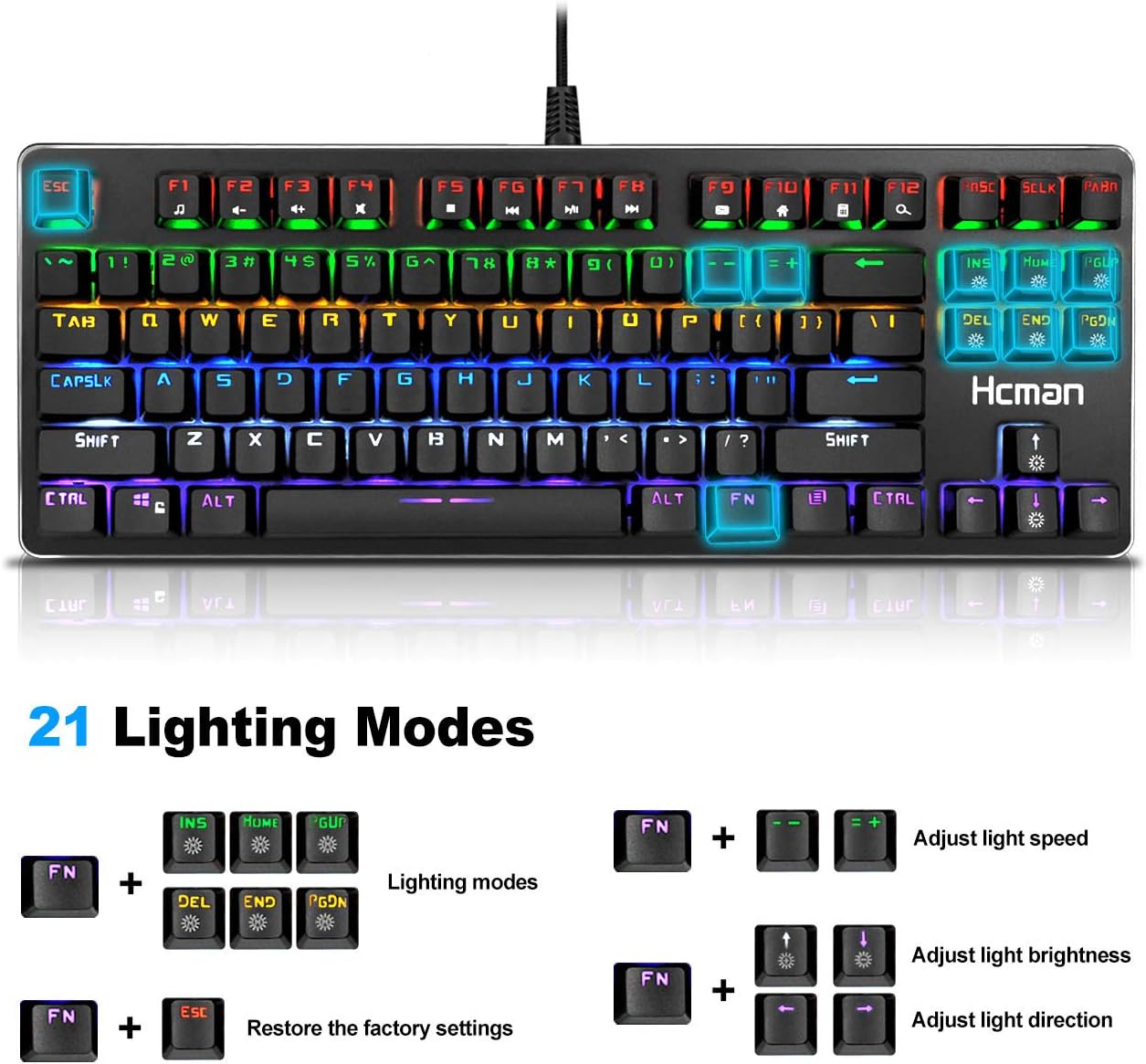
Image: Visual guide to controlling the 21 lighting modes, brightness, speed, and direction using Fn key combinations.

Image: An illustration of the 10 distinct side lighting modes available on the keyboard, activated by Fn + SCLK.
Maintenance
Regular cleaning helps maintain the performance and appearance of your keyboard.
- General Cleaning: Use a soft, dry cloth to wipe the surface of the keyboard. For stubborn dirt, a slightly damp cloth can be used, ensuring no liquid enters the key switches.
- Keycap Cleaning:
- Use the provided keycap puller tool to carefully remove keycaps. Gently pull straight up to avoid damaging the switch.
- Clean the removed keycaps with mild soap and water, then dry them completely before reattaching.
- Use compressed air to remove dust and debris from underneath the keycaps and around the switches.
- Align the keycaps correctly and press them firmly back onto the switches until they click into place.
Caution: Do not immerse the keyboard in water or any other liquid. Ensure the keyboard is disconnected from your computer before cleaning.
Troubleshooting
| Problem | Solution |
|---|---|
| Keyboard is not responding. |
|
| Backlighting is not working or is dim. |
|
| Certain keys are not registering. |
|
Specifications
| Feature | Detail |
|---|---|
| Model Number | H02 |
| Keyboard Type | Mechanical Gaming Keyboard |
| Switch Type | Blue Mechanical Switches |
| Key Count | 87 Keys |
| Connectivity | Wired USB |
| Backlighting | LED (21 modes, adjustable brightness/speed/direction) |
| Anti-Ghosting | 100% Anti-Ghosting |
| Material | Aluminum alloy panel, ABS keycaps |
| Dimensions (L x W x H) | 13.78 x 4.72 x 1.38 inches (35 x 12 x 3.5 cm) |
| Weight | 1.38 pounds (0.63 kg) |
| Cable Length | Approximately 1.5m (4.9ft) |
| Compatible OS | Windows 10, 8, 7, XP, Vista, Mac OS X |

Image: Details of the keyboard's construction, including the aluminum alloy panel, blue switches, and braided USB cable.
Warranty and Support
Hcman products are designed for durability and performance. For any issues or questions regarding your Hcman H02 Mechanical Gaming Keyboard, please refer to your purchase documentation for warranty details and contact information for customer support.
Please retain your proof of purchase for warranty claims.