
1. Setup and Battery Installation
The Smartby AH59-02733B remote control requires a CR2032 lithium coin cell battery for operation. No programming or pairing is necessary; simply install the battery, and the remote is ready for use.
Battery Installation Steps:
- Locate the battery compartment on the back of the remote control.
- Open the battery compartment cover.
- Insert one (1) new CR2032 battery, ensuring the positive (+) side faces upwards as indicated inside the compartment.
- Close the battery compartment cover securely.

Image 1: The Smartby AH59-02733B remote control alongside a CR2032 battery, illustrating the required battery type and its specifications (3V, 0.787"W x 0.126"D).
Once the battery is correctly installed, the remote control is immediately operational with compatible Samsung Soundbar models.
2. Operating Instructions
This remote control provides full functionality for your compatible Samsung Soundbar. Point the remote directly at the soundbar for optimal performance.
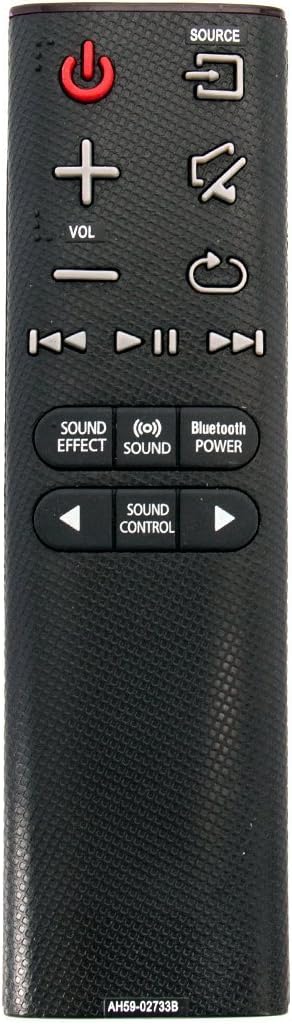
Image 2: Front view of the Smartby AH59-02733B remote control, displaying all buttons and their functions.
Key Functions:
- Power Button (⏻): Turns the soundbar on or off.
- Source Button: Cycles through available input sources (e.g., TV, HDMI, Optical).
- Volume Up/Down (VOL +/-): Adjusts the soundbar's volume level.
- Mute Button: Mutes or unmutes the soundbar audio.
- Playback Controls (⏮︎, ▶︎▶︎, ⏸︎): Control media playback (previous track, play/pause, next track).
- Sound Effect: Cycles through various sound effects or modes.
- Sound: Adjusts specific sound settings.
- Bluetooth Power: Activates or deactivates Bluetooth connectivity.
- Sound Control (◀︎, ▶︎): Navigates or adjusts sound control options.
3. Maintenance
To ensure the longevity and proper functioning of your remote control, follow these maintenance guidelines:
- Battery Replacement: Replace the CR2032 battery when the remote's responsiveness decreases or it stops functioning. Always use new, high-quality batteries.
- Cleaning: Gently wipe the remote's surface with a soft, dry cloth. Avoid using liquid cleaners or abrasive materials, as these can damage the remote.
- Storage: Store the remote in a dry place, away from extreme temperatures and direct sunlight.
4. Troubleshooting
If your remote control is not functioning as expected, please follow these troubleshooting steps:
- Check Batteries: Ensure the CR2032 battery is inserted correctly with the positive (+) and negative (-) ends in the right direction. Replace with a brand-new battery if necessary.
- Remote Reset Procedure:
- Remove the battery from the remote control.
- Press every button on the remote control for at least 3 seconds, one (1) time each, to drain any residual power. This also helps to identify if any buttons are stuck.
- Insert a brand-new CR2032 battery into the remote.
- Soundbar Reset Procedure: Sometimes the issue may originate from the soundbar itself. To reset the soundbar:
- Unplug the soundbar from its power outlet.
- Press and hold the power button on the side of the soundbar for 15 seconds. This action helps to drain any residual power from the soundbar's internal components.
- Plug the soundbar back into the power outlet and power it on.
- Line of Sight: Ensure there are no obstructions between the remote control and the soundbar. The remote requires a clear line of sight to transmit signals.
After performing these steps, check if the remote control is now working correctly.
5. Specifications
| Model Number | AH59-02733B |
| Brand | Smartby |
| Compatible Devices | Samsung Soundbar (HW-K360, HW-KM36C, HW-KM36, HW-K450, HW-K550, HW-K551, HW-J4000, HW-JM4000) |
| Battery Type | 1 x CR2032 (Lithium Cell, 3V) |
| Item Weight | 1.44 ounces |
| Package Dimensions | 5.31 x 1.97 x 0.67 inches |
| Color | Black |
| Special Feature | Ergonomic |
6. Warranty Information
Specific warranty details for the Smartby AH59-02733B remote control are not provided within this document. For information regarding product warranty, please refer to the original purchase documentation or contact the seller directly.
7. Support
For further assistance or inquiries regarding your Smartby AH59-02733B remote control, please contact the retailer from whom the product was purchased or visit the Smartby official website for support resources.