
GPX HTB037B
GPX HTB037B 29-inch Bluetooth Soundbar User Manual
Model: HTB037B
1. Introduction
This manual provides essential instructions for the setup, operation, and maintenance of your GPX HTB037B 29-inch Bluetooth Soundbar. Please read this manual thoroughly before using the product to ensure proper functionality and to maximize your audio experience. Keep this manual for future reference.
2. Safety Information
- Do not expose the soundbar to water or moisture.
- Avoid placing the soundbar near heat sources such as radiators, heat registers, stoves, or other apparatus (including amplifiers) that produce heat.
- Use only attachments/accessories specified by the manufacturer.
- Unplug this apparatus during lightning storms or when unused for long periods.
- Refer all servicing to qualified service personnel. Servicing is required when the apparatus has been damaged in any way, such as power-supply cord or plug is damaged, liquid has been spilled or objects have fallen into the apparatus, the apparatus has been exposed to rain or moisture, does not operate normally, or has been dropped.
- Ensure proper ventilation around the unit.
3. Package Contents
Verify that all items are present upon unpacking:
- GPX HTB037B 29-inch Bluetooth Soundbar
- Connection Cables (e.g., RCA audio cable, 3.5mm auxiliary cable)
- Power Adapter
- Remote Control (batteries may be required, not included)
- User Manual (this document)
4. Product Overview
The GPX HTB037B is a 29-inch Bluetooth soundbar designed to enhance your audio experience for televisions, smartphones, and other compatible devices. It features integrated stereo speakers with a fabric grille and multiple connectivity options.
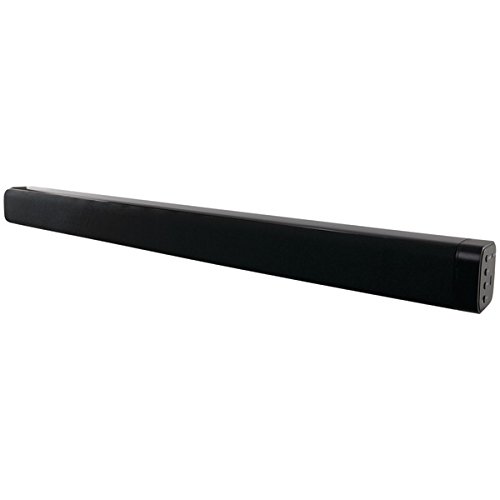
Image 1: GPX HTB037B 29-inch Bluetooth Soundbar. This image displays the soundbar's sleek black, rectangular design with a visible fabric speaker grille on the front. The right side panel, where connection ports are typically located, is also visible.
Key Features:
- Integrated stereo speakers with fabric speaker grille
- Bluetooth wireless technology (A2DP profile support)
- 3.5mm auxiliary input
- RCA stereo audio inputs
5. Setup
5.1 Placement
Place the soundbar on a stable, flat surface, such as a TV stand or desktop. Ensure there is adequate space around the unit for proper ventilation.
5.2 Power Connection
- Connect the power adapter to the DC input port on the soundbar.
- Plug the power adapter into a standard electrical outlet.
5.3 Audio Connections
Choose one of the following methods to connect your audio source:
5.3.1 Bluetooth Connection
- Power on the soundbar.
- Select Bluetooth mode on the soundbar (refer to operating instructions for mode selection).
- Enable Bluetooth on your audio device (e.g., smartphone, tablet, laptop).
- Search for available devices and select "GPX HTB037B" (or similar name) from the list.
- Once paired, audio from your device will play through the soundbar.
5.3.2 3.5mm Auxiliary Input
- Connect one end of a 3.5mm audio cable (not always included) to the AUX IN port on the soundbar.
- Connect the other end of the 3.5mm audio cable to the headphone jack or auxiliary output of your audio device.
- Select AUX mode on the soundbar.
5.3.3 RCA Stereo Audio Inputs
- Connect the red and white RCA plugs of an RCA audio cable (included) to the corresponding RCA input ports on the soundbar.
- Connect the other end of the RCA cable to the audio output ports (usually red and white) of your television or other audio source.
- Select RCA mode on the soundbar.
6. Operating Instructions
6.1 Power On/Off
Press the Power button on the soundbar or remote control to turn the unit on or off.
6.2 Mode Selection
Press the Mode button on the soundbar or remote control to cycle through available input modes: Bluetooth, AUX, and RCA.
6.3 Volume Control
Adjust the volume using the Volume Up (+) and Volume Down (-) buttons on the soundbar or remote control. You can also control the volume from your connected audio device.
6.4 Bluetooth Playback
Once successfully paired via Bluetooth, you can control playback (play/pause, skip tracks) directly from your connected device. Some remote controls may also offer basic playback controls.
7. Troubleshooting
| Problem | Possible Solution |
|---|---|
| No power | Ensure the power adapter is securely connected to the soundbar and a working electrical outlet. |
| No sound | Check volume levels on both the soundbar and the connected audio device. Ensure the correct input mode (Bluetooth, AUX, RCA) is selected. Verify audio cables are securely connected. |
| Bluetooth pairing fails | Ensure the soundbar is in Bluetooth pairing mode. Disable and re-enable Bluetooth on your device. Move your device closer to the soundbar. Clear previous pairings on your device and try again. |
| Sound distortion | Reduce the volume on both the soundbar and the audio source. Check for interference from other electronic devices. Ensure audio cables are not damaged. |
8. Specifications
- Model: HTB037B
- Brand: GPX
- Speaker Type: Soundbar
- Speaker Size: 29 Inches
- Audio Output Mode: Stereo (2.0 Channel)
- Connectivity Technology: Bluetooth, Auxiliary (3.5mm), RCA
- Wireless Communication: Bluetooth (A2DP profile)
- Compatible Devices: Laptop, MP3 Player, Smartphone, Tablet, Television, Video Game Console
- Power Source: Electric Cable
- Color: Black
- Product Dimensions: 78 x 22 x 21 cm (approximately 30.7 x 8.7 x 8.3 inches)
- Product Weight: 400 Grams (approximately 0.88 lbs)
- Mounting Type: Desktop Mount
- Manufacturer: GPX, Inc.
- Model Year: 2017
9. Maintenance
- Cleaning: Use a soft, dry cloth to clean the exterior of the soundbar. Do not use liquid cleaners or abrasive materials.
- Storage: If storing the soundbar for an extended period, disconnect it from power and store it in a cool, dry place.
- Ventilation: Ensure the speaker grilles and ventilation openings are free from dust and obstructions.
10. Warranty and Support
For warranty information and customer support, please refer to the documentation provided at the time of purchase or contact GPX, Inc. directly through their official website or customer service channels. Keep your proof of purchase for warranty claims.
Related documentsHTB037B


Ask a question about this manual
Ask about setup, troubleshooting, compatibility, parts, safety, or missing instructions. Manuals+ will review the question and use this page’s manual context to help answer it.