Commax 2-Apartment Building Audio Intercom Set User Manual
Model: DR-2UM/DP-SS/RF-12015S
1. Introduction
This manual provides detailed instructions for the installation, operation, and maintenance of your Commax 2-Apartment Building Audio Intercom Set. This system is designed to facilitate clear audio communication between visitors at the building entrance and residents in two separate apartments, along with the capability to remotely release an electric door strike (not included).
Please read this manual thoroughly before installation and operation to ensure proper functionality and safety.
2. Product Components
Your Commax 2-Apartment Building Audio Intercom Set includes the following main components:
- 1 x 2-Button Lobby Unit (Model: DR-2UM)
- 2 x Household Handsets (Model: DP-SS)
- 1 x Power Supply (Model: RF-12015S)


2.1. Lobby Unit (DR-2UM)
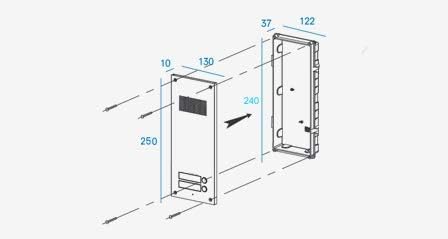
The DR-2UM is the outdoor unit, typically flush-mounted at the building entrance. It features two call buttons, one for each apartment, and an integrated speaker and microphone for two-way audio communication with visitors.

2.2. Household Handset (DP-SS)
The DP-SS is the indoor unit, designed for surface mounting within each apartment. It allows residents to communicate with visitors at the lobby unit and features a button to release an electric door strike (if connected).


3. Setup and Installation
Proper installation is crucial for the optimal performance of your intercom system. It is recommended that installation be performed by a qualified technician.
3.1. Important Considerations
- The lobby unit is not waterproof and should be installed in a sheltered location, protected from direct rain and moisture.
- Ensure all power is disconnected before beginning any wiring.
- Accessories such as electric door strike, power supply for electric door strike, and wiring cables are not included and must be purchased separately.
3.2. Lobby Unit (DR-2UM) Installation
The DR-2UM lobby unit is designed for flush mounting. Follow these steps for installation:
- Prepare the wall opening according to the dimensions provided in the specifications (refer to Figure 3.1).
- Run the necessary wiring from the power supply and to the handsets through the opening.
- Connect the wiring to the lobby unit terminals as per the wiring diagram (refer to Section 3.4).
- Secure the lobby unit into the prepared opening using appropriate fasteners.
3.3. Household Handset (DP-SS) Installation
The DP-SS handsets are designed for surface mounting indoors. Follow these steps:
- Choose a suitable indoor location for each handset.
- Mount the handset bracket securely to the wall using screws (refer to Figure 3.2).
- Run the wiring from the lobby unit and to the door strike (if applicable) to the handset location.
- Connect the wiring to the handset terminals as per the wiring diagram (refer to Section 3.4).
- Attach the handset to the mounted bracket.

3.4. Wiring Diagram
The system requires a 12V DC power source. The lobby unit powers the handsets. Ensure correct polarity and secure connections for all wiring.
- Lobby Unit (DR-2UM) Wiring: Requires 3 common wires plus an individual wire for each apartment.
- Household Handset (DP-SS) Wiring: Requires 6 wires in total. 4 wires connect to the door station, and 2 wires connect to the electric door lock (if used).
Refer to the wiring diagram on the back of the DP-SS handset (Figure 2.6) for detailed terminal connections.
4. Operating Instructions
4.1. From the Lobby Unit (DR-2UM)
- To Call an Apartment: A visitor presses the corresponding call button for the desired apartment.
- To Talk: Once the resident picks up the handset, two-way audio communication is established automatically.
4.2. From the Household Handset (DP-SS)
- To Answer a Call: When the lobby unit calls, the handset will ring. Pick up the handset to establish communication with the visitor.
- To Talk: Speak into the handset's microphone and listen through the earpiece.
- To Release Door: While communicating with a visitor, press the door release button on the handset to activate the connected electric door strike (door strike not included).
5. Maintenance
To ensure the longevity and proper functioning of your intercom system, follow these simple maintenance guidelines:
- Cleaning: Use a soft, dry cloth to clean the surfaces of the lobby unit and handsets. Avoid using abrasive cleaners, solvents, or excessive moisture.
- Environment: Ensure the lobby unit remains protected from direct water exposure. The system is designed for indoor use, except for the lobby unit which should be in a sheltered outdoor location.
- Connections: Periodically check all wiring connections to ensure they are secure and free from corrosion.
6. Troubleshooting
If you encounter issues with your intercom system, refer to the following common problems and solutions:
| Problem | Possible Cause | Solution |
|---|---|---|
| No power to system/handsets | Power supply unplugged or faulty; wiring issue. | Check if the power supply is securely plugged in. Verify the power outlet is functional. Inspect all power wiring connections. |
| No audio from lobby unit or handset | Loose wiring connections; faulty component. | Check all audio wiring connections between the lobby unit and handsets. Ensure handsets are properly seated. |
| Door release not working | Electric door strike not connected or faulty; wiring issue. | Verify the electric door strike is correctly installed and functional. Check the 2-wire connection from the handset to the door strike. Ensure the door strike has its own power supply if required. |
| Intermittent communication | Loose connections; interference. | Inspect all wiring for secure connections. Ensure wiring is not run too close to sources of electrical interference. |
If the problem persists after attempting these solutions, please contact customer support or a qualified technician.
7. Specifications
Detailed specifications for the Commax 2-Apartment Building Audio Intercom Set components:
| Feature | Lobby Unit (DR-2UM) | Room Station (DP-SS) |
|---|---|---|
| Model Number | DR-2UM | DP-SS |
| Power Source | DC12V, 500mA | DC12V (from door station) |
| Communication Ways | Synchronous Communication | Synchronous Communication |
| Wiring | Common 3 wires + individual 1 wire | 6 wires: 4 to door station, 2 to door lock |
| Compatible Room Unit | Commax Handset: DP-SS, DP-MSS, DP-TS, DP-KSS | N/A |
| Transmission Distance | Ø0.5mm/AWG24: 30m/90ft Ø0.65mm/AWG22: 50m/150ft Ø0.8mm/AWG20: 70m/210ft Ø1.0mm/AWG18: 100m/300ft | N/A |
| Operating Temperature | -10°C to +50°C | 0°C to +50°C |
| Dimensions (mm) | 142 x 250 x 50 | 70 x 210 x 80 (with handset) |
| Mount Type | Flush-mounted type | Surface mounted |
General Specifications:
- Brand: Commax
- Color: Silver
- Connectivity Technology: Wired
- Control Method: Touch
- Usage: Indoor use (handsets), Sheltered outdoor use (lobby unit)
- UPC: 730957987801
8. Warranty and Support
For warranty information, please refer to the documentation provided with your purchase or contact your retailer. Commax products typically come with a manufacturer's warranty covering defects in materials and workmanship.
For technical support, troubleshooting assistance beyond this manual, or to inquire about replacement parts, please contact Commax customer service or the authorized dealer from whom you purchased the product.


