
Introduction
This manual provides detailed instructions for the Smartby AKB73756542 replacement remote control, designed for use with various LG Smart TV models. Please read this guide thoroughly to ensure proper setup and operation of your new remote control.
Product Overview
The Smartby AKB73756542 remote control is a direct replacement for the original LG remote, offering full functionality without the need for programming. It features a standard button layout for intuitive control of your television.
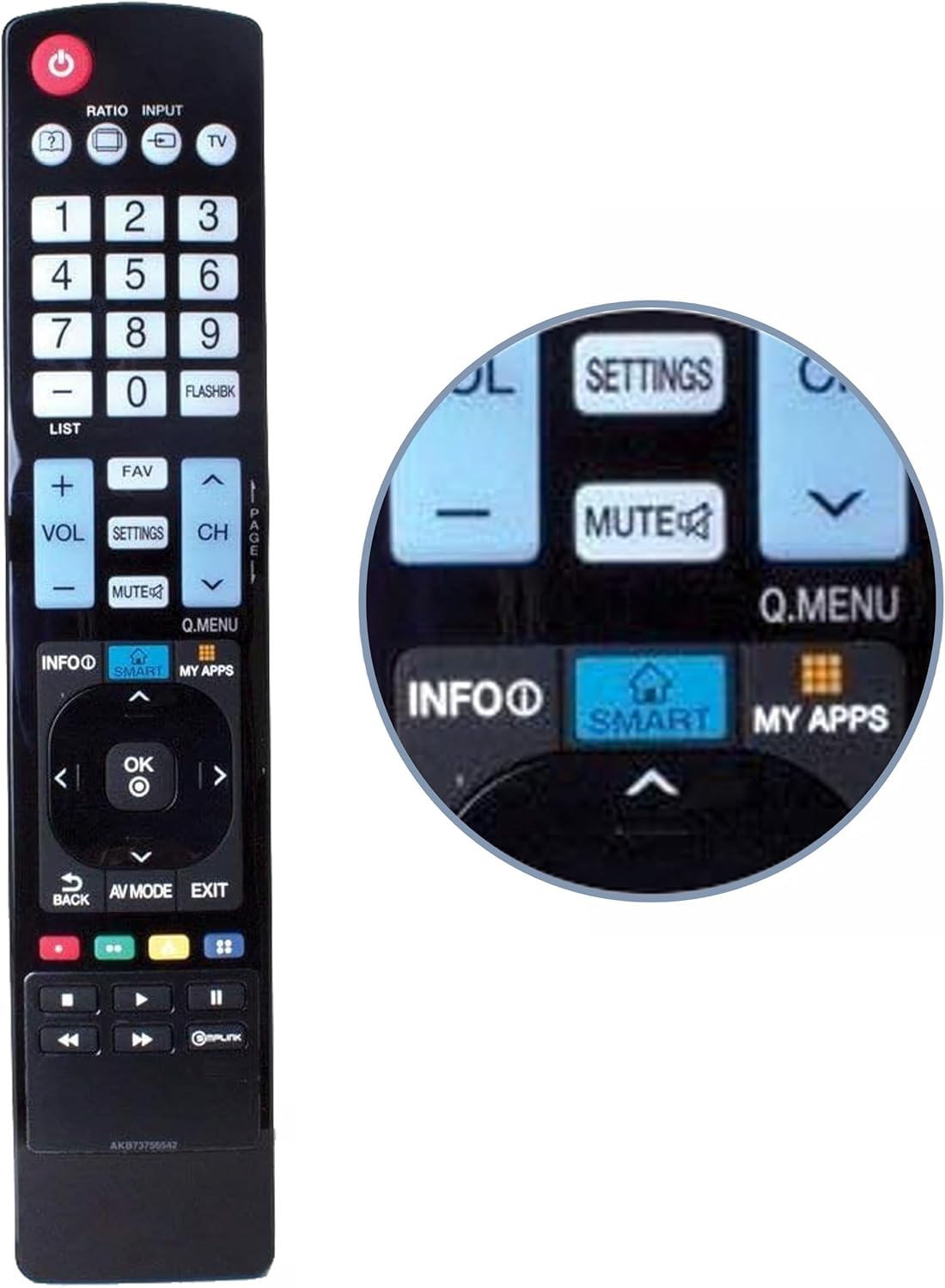
Figure 1: Front view of the Smartby AKB73756542 remote control. This image displays the full button layout, including power, input, number pad, volume, channel, navigation, and dedicated Smart TV function buttons. A magnified inset highlights the 'SMART' and 'MY APPS' buttons for quick access to smart features.

Figure 2: Front and back view of the remote control. This image shows both the button-side and the reverse side of the remote, illustrating its ergonomic design and the location of the battery compartment on the back.

Figure 3: Angled view of the remote control. This perspective provides a clear view of the button arrangement and the overall shape of the remote, emphasizing its user-friendly design.
Setup
Installing Batteries
The Smartby AKB73756542 remote control operates on two AAA batteries (not included). Follow these steps to install them:
- Locate the battery compartment on the back of the remote control.
- Slide the battery cover downwards or press the latch and lift to open.
- Insert two AAA batteries, ensuring the positive (+) and negative (-) terminals match the diagrams inside the compartment.
- Replace the battery cover by sliding it back into place until it clicks securely.
No programming is required. The remote is ready for use immediately after battery installation.
Operating Instructions
This remote control provides full functionality for compatible LG Smart TVs. Point the remote directly at your television when operating.
Key Functions
- Power (red button): Turns the TV on or off.
- Input: Selects the video input source (e.g., HDMI 1, AV).
- Number Pad (0-9): Directly enters channel numbers.
- VOL (+/-): Adjusts the volume level.
- CH (up/down): Changes TV channels.
- MUTE: Silences the TV audio.
- Navigation Buttons (Up, Down, Left, Right, OK): Navigates menus and confirms selections.
- SMART: Accesses the LG Smart TV home screen or smart features.
- MY APPS: Opens the applications menu.
- SETTINGS: Displays the TV's settings menu.
- BACK: Returns to the previous screen or menu.
- EXIT: Exits the current menu or application.
- Playback Controls (Play, Pause, Stop, Rewind, Fast Forward): Controls media playback.
Compatibility
This remote control (Part: AGF76692608) is compatible with a wide range of LG Smart TV models. A partial list of compatible models includes:
- 32LN5700
- 32LN570B
- 32LN5750
- 39LN5700
- 39LN5700-UH
- 39LN5700UH
- 39LN5750
- 42LN5700
- 42LN5700-UH
- 42LN5700UH
- 42LN5750
- 47LN5600
- 47LN5700
- 47LN5700-UH
- 47LN5700UH
- 47LN5710
- 47LN5710-UI
- 47LN5710UI
- 47LN5750
- 47LN5790
- 50LN5600
- 50LN5700
- 50LN5700-UH
- 50LN5700UH
- 50LN5710
- 50LN5750
- 55LN5600
- 55LN5600-UI
- 55LN5600UI
- 55LN5700
- 55LN5700-UH
- 55LN5700UH
- 55LN5710
- 55LN5710-UI
- 55LN5701UI
- 55LN5750
- 55LN5790
- 60LN5600
- 60LN5600-UB
- 60LN5600UB
- 60LN5700
- 60LN5710
- 60LN5710-UB
- 60LN5710UB
- 60LN5750
- 60LN6150
- 60LN6150-UB
- 60LN6150UB
This remote is also compatible with original LG remote control models AKB73615397, AKB73615303, AKB73615362, AKB73615302, AKB73756542, AKB73615361, and AKB73615362.
Maintenance
Battery Replacement
Replace batteries when the remote's response becomes sluggish or stops working. Always replace both batteries at the same time with new AAA batteries. Do not mix old and new batteries, or different types of batteries.
Cleaning
To clean the remote control, gently wipe its surface with a soft, dry cloth. For stubborn dirt, slightly dampen the cloth with water. Avoid using harsh chemicals, abrasive cleaners, or excessive moisture, as these can damage the remote.
Troubleshooting
Common Issues and Solutions
- Remote not responding:
- Ensure batteries are inserted correctly with the correct polarity.
- Replace old batteries with new ones.
- Check for any obstructions between the remote and the TV's infrared sensor.
- Ensure you are within the effective range and pointing the remote directly at the TV.
- Specific buttons not working:
- Clean the remote control surface, especially around the unresponsive buttons, to remove any dirt or debris.
- If the issue persists after replacing batteries and cleaning, the remote may require replacement.
Specifications
| Brand | Smartby |
| Model Number | AKB73756542 |
| Connectivity Technology | Infrared |
| Compatible Devices | Television |
| Max Number of Supported Devices | 1 |
| Special Feature | Ergonomic |
| Item Weight | 3.66 ounces |
| Package Dimensions | 10 x 2.8 x 0.9 inches |
| Date First Available | September 1, 2017 |
Warranty and Support
This product is typically backed by a 30-day return policy. For specific warranty details or support inquiries, please refer to your purchase documentation or contact the seller directly. Ensure to retain your proof of purchase for any warranty claims.