
Introduction
The Fujifilm XF80mmF2.8 R LM OIS WR Macro Lens is a mid-telephoto macro lens designed to deliver high-quality results with Fujifilm's X-Trans CMOS sensors. This lens features an optical construction of 16 elements in 12 groups, including one aspherical lens, one Super ED lens, and three ED lenses. It incorporates a floating focus system for precise macro shooting from close-up to distant subjects. With a focal length equivalent to 122mm (on a 35mm format) and a maximum aperture of F2.8, it offers 1.0X magnification, making it suitable for detailed macro photography of flowers and nature, as well as portraits with pleasing bokeh.

Figure 1: The Fujifilm XF80mmF2.8 R LM OIS WR Macro Lens. This image displays the lens from the front, showing the aperture ring, focus ring, and the lens barrel with its various markings.
What's in the Box
Verify that all the following items are included in your package:
- Fujifilm XF80mmF2.8 R LM OIS WR Lens
- Front Lens Cap
- Rear Lens Cap
- Lens Pouch
- Instruction Manual (this document)
Key Features
- High Resolving Power and Bokeh: Optical construction with 16 elements in 12 groups, including one aspherical, one Super ED, and three ED lenses, ensures sharp images and pleasing background blur.
- New AF System: Employs a floating focus system that divides the focus lens group into "front focus group" and "rear focus group" for accurate focusing across various shooting distances.
- Optical Image Stabilization (OIS): Features a 5-stop image stabilization system, suppressing angle and shift shake using a gyro sensor and an acceleration sensor.
- Weather and Dust Resistant: Designed for operation in temperatures down to -10°C (14°F) and includes a fluorine coating on the front element for added protection.
Setup
Attaching the Lens
- Ensure the camera is turned off.
- Remove the rear lens cap from the lens and the body cap from the camera.
- Align the mounting marks on the lens with the corresponding marks on the camera body.
- Mount the lens by rotating it clockwise until it clicks into place. Do not force the lens.
Attaching the Lens Hood
The lens hood helps to prevent stray light from entering the lens, reducing flare and ghosting, and also offers some physical protection to the front element.

Figure 2: The dedicated lens hood for the XF80mmF2.8 R LM OIS WR lens. This image shows the cylindrical shape of the hood, designed to block unwanted light.
- Align the red dot on the lens hood with the red dot on the front of the lens barrel.
- Rotate the hood clockwise until it locks securely into position.
Operating the Lens
Aperture Control
The lens features an aperture ring for direct control over the F-stop. Rotate the aperture ring to select your desired aperture value. For automatic aperture control, set the ring to the 'A' position.
Focusing
The XF80mmF2.8 R LM OIS WR lens supports both autofocus (AF) and manual focus (MF). The focus mode can be selected on your camera body.
- Autofocus: When the camera is set to AF, the lens will automatically focus on your subject. The linear motor ensures fast and quiet autofocus performance.
- Manual Focus: When the camera is set to MF, rotate the focus ring on the lens to adjust focus manually. Utilize your camera's focus peaking or magnification features for precise manual focusing.
Focus Limiter Switch
The lens is equipped with a focus limiter switch to optimize autofocus speed by restricting the focus range. This is particularly useful in macro photography.
- FULL: The lens will focus across its entire range (0.25m to infinity).
- 0.5m - ∞: Limits focus to subjects from 0.5 meters to infinity. Use this setting for non-macro subjects to speed up AF.
- 0.25m - 0.5m: Limits focus to subjects within the macro range of 0.25 meters to 0.5 meters. Use this for close-up macro shots.
Optical Image Stabilization (OIS)
The built-in OIS system helps to reduce camera shake, allowing for sharper images at slower shutter speeds, especially beneficial in low light or when shooting handheld macro. The OIS function is typically controlled via a switch on the camera body or through the camera's menu system.
Maintenance
Cleaning the Lens
- Use a blower brush to remove dust and loose particles from the lens surface.
- For smudges or fingerprints, use a clean, soft microfiber cloth specifically designed for optics. Apply a small amount of lens cleaning solution to the cloth, not directly to the lens.
- The front element features a fluorine coating, which repels water and dirt, making it easier to clean.
Storage
- Always attach the front and rear lens caps when the lens is not in use.
- Store the lens in a cool, dry place, away from direct sunlight and extreme temperatures.
- If storing for extended periods, consider using a dehumidifying cabinet or silica gel packets to prevent mold growth.
Weather Resistance
This lens is weather and dust resistant. While it is designed to withstand splashes and dust, it is not fully waterproof. Avoid submerging the lens in water or exposing it to heavy rain for prolonged periods. Ensure the lens is properly mounted to a weather-resistant camera body to maintain the system's overall resistance.
Troubleshooting
| Problem | Possible Cause | Solution |
|---|---|---|
| Lens not recognized by camera. | Improper mounting; dirty electrical contacts. | Re-mount the lens, ensuring it clicks into place. Clean the electrical contacts on both the lens and camera body with a clean, dry cloth. |
| Autofocus is slow or inaccurate. | Low light conditions; focus limiter set incorrectly; subject lacks contrast. | Ensure adequate lighting. Adjust the focus limiter switch to "FULL" or the appropriate range for your subject distance. Use manual focus if AF struggles. |
| Images are blurry. | Camera shake; incorrect focus; dirty lens element. | Ensure OIS is active (if shooting handheld). Verify focus point. Clean the lens elements. Use a faster shutter speed or tripod. |
| Lens hood does not attach securely. | Misalignment; debris in mounting groove. | Re-align the red dots and rotate firmly until it clicks. Check for any obstructions in the mounting mechanism. |
Specifications
| Feature | Detail |
|---|---|
| Brand | Fujifilm |
| Model Number | XF80mmF2.8 R LM OIS WR Lens |
| Focal Length | 80 mm (122mm equivalent on 35mm format) |
| Maximum Aperture | F2.8 |
| Lens Type | Macro, Telephoto |
| Compatible Mountings | Fujifilm X |
| Optical Construction | 16 elements in 12 groups (including 1 Aspherical, 1 Super ED, 3 ED lenses) |
| Magnification Factor | 1.0X |
| Image Stabilization | Optical Image Stabilization (OIS), 5-stop |
| Autofocus System | Floating Focus System with Linear Motor (LM) |
| Weather Resistance | Weather and Dust Resistant, -10°C (14°F) low-temperature operation, Fluorine coating |
| Product Dimensions | 8.2 x 6 x 6.4 inches |
| Item Weight | 2.6 pounds |
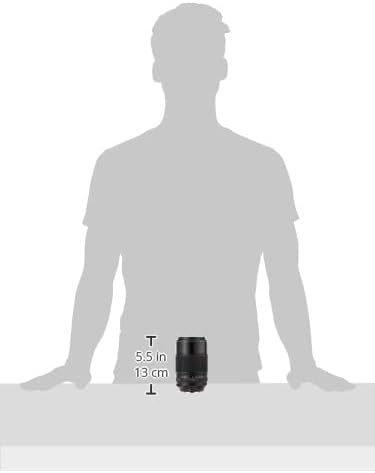
Figure 3: A size comparison image of the Fujifilm XF80mmF2.8 R LM OIS WR lens, indicating its approximate dimensions of 5.5 inches (13 cm) in height.
Warranty and Support
For information regarding the product warranty, please refer to the warranty card included with your purchase or visit the official Fujifilm website. For technical support, service, or inquiries about your Fujifilm XF80mmF2.8 R LM OIS WR Lens, please contact Fujifilm customer service or an authorized service center in your region. Contact details can typically be found on the Fujifilm website or in the documentation provided with your product.


