
Introduction
The JBL Boombox is a powerful, portable Bluetooth speaker designed to deliver monstrous sound and deep bass for up to 24 hours on a single charge. Its robust design is IPX7 waterproof, making it suitable for various environments, including poolside or beach parties. The speaker features a high-capacity 20,000mAh battery with dual USB charge-out ports for external devices and supports JBL Connect+ for linking with over 100 compatible speakers.
What's in the Box
- JBL Boombox Speaker
- Power Adaptor
- Quick Start Guide
Product Overview
Familiarize yourself with the main components and controls of your JBL Boombox.
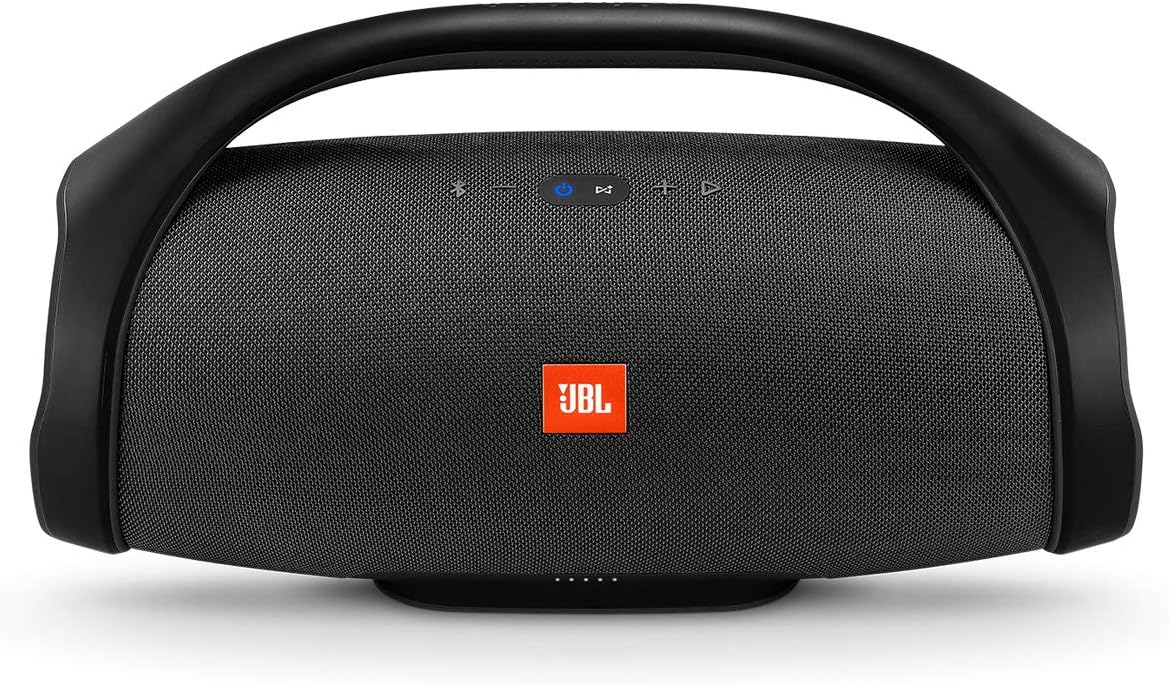
Front view of the JBL Boombox, highlighting the control panel and JBL logo.
Controls and Indicators
- Power Button: Turns the speaker on or off.
- Bluetooth Button: Initiates Bluetooth pairing mode.
- Volume Down (-): Decreases the audio volume.
- Volume Up (+): Increases the audio volume.
- Play/Pause Button: Controls audio playback (play, pause, skip tracks).
- JBL Connect+ Button: Connects to other JBL Connect+ enabled speakers.
- Battery Indicator LEDs: Displays the current battery level.
Rear view of the JBL Boombox, showing the sealed port compartment.
Ports
- Power Input: For connecting the power adaptor to charge the speaker.
- USB Ports (x2): For charging external devices.
- 3.5mm Audio Input: For wired audio connection.
Setup
Charging the Speaker
Before first use, fully charge your JBL Boombox. Connect the provided power adaptor to the speaker's power input and a wall outlet. A full charge takes approximately 6.5 hours. The battery indicator LEDs will show charging progress.
Powering On/Off
Press the Power button located on the top of the speaker to turn it on. Press and hold the Power button again to turn it off.
Operating Instructions
Bluetooth Pairing
- Turn on the JBL Boombox. The Bluetooth indicator will flash blue, indicating it's in pairing mode.
- On your mobile device, enable Bluetooth and search for available devices.
- Select "JBL Boombox" from the list. Once connected, the Bluetooth indicator will turn solid blue.
The speaker can connect to up to two smartphones or tablets simultaneously.
JBL Connect+
Amplify your listening experience by wirelessly connecting multiple JBL Connect+ enabled speakers. Press the JBL Connect+ button on all desired speakers to link them together. This allows for synchronized audio playback across all connected speakers.
Sound Modes
The JBL Boombox offers two sound modes to optimize audio for different environments:
- Indoor Mode: Provides deeper bass and richer sound, ideal for enclosed spaces.
- Outdoor Mode: Delivers expansive sound with strong bass and longer playtime, suitable for open-air environments.
Switch between modes using the dedicated button on the speaker.
Charging External Devices
Utilize the dual USB ports on the back of the speaker to charge your smartphones or tablets. Simply connect your device's charging cable to one of the USB ports on the JBL Boombox.
Maintenance
Cleaning
To clean your JBL Boombox, use a soft, damp cloth. Avoid using harsh chemicals or abrasive materials, as these can damage the speaker's finish or components. Ensure all ports are dry before charging or connecting devices.
Storage
When storing the speaker for extended periods, ensure it is fully charged and stored in a cool, dry place away from direct sunlight and extreme temperatures. Periodically recharge the battery to maintain its health.
Waterproofing (IPX7)

The JBL Boombox is designed to withstand splashes and submersion.
The JBL Boombox is IPX7 waterproof, meaning it can be submerged in water up to 1 meter (3 feet) for up to 30 minutes. Always ensure the protective flap covering the charging ports is securely closed before exposing the speaker to water. Do not charge the speaker if it or the ports are wet.
Troubleshooting
| Problem | Possible Solution |
|---|---|
| Speaker does not power on. | Ensure the battery is charged. Connect the power adaptor and try again. |
| Cannot connect via Bluetooth. | Make sure the speaker is in Bluetooth pairing mode (flashing blue light). Ensure Bluetooth is enabled on your device and it's within range. Try forgetting the device on your phone and re-pairing. |
| Poor sound quality or distortion. | Check the audio source and ensure the volume is not too high on either the speaker or the connected device. Move closer to the speaker to reduce interference. |
| External device not charging. | Ensure the JBL Boombox has sufficient battery charge. Verify the USB cable is properly connected to both the speaker and the device. |
Specifications

Physical dimensions of the JBL Boombox.
| Feature | Detail |
|---|---|
| Model Name | JBL Boombox - Black |
| Speaker Type | Portable Bluetooth Speakers |
| Special Features | Smartphone-Charging, Stereo Pairing, Waterproof |
| Recommended Uses | Music, Pool, Indoor |
| Compatible Devices | Phones, Smartphone, Tablet |
| Controller Type | Battery Powered |
| Color | Black |
| Battery Life | Up to 24 Hours |
| Product Dimensions | 7.9"D x 19.1"W x 10.1"H |
| Item Weight | 6.16 pounds (2.8 Kilograms) |
| Water Resistance Level | IPX7 Waterproof |
| Control Method | App, On-device buttons |
| Wireless Technology | Bluetooth 4.2 |
| Speaker Maximum Output Power | 60 Watts (when plugged in) |
| Charging Time | 6.5 hours |
Warranty and Support
The JBL Boombox comes with a full warranty. For detailed warranty information and support, please refer to the official JBL website or the included Quick Start Guide.
You can also download the comprehensive user guide in PDF format: JBL Boombox User Guide (PDF)
For more information about JBL products, visit the official JBL Store: JBL Brand Store


