
1. Introduction
This manual provides detailed instructions for the safe and efficient use of your Tenergy Modern Torchiere Floor Lamp. Please read this manual thoroughly before installation and operation, and retain it for future reference.
The Tenergy Torchiere Floor Lamp features a 30W LED light source providing 3000 lumens of warm white light, a convenient remote control, a touch-sensitive dimmer, and a 90° adjustable head for versatile lighting.
2. Safety Information
- Ensure the lamp is placed on a stable, flat surface to prevent tipping.
- Do not expose the lamp to water or moisture. This product is designed for indoor use only.
- Keep the power cord away from high-traffic areas to avoid tripping hazards.
- Use only the provided UL-certified adapter. Do not attempt to use other power adapters.
- Do not attempt to disassemble or modify the lamp. Refer all servicing to qualified personnel.
- Unplug the lamp from the power outlet before cleaning or when not in use for extended periods.
- The LED light source is non-replaceable. Do not attempt to replace the LEDs.
3. Package Contents
Verify that all components are present and in good condition upon opening the package:
- Tenergy Torchiere LED Floor Lamp (main body)
- Remote Control
- Power Adapter
- Assembly Hardware (screws, hex screwdriver)

Figure 3.1: Overview of Tenergy Torchiere LED Floor Lamp components.
4. Setup and Assembly
Follow these steps to assemble your Tenergy Torchiere Floor Lamp:
- Carefully unpack all components from the box.
- Connect the pole sections by screwing them together clockwise until secure.
- Attach the assembled pole to the heavy base, ensuring it is firmly tightened.
- Secure the light head to the top of the pole using the provided screws and hex screwdriver.
- Connect the power adapter to the lamp's power input and then plug it into a wall outlet.
Video 4.1: Assembly and feature overview of the Tenergy Torchiere LED Floor Lamp.
5. Operating Instructions
5.1 Power On/Off and Dimming (Touch Control)
The lamp features a touch-sensitive control on the pole:
- To Turn On/Off: A single tap on the touch sensor will toggle the lamp on or off.
- To Adjust Brightness: Hold down the touch sensor to gradually adjust the light brightness (stepless dimming). Release when the desired brightness is reached.
- Memory Function: The lamp will remember your last set brightness level even after being turned off.

Figure 5.1: Touch control and dimmer memory functionality.
5.2 Remote Control Operation
The included remote control provides convenient operation from a distance:
- Power Button: Press to turn the lamp on or off.
- Brightness Adjustment: Use the '+' and '-' buttons to increase or decrease the brightness.
- Preset Brightness Levels: The remote may include buttons for preset brightness levels (e.g., 25%, 50%, 75%, 100%).
- Magnetic Feature: The remote has a magnetic back, allowing it to be conveniently stored on metal surfaces like the lamp pole or a refrigerator.
- Range: The remote operates omnidirectionally up to 60 feet.
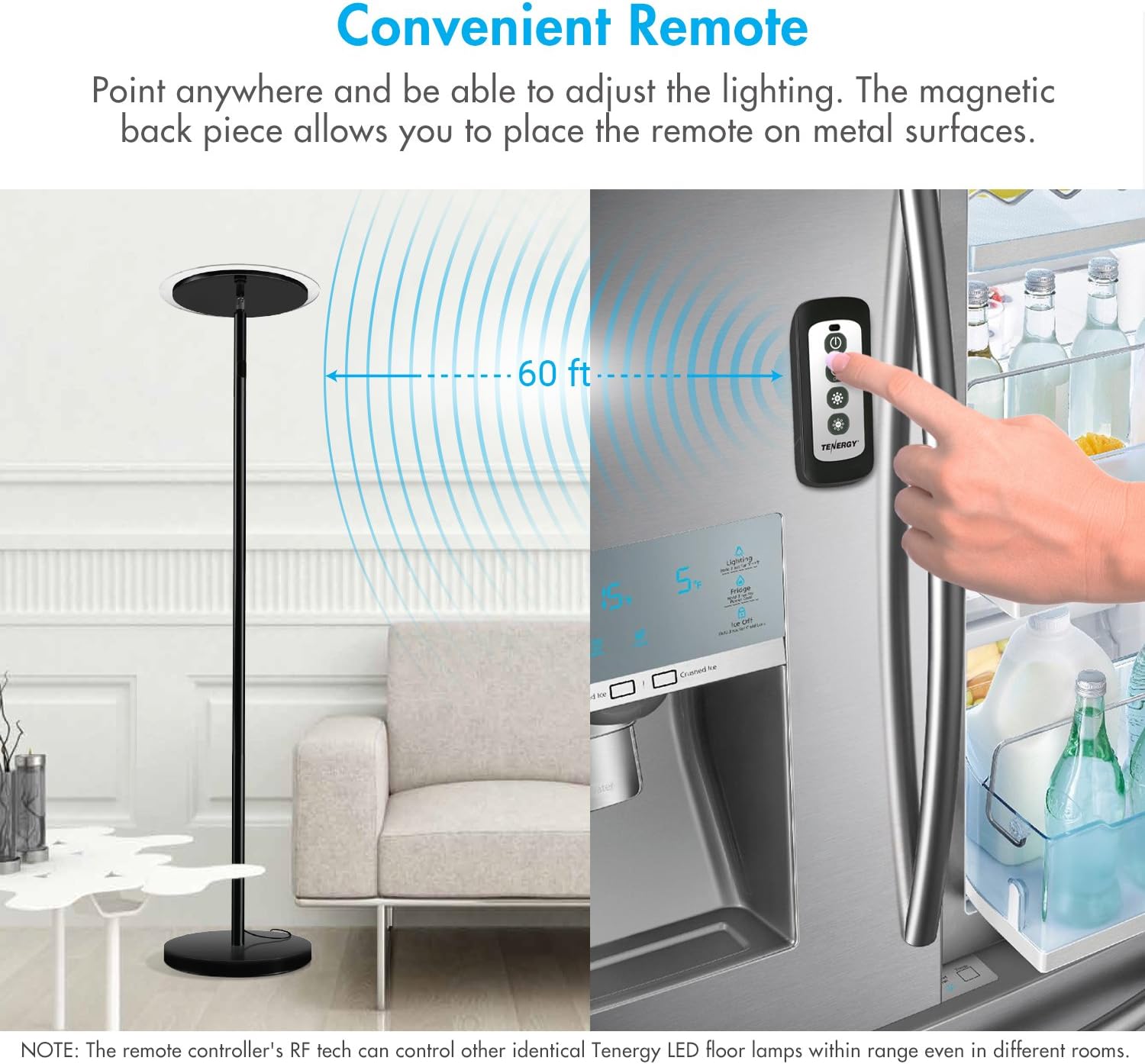
Figure 5.2: Remote control with magnetic feature and operational range.
5.3 Adjustable Head
The lamp head can be tilted up to 90° to direct light to specific areas or bounce it off walls or ceilings for ambient lighting.
- Gently adjust the lamp head to the desired angle.

Figure 5.3: Adjustable lamp head for directional lighting.
6. Maintenance
- Cleaning: Ensure the lamp is unplugged before cleaning. Use a soft, dry cloth to wipe down the lamp. Do not use abrasive cleaners or solvents.
- Dusting: Regularly dust the lamp head and glass diffuser to maintain optimal light output.
- Cord Care: Periodically inspect the power cord for any damage. If damaged, discontinue use and contact customer support.
7. Troubleshooting
- Lamp does not turn on:
- Ensure the power adapter is securely plugged into both the lamp and a working wall outlet.
- Check if the wall outlet is receiving power by plugging in another device.
- Verify the remote control battery is functional and correctly inserted.
- Remote control is not working:
- Ensure there are no obstructions between the remote and the lamp.
- Replace the remote control battery if necessary.
- Note: The remote uses RF technology and can control other identical Tenergy LED floor lamps within range, even in different rooms.
- Lamp turns on automatically after power outage:
- This is a known behavior for some units. If this is undesirable, unplug the lamp during power outages or when away for extended periods.
- Lamp is unstable:
- Ensure all pole sections are tightly screwed together and the pole is securely attached to the base.
- Place the lamp on a completely flat and level surface.
8. Specifications
| Feature | Specification |
|---|---|
| Model Number | 59117 |
| Light Source Type | LED |
| Wattage | 30 Watts |
| Brightness | 3000 Lumens |
| Color Temperature | 3000 Kelvin (Warm White) |
| Control Method | Remote, Touch |
| Adjustable Head | 90° Tiltable |
| Base Material | Metal |
| Finish Type | Matte |
| Product Dimensions | 850.8"D x 151.2"W x 720"H (Note: These dimensions appear unusually large and may be incorrect in the source data. Please refer to product packaging for accurate dimensions.) |
| Item Weight | 14.77 pounds |
| Certification | UL Certified Adapter |
| UPC | 844949029773 |
9. Warranty and Support
The Tenergy Torchiere Lamp is built to last up to 30,000 hours. Tenergy offers a 2-year extended warranty upon product registration and lifetime support from their customer service team.
For warranty registration or technical support, please refer to the contact information provided on the product packaging or the official Tenergy website.