
1. Introduction
The Santamedical PM-470 is a compact, portable, micro-computer controlled Transcutaneous Electrical Nerve Stimulation (TENS) device designed to provide temporary relief from muscle and nerve pain. It utilizes electrical pulses to stimulate nerves and muscles, which may help alleviate discomfort and promote relaxation. This manual provides essential information for the safe and effective use of your PM-470 TENS unit.
Key Features:
- Multi-Functional: Designed to help ease pain, reduce tiredness, promote blood circulation, and enhance sleep quality.
- Scientifically Designed: Incorporates body simulation, bionic, bio-electric, and intelligent microcomputer control technologies for effective muscle penetration.
- Adjustable Settings: Features 20 intensity levels and adjustable treatment times from 10 to 60 minutes.
- Pre-Programmed Modes: Includes 6 pre-programmed massage modes: Knocking, Kneading, Shiatsu, and Vibration, along with manual mode options.
- Rechargeable Battery: Equipped with an internal lithium battery for convenient, cordless operation.
2. Important Safety Information
Please read all safety warnings and instructions before using the Santamedical PM-470 TENS Unit. Improper use can lead to injury or adverse reactions.
General Warnings:
- Do Not Use: On the head, face, neck, or chest. Avoid placing electrodes near the heart or across the chest.
- Consult a Physician: If you have a pacemaker, heart condition, epilepsy, are pregnant, or have any other medical condition, consult your doctor before use.
- Skin Irritation: Discontinue use if skin irritation or redness occurs.
- Not for Children: Keep out of reach of children.
- Avoid Wet Environments: Do not use in the bath, shower, or in excessively humid conditions.
- Not a Substitute for Medical Care: This device is for temporary pain relief and is not intended to diagnose, treat, cure, or prevent any disease or health condition.
Legal Disclaimer: Statements regarding dietary supplements have not been evaluated by the FDA and are not intended to diagnose, treat, cure, or prevent any disease or health condition.
3. Package Contents
Verify that all items listed below are included in your Santamedical PM-470 package:
- Santamedical PM-470 TENS Unit (handheld controller)
- 4 Electrode Pads
- 2 Sets of Electrode Wires
- Wall Unit Charger
- USB Cable
- Pad and Wires Collector
- Operating Manual (this document)
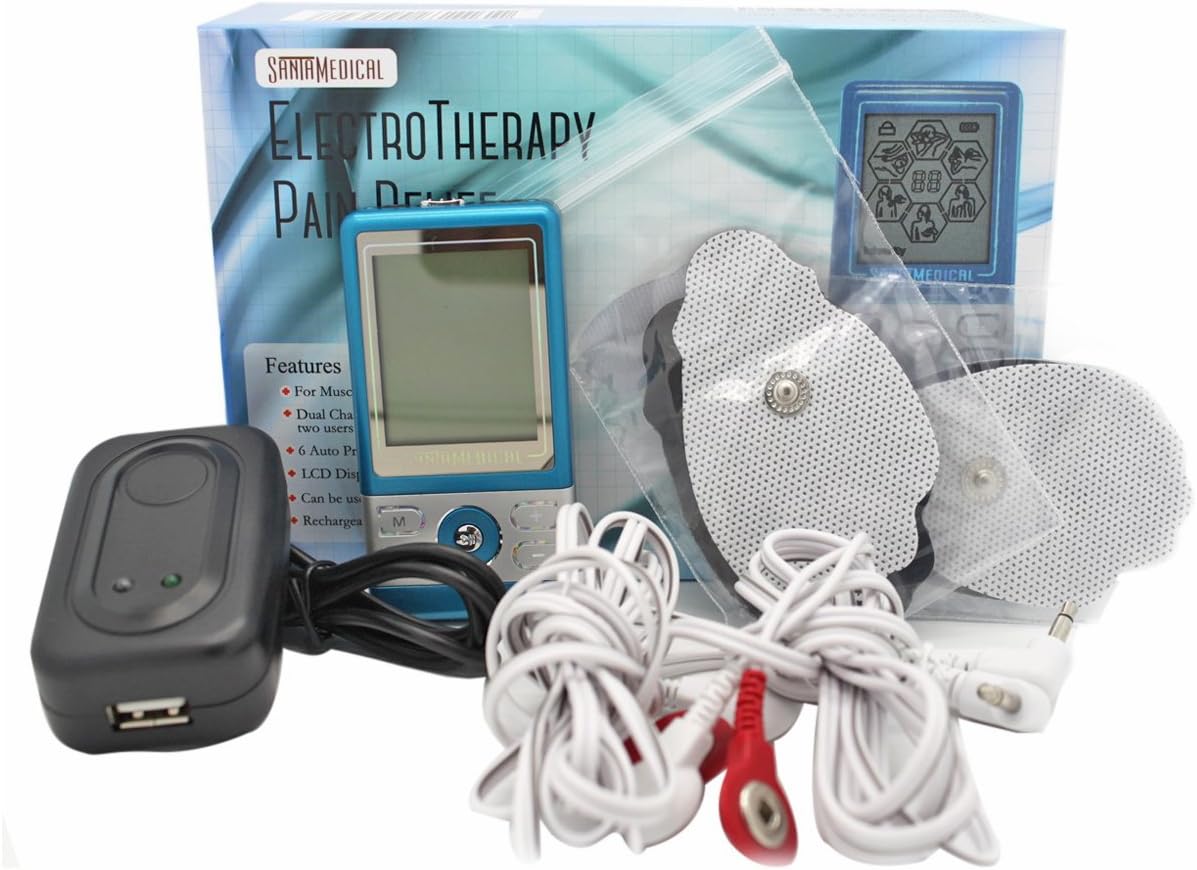
This image displays all items included in the Santamedical PM-470 TENS Unit package: the TENS unit, electrode pads, electrode wires, USB cable, wall charger, and pad/wires collector.
4. Device Overview
The Santamedical PM-470 TENS Unit features an intuitive design for ease of use. Familiarize yourself with the components and controls:
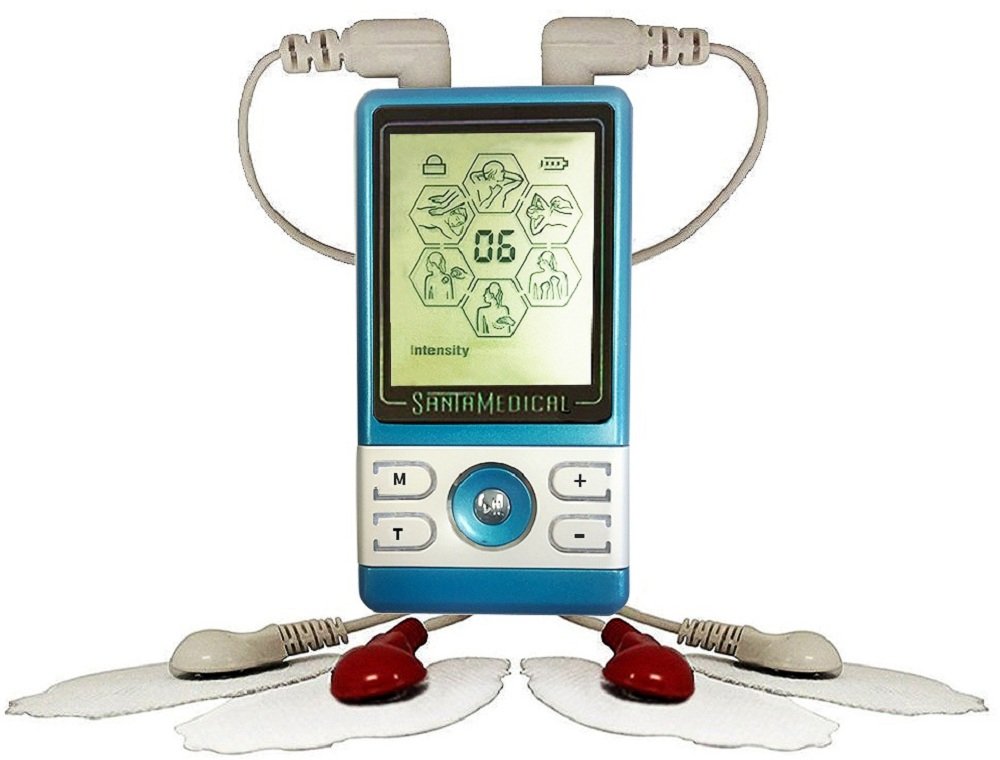
This image shows the front of the Santamedical PM-470 TENS Unit, highlighting its digital display, mode selection, intensity controls, and the Santamedical branding.
Controls and Display:
- Digital Display: Shows current mode, intensity level, and remaining treatment time.
- Power Button: Turns the device on or off.
- Mode (M) Button: Cycles through the 6 pre-programmed massage modes.
- Time (T) Button: Adjusts the treatment duration.
- Intensity Buttons (+/-): Increases or decreases the intensity of the electrical pulses.
5. Setup and Electrode Placement
Charging the Device:
- Connect the USB cable to the TENS unit and the wall charger.
- Plug the wall charger into a standard electrical outlet.
- The battery indicator on the display will show charging status. A full charge typically takes approximately 1 hour.
- Disconnect the charger once fully charged. The device can also be charged via a computer USB port.
Connecting Electrodes:
- Ensure the TENS unit is turned off before connecting or disconnecting electrodes.
- Insert the pin connectors of the electrode wires into the output jacks on the top of the TENS unit.
- Attach the snap connectors of the electrode wires to the electrode pads.

The Santamedical PM-470 TENS Unit is shown with its two output channels connected to four electrode pads, illustrating how the device is prepared for use.
Electrode Placement Guidelines:
Proper electrode placement is crucial for effective therapy. Always place pads on clean, dry, healthy skin. Avoid placing pads over open wounds, rashes, or irritated skin.
- Place pads on or around the area of pain.
- Ensure pads are at least one inch apart.
- For larger areas, use all four pads. For smaller areas, two pads may suffice.
- Avoid placing pads directly over joints that bend frequently, as this can cause them to detach.

This image provides visual examples of how to correctly place electrode pads on different body areas such as the buttocks, thighs, and back for effective TENS therapy.

This diagram illustrates different body parts where the Santamedical PM-470 TENS Unit can be applied for pain relief, including the back, shoulders, neck, arms, chest, and legs.
6. Operating Instructions
Starting a Session:
- Ensure the electrode pads are securely attached to your skin and the wires are connected to the unit.
- Press the Power Button to turn on the device. The screen will illuminate.
- Press the Mode (M) Button to cycle through the 6 available massage modes. Select the desired mode.
- Press the Time (T) Button to set the desired treatment duration. The default time is typically 10 minutes, adjustable up to 60 minutes.
- Gradually increase the intensity by pressing the '+' Button. Start with the lowest setting and increase slowly until you feel a comfortable, strong pulse. Avoid increasing intensity to an uncomfortable level.
- To decrease intensity, press the '-' Button.
Ending a Session:
- The device will automatically shut off once the set treatment time has elapsed.
- You can manually end a session by pressing the Power Button to turn off the device.
- After turning off the unit, carefully remove the electrode pads from your skin.
7. Care and Maintenance
Cleaning the Unit:
- Wipe the TENS unit with a soft, damp cloth. Do not use abrasive cleaners or immerse the unit in water.
- Ensure the unit is completely dry before storing.
Electrode Pad Care:
- After each use, place the electrode pads back onto the provided pad and wires collector or the plastic film they came with to preserve their adhesive quality.
- If pads lose their stickiness, gently wipe the adhesive surface with a damp cloth and allow to air dry. Replace pads when they no longer adhere well.
Storage:
- Store the TENS unit and accessories in a cool, dry place, away from direct sunlight and extreme temperatures.
- Keep the device and all components out of reach of children.
8. Troubleshooting
If you experience issues with your Santamedical PM-470, refer to the following common problems and solutions:
| Problem | Possible Cause | Solution |
|---|---|---|
| No sensation or weak pulse |
|
|
| Device does not turn on |
|
|
| Skin irritation under pads |
|
|
9. Technical Specifications
- Model Name: PM-470
- Power Source: Battery Powered (1 Lithium Ion battery, included)
- Charging Time: Approximately 1 Hour
- Intensity Levels: 20
- Pre-Programmed Modes: 6 (Knocking, Kneading, Shiatsu, Vibration, etc.)
- Adjustable Timer: 10-60 minutes
- Form Factor: Handheld Wand
- Water Resistance Level: Not Water Resistant
- Manufacturer: Santamedical
10. Support and Warranty
For technical support, warranty information, or any questions regarding your Santamedical PM-470 TENS Unit, please contact Santamedical customer service. Refer to the product packaging or the official Santamedical website for the most current contact details.
Please retain your proof of purchase for warranty claims.