
PROTEAR E8830
PROTEAR AM FM Radio Headphones
Model: E8830 | Brand: PROTEAR
1. Introduction
The PROTEAR AM FM Radio Headphones are designed to provide effective hearing protection while allowing users to listen to their favorite radio stations or external audio sources. Featuring a Noise Reduction Rating (NRR) of 25dB, these earmuffs help safeguard your hearing in noisy environments. The integrated digital AM/FM radio includes an LCD display, preset memory, and a powerful antenna for clear reception. Its comfortable, adjustable design ensures suitability for extended wear across various activities.

Image: PROTEAR AM FM Radio Headphones, black, with antenna extended and digital display showing time.
2. Safety Information
Always prioritize your safety when using hearing protection devices. Adhere to the following guidelines:
- Noise Reduction Rating (NRR): These earmuffs provide an NRR of 25dB, certified by ANSI S3.19. This rating indicates the average amount of noise reduction provided when worn correctly.
- Proper Fit: Ensure the earmuffs fit snugly over your ears to achieve the stated noise reduction. Any gaps can significantly reduce effectiveness.
- Battery Safety: Use only the specified battery type (2 AA batteries, not included). Do not mix old and new batteries, or different types of batteries. Dispose of used batteries responsibly.
- Environmental Use: While designed for noisy environments, these earmuffs should not be used in situations where the inability to hear critical sounds (e.g., alarms, warning shouts) could pose a danger.

Image: Chart illustrating typical noise levels for different activities and how the 25dB NRR of the headphones helps reduce harmful noise.
3. Package Contents
Verify that all items are present in your package:
- PROTEAR AM FM Radio Headphones (1 unit)
- 3.5mm AUX Audio Cable (1 unit)
Video: An overview of the PROTEAR AM/FM/MP3 Ear Muffs Hearing Protection Headphones, demonstrating the product and its included accessories.
4. Setup
4.1 Battery Installation
The headphones require two (2) AA batteries for operation (not included).
- Locate the battery compartment on the side of the right earcup.
- Gently open the battery compartment cover.
- Insert two AA batteries, ensuring correct polarity (+/-) as indicated inside the compartment.
- Close the battery compartment cover securely.

Image: Detailed view of the right earcup, highlighting the battery compartment and the 3.5mm auxiliary input port.
4.2 Adjusting Fit
For optimal comfort and noise reduction, adjust the headphones to fit your head properly.
- Headband Adjustment: Hold the earcups and slide the headband up or down to extend or retract the arms until the earcups comfortably cover your ears.
- Earcup Rotation: The earcups can rotate to conform to the shape of your head, ensuring a snug seal around your ears.

Image: Diagram showing the adjustable headband mechanism and the rotatable earcups, with dimensions for proper fit.
5. Operating Instructions
5.1 Power On/Off
To power the headphones on or off, use the dedicated switch located on the right earcup.
- Power On: Slide the ON/OFF switch to the 'ON' position. The LCD display will illuminate.
- Power Off: Slide the ON/OFF switch to the 'OFF' position. The LCD display will turn off.
5.2 Radio Tuning and Presets
The headphones feature digital AM/FM radio tuning with preset memory.
- Switching Bands: Press the 'AM/FM' button to toggle between AM and FM radio bands.
- Manual Tuning: Use the 'TUNE' knob to manually adjust the frequency.
- Auto Scan: Press and hold the 'TUNE' button to automatically scan for the next available station.
- Setting Presets: To save a station, tune to the desired frequency, then press and hold the 'SET' button until the preset number flashes. Use the 'TUNE' knob to select a preset number (1-8 for both AM and FM), then press 'SET' again to confirm.
- Recalling Presets: Briefly press the 'SET' button to cycle through your saved preset stations.

Image: Close-up of the earcup controls, showing the LCD digital display, AM/FM button, SET button, TUNE knob, and the large volume knob for easy operation.
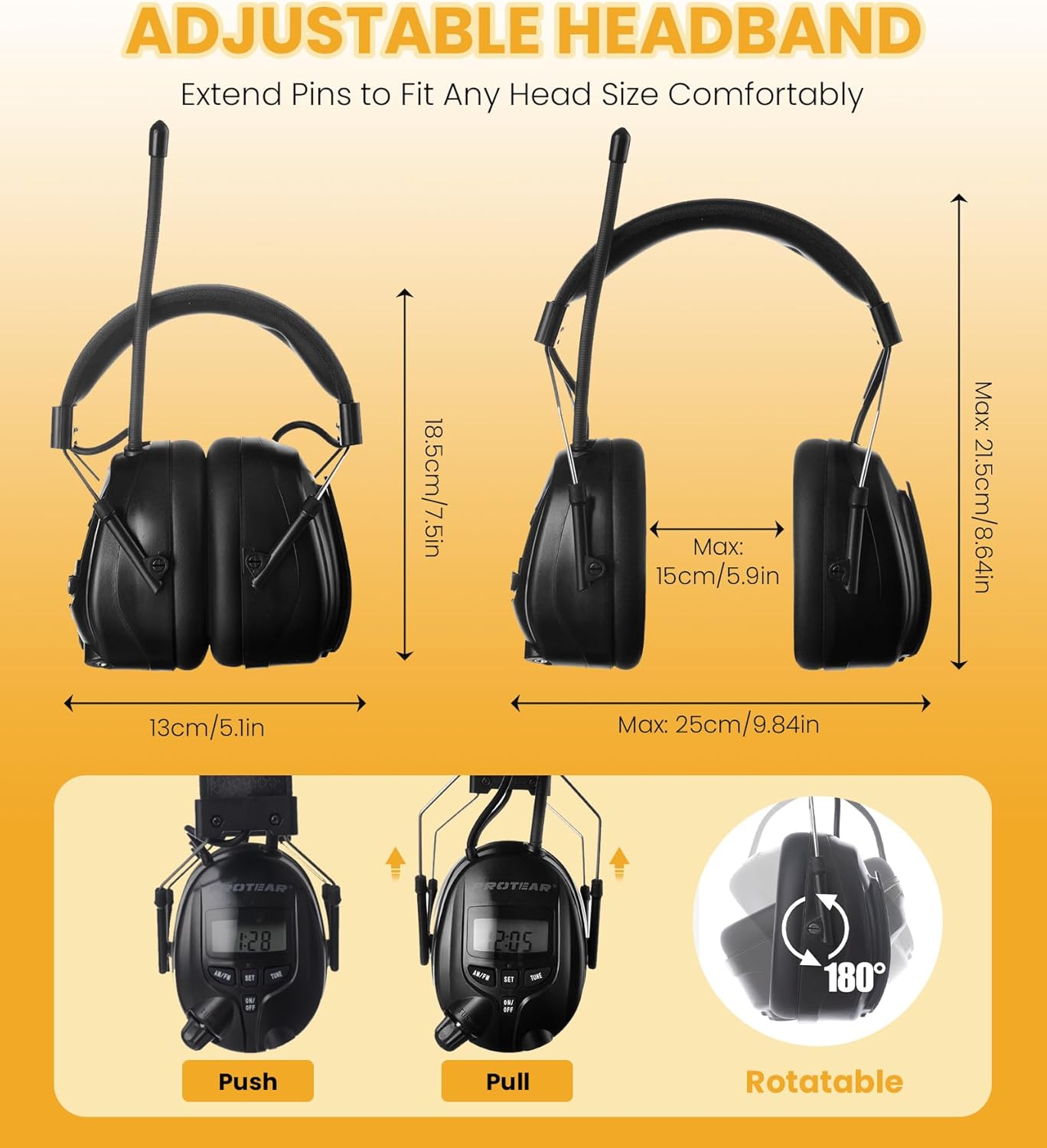
Image: Infographic highlighting key features such as AM (520-1710KHz) and FM (87.5-108MHz) frequency ranges, stereo sound, and a built-in microphone for hands-free calling.
5.3 Volume Control
Adjust the audio volume using the large volume knob located on the right earcup.
- Rotate the volume knob clockwise to increase volume.
- Rotate the volume knob counter-clockwise to decrease volume.
5.4 Auxiliary Input
Connect external audio devices (e.g., MP3 players, smartphones) using the included 3.5mm AUX cable.
- Plug one end of the 3.5mm AUX cable into the auxiliary input port on the right earcup.
- Plug the other end of the AUX cable into the headphone jack of your external audio device.
- Adjust the volume using the volume knob on the headphones and/or the volume controls on your external device.
6. Maintenance
Proper care will extend the life and performance of your PROTEAR headphones.
- Cleaning: Wipe the exterior surfaces with a soft, damp cloth. Do not use harsh chemicals or abrasive cleaners.
- Storage: Store the headphones in a cool, dry place when not in use. Avoid exposing them to extreme temperatures or direct sunlight.
- Moisture: Avoid water and moisture. These headphones are not waterproof.
- Ear Cushion Replacement: The snap-in design of the ear cushions allows for easy maintenance and replacement if needed.
7. Troubleshooting
If you encounter issues with your headphones, refer to the following common problems and solutions:
| Problem | Possible Cause | Solution |
|---|---|---|
| No power/Display off | Batteries are dead or incorrectly inserted. | Replace batteries with new AA batteries, ensuring correct polarity. |
| Poor radio reception | Weak signal or antenna position. | Extend the antenna fully and adjust its position. Try moving to an area with better signal. |
| No audio from AUX input | Cable not fully inserted or external device volume too low. | Ensure the AUX cable is securely connected to both devices. Increase volume on both the headphones and the external device. |
| Sound distortion | Volume too high or weak radio signal. | Decrease volume. For radio, try tuning to a stronger station or adjusting antenna. |
8. Specifications
| Feature | Detail |
|---|---|
| Model | E8830 |
| Noise Reduction Rating (NRR) | 25dB (ANSI S3.19 Certified) |
| Radio Bands | AM/FM Digital Tuning |
| Power Source | 2 x AA Batteries (not included) |
| Auxiliary Input | 3.5mm Jack |
| Manufacturer | PROTEAR |
| Dimensions (Package) | 7.52 x 5.79 x 4.21 inches |
| Weight | 14.11 ounces |
| Fabric Type | ABS |
9. Warranty and Support
PROTEAR stands behind the quality of its products.
- Warranty: This product comes with a one-year warranty against manufacturing defects. Please retain your proof of purchase.
- After-Sales Service: For any questions, concerns, or support needs, please contact PROTEAR customer service. They aim to answer your questions within 24 hours.

Image: Certifications (CE, RoHS, ANSI) and details on the one-year warranty and responsive after-sales service provided by PROTEAR.
Ask a question about this manual
Ask about setup, troubleshooting, compatibility, parts, safety, or missing instructions. Manuals+ will review the question and use this page’s manual context to help answer it.