Introduction
Thank you for purchasing the PIONEER TS-G1330F 13cm 3-Way Coaxial Speakers. This manual provides essential information for the proper installation, operation, and maintenance of your new car audio speakers. Please read this manual thoroughly before installation and retain it for future reference.
Safety Information
Always observe the following safety precautions to prevent injury or damage to the product and vehicle.
- Professional Installation Recommended: For optimal performance and safety, professional installation by a qualified technician is highly recommended.
- Disconnect Battery: Before starting any electrical work, disconnect the negative terminal of your vehicle's battery to prevent short circuits and electrical hazards.
- Proper Wiring: Ensure all wiring is correctly connected according to the vehicle's electrical system and speaker polarity. Incorrect wiring can damage the speakers or your car's audio system.
- Secure Mounting: Mount the speakers securely to prevent them from becoming loose during vehicle operation, which could cause injury or damage.
- Avoid Obstruction: Do not install speakers in locations that obstruct the driver's view or interfere with the operation of safety devices like airbags.
- Volume Control: Prolonged exposure to high volume levels can cause hearing damage. Adjust the volume to a safe and comfortable level.
Package Contents
Verify that all items are present in the package:
- 2 x PIONEER TS-G1330F 13cm 3-Way Coaxial Speakers
- 2 x Speaker Grills
- Mounting Screws (quantity may vary)
- Speaker Cables (quantity may vary)
Features
- Power Handling: 250 Watts Max (35 Watts Nominal)
- Cone Material: IMPP (Injection Molded Polypropylene) Composite Cone for enhanced durability and bass response.
- Frequency Response: 33 - 24,000 Hz, providing a wide range of audio reproduction.
- Midrange Size: 30 mm
- Tweeter Size: 10 mm
- Speaker Type: 3-Way Coaxial design for clear separation of highs, mids, and lows.
- Included: Supplied as a pair and with protective grills.
Specifications
| Specification | Value |
|---|---|
| Model | TS-G1330F |
| Speaker Type | Coaxial, 3-Way |
| Speaker Size | 13 cm (5.12 Inches) |
| Maximum Output Power | 250 Watts |
| Nominal Output Power | 35 Watts |
| Frequency Response | 33 - 24,000 Hz |
| Lowest Resonance Frequency | 101 Hz |
| Cut-out Hole Diameter | 121 mm |
| Mounting Depth | 44 mm |
| Item Weight | 0.97 Kilograms (per speaker) |
| Included Components | 2 Speakers |
| Special Feature | Bass Boost |
| Connectivity Technology | Coaxial |
Setup and Installation
Careful installation is crucial for optimal sound quality and speaker longevity. If you are unsure about any step, consult a professional installer.
1. Before Installation
- Vehicle Compatibility: Ensure the speakers are compatible with your vehicle's speaker openings and mounting depth. The TS-G1330F requires a 121 mm cut-out hole and 44 mm mounting depth.
- Tools Required: Gather necessary tools such as screwdrivers, wire strippers, crimping tools, and a drill (if new holes are needed).
- Disconnect Power: Always disconnect the negative terminal of your car battery before beginning any electrical work.
2. Mounting the Speakers
- Remove Existing Speakers: Carefully remove the factory speakers from their mounting locations.
- Prepare Mounting Location: If necessary, enlarge the speaker opening to the required 121 mm diameter. Ensure there is sufficient depth (44 mm) for the speaker magnet.
- Connect Wiring: Connect the speaker wires from your car's audio system to the terminals on the PIONEER speakers. Pay close attention to polarity (positive to positive, negative to negative) to ensure correct phase and sound reproduction.
- Secure Speakers: Place the speaker into the opening and align the mounting holes. Use the provided screws to securely fasten the speaker to the vehicle's panel. Do not overtighten.
- Install Grills: If desired, attach the speaker grills over the installed speakers for protection.

Image: Front view of the PIONEER TS-G1330F speaker without its protective grille, showing the cone and tweeter assembly.

Image: Front view of the PIONEER TS-G1330F speaker with its protective grille installed, providing a finished look.
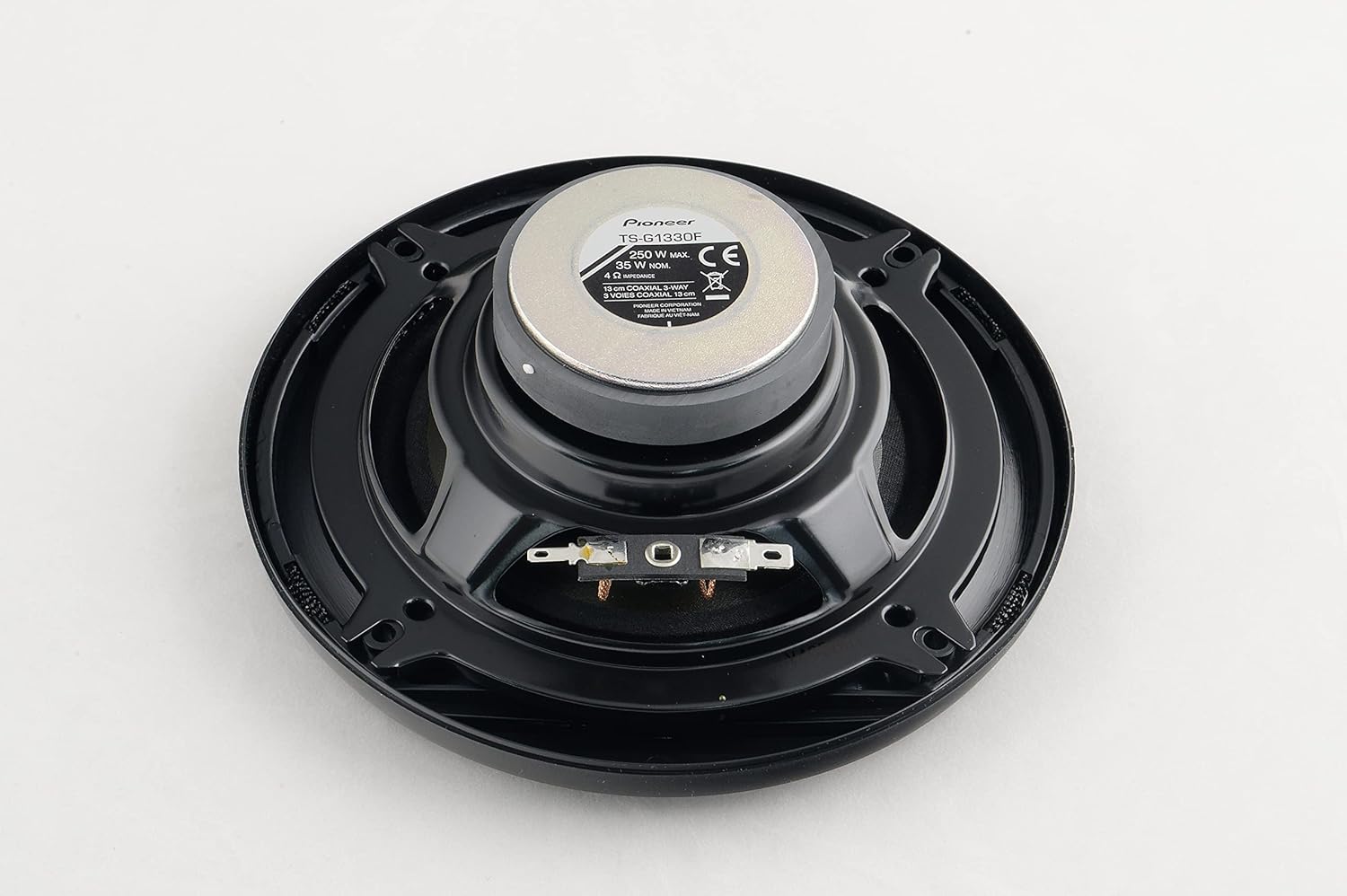
Image: Rear view of the PIONEER TS-G1330F speaker, showing the magnet structure and wiring terminals.
3. Final Steps
- Reconnect Battery: Once all speakers are securely installed and wired, reconnect the negative terminal of your car battery.
- Test System: Turn on your car's audio system and test the speakers at a low volume. Gradually increase the volume to ensure proper function and sound quality.
Operation
The PIONEER TS-G1330F speakers are designed to work with your car's existing head unit or aftermarket car stereo. Once installed, their operation is controlled directly by your audio source.
- Audio Source: Play audio from your car stereo (radio, CD, USB, Bluetooth, etc.).
- Volume Control: Adjust the volume using your head unit's controls.
- Tone Adjustments: Utilize your head unit's equalizer, bass, treble, and balance/fader controls to fine-tune the sound to your preference.
- Break-in Period: Allow a short break-in period (typically 10-20 hours of normal use) for the speaker components to loosen up and achieve their optimal sound performance.
Maintenance
Your PIONEER TS-G1330F speakers require minimal maintenance to ensure long-lasting performance.
- Cleaning: Gently wipe the speaker grills and surrounds with a soft, dry cloth to remove dust. Avoid using harsh chemicals or abrasive cleaners.
- Avoid Moisture: While the speakers are designed for car environments, avoid direct exposure to excessive moisture or liquids.
- Inspect Connections: Periodically check the wiring connections to ensure they remain secure.
Troubleshooting
If you encounter issues with your speakers, refer to the following common problems and solutions:
| Problem | Possible Cause | Solution |
|---|---|---|
| No sound from speakers | Loose or incorrect wiring; Head unit off or muted; Blown fuse in head unit or vehicle. | Check all wiring connections for security and correct polarity; Ensure head unit is on and not muted; Check vehicle and head unit fuses. |
| Distorted or poor sound quality | Incorrect wiring polarity; Over-driving speakers (volume too high); Damaged speaker; Poor audio source. | Verify correct wiring polarity; Reduce volume; Test with a different audio source; Inspect speakers for physical damage. |
| One speaker not working | Loose connection to that speaker; Balance/fader setting on head unit; Damaged speaker. | Check wiring for the specific speaker; Adjust balance/fader settings on head unit; Swap speakers to determine if the issue is with the speaker or wiring. |
| Buzzing or humming noise | Ground loop issue; Interference from other electrical components; Loose wiring. | Ensure proper grounding of head unit and amplifier (if applicable); Check for loose wiring; Consider installing a ground loop isolator. |
If the problem persists after attempting these solutions, please contact PIONEER customer support or a qualified car audio technician.
Warranty and Support
PIONEER products are manufactured to high-quality standards. For information regarding warranty coverage, terms, and conditions, please refer to the warranty card included with your purchase or visit the official PIONEER website. For technical support or service inquiries, please contact PIONEER customer service through their official channels.


