
1. Product Overview
The Schumacher DSR117 ProSeries Rapid auto battery tender charger is an essential tool designed to keep your vehicle's 12V lithium battery charged and ready. This versatile charger is compatible with 12V standard, AGM, and gel batteries, making it suitable for a wide range of cars, trucks, and SUVs. It ensures optimal battery performance with its rapid 10-amp charging capability and microprocessor-controlled multi-stage charging.
Key features include:
- Fully Automatic Charging: Delivers a rapid 10 amp charge with microprocessor-controlled multi-stage charging to optimize battery health and longevity.
- Service Mode: Can maintain batteries at a stable 13.6 volts during extended service or showroom display periods, preventing discharge.
- Enhanced Safety Features: Includes reverse hook-up protection to prevent damage from incorrect connections and clear LED indicators for charging status and battery condition.
- Versatile Compatibility & Convenience: Designed for 12V standard, AGM, and gel batteries. Features a simple start/stop interface, hook attachment for safe hanging, and compact dimensions for easy storage and handling.

Figure 1: Schumacher DSR117 ProSeries 10A 12V Battery Charger.
2. What's Included
The Schumacher DSR117 DSR Pro Series 10A 12V Battery Charger package includes:
- Schumacher DSR117 DSR Pro Series 10A 12V Battery Charger unit
- Color-coded clamps (red for positive, black for negative)
- 120V AC plug
- User manual (this document)
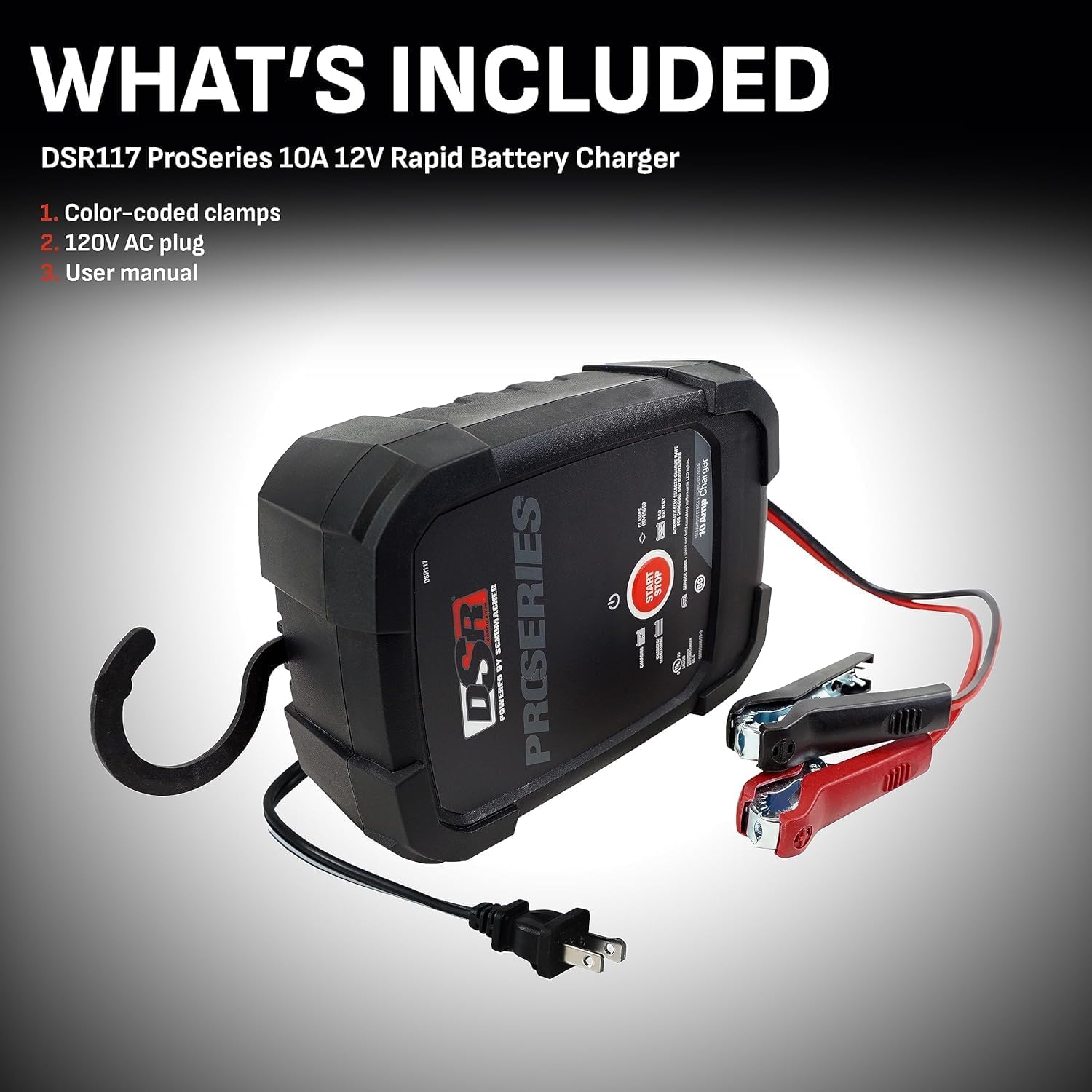
Figure 2: Included components: the DSR117 charger, color-coded battery clamps, and AC power cord.
3. Setup and Initial Use
Follow these steps for safe and effective setup of your DSR117 charger:
- Prepare the Vehicle: Turn off all vehicle accessories to prevent electrical surges or damage.
- Connect to Battery:
- Connect the positive (red) clamp to the positive (+) battery post.
- Connect the negative (black) clamp to the vehicle chassis or engine block, away from the battery.
- Connect to Power: Plug the DSR117's AC power cord into a standard 120V AC outlet. The green Power LED will illuminate.
- Start Charging: Press the Start/Stop button on the charger to begin the charging process.

Figure 3: Quick guide for connecting the DSR117 charger to a vehicle battery.
4. Operating Instructions
The DSR117 features microprocessor-controlled charging, automatically adjusting the amperage rate to optimize battery health. It supports 12V standard, AGM, and gel batteries.
4.1. Charging Process
Once connected and started, the charger will automatically detect the battery type and condition, then initiate the appropriate multi-stage charging cycle. LED indicators on the unit will show the charging status.
4.2. Service Mode
The DSR117 includes a 13.6-volt service mode. This mode is designed to maintain a stable voltage for batteries during extended service periods or when a vehicle is on showroom display. This prevents battery discharge while accessories are in use or during prolonged inactivity.

Figure 4: The DSR117 charger featuring its Service Mode capability, maintaining a stable 13.6V.
4.3. Disconnecting the Charger
When charging is complete, or if you need to disconnect the charger:
- Unplug the AC power cord from the outlet.
- Remove the negative (black) clamp from the vehicle chassis or engine block.
- Remove the positive (red) clamp from the battery post.
5. Maintenance
To ensure the longevity and optimal performance of your Schumacher DSR117 battery charger, follow these general maintenance guidelines:
- Cleaning: Regularly wipe down the charger's exterior with a dry cloth to remove dust and grime. Do not use harsh chemicals or abrasive cleaners.
- Cable Inspection: Periodically inspect the AC power cord and battery clamps for any signs of damage, fraying, or corrosion. Replace if necessary.
- Storage: Store the charger in a cool, dry place when not in use. Ensure cables are neatly coiled and not kinked.
- Ventilation: Ensure the charger's ventilation openings are clear of obstructions during operation to prevent overheating.
No user-serviceable parts are inside the unit. Refer all servicing to qualified service personnel.
6. Troubleshooting
If you encounter issues with your DSR117 battery charger, consider the following common troubleshooting steps:
- Charger Not Turning On: Ensure the AC power cord is securely plugged into a live outlet. Check the outlet with another device to confirm it has power.
- No Charging Indication: Verify that the battery clamps are correctly connected to the battery terminals (positive to positive, negative to chassis). The DSR117 has reverse hook-up protection, which will prevent operation if connections are incorrect.
- Slow Charging: Ensure the battery type selected (if applicable, though DSR117 is automatic) matches the battery being charged. Check for excessive corrosion on battery terminals, which can impede charging.
- Overheating: Ensure the charger is placed in a well-ventilated area and its vents are not blocked.
For persistent issues or complex problems, please contact Schumacher Electric customer support.
7. Specifications
| Feature | Detail |
|---|---|
| Brand | Schumacher |
| Model Number | DSR117 |
| Product Dimensions | 9.5" x 8.13" x 3" (24.13 cm x 20.65 cm x 7.62 cm) |
| Item Weight | 2.35 pounds (1.07 kg) |
| Output Voltage | 12 Volts |
| Charging Amperage | 10 Amp |
| Battery Compatibility | 12V Standard, AGM, Gel batteries |
| First Available | August 28, 2017 |
8. Warranty and Support
Schumacher Electric stands behind its products. For any product questions, feedback, or support, please refer to the following information:
- Safety Information: For use as directed only.
- Directions: Please refer to the product label for instructions for use.
- Customer Support Phone: 1-800-621-5485
- Customer Support Email: info@schumacherelectric.com
- Online Store: Visit the Schumacher Electric Store

Figure 5: Contact information for Schumacher Electric Customer Support.