
1. Introduction
Thank you for choosing the Intelbras RC 5003 FRS Radio Communicator. This device is designed for reliable and clear communication, suitable for various applications. This manual provides essential information for the proper setup, operation, and maintenance of your radio communicators. Please read it thoroughly before use.
2. Safety Information
- Do not immerse the device in water or expose it to excessive moisture.
- Do not attempt to open or modify the radio communicator. Repairs should only be performed by authorized personnel.
- Use only Intelbras approved batteries and charging accessories.
- Keep the device away from extreme temperatures and direct sunlight.
- Dispose of batteries according to local regulations.
- Avoid using the radio communicator while driving or operating heavy machinery to prevent distractions.
3. Package Contents
Please check the package for the following items:
- 3 x Intelbras RC 5003 Radio Communicators
- 3 x Power Adapters
- 3 x USB Cables
- 3 x Belt Clips
- 3 x Earphones
- 1 x User Manual (this document)
4. Product Overview
Familiarize yourself with the main components of your Intelbras RC 5003 radio communicator.
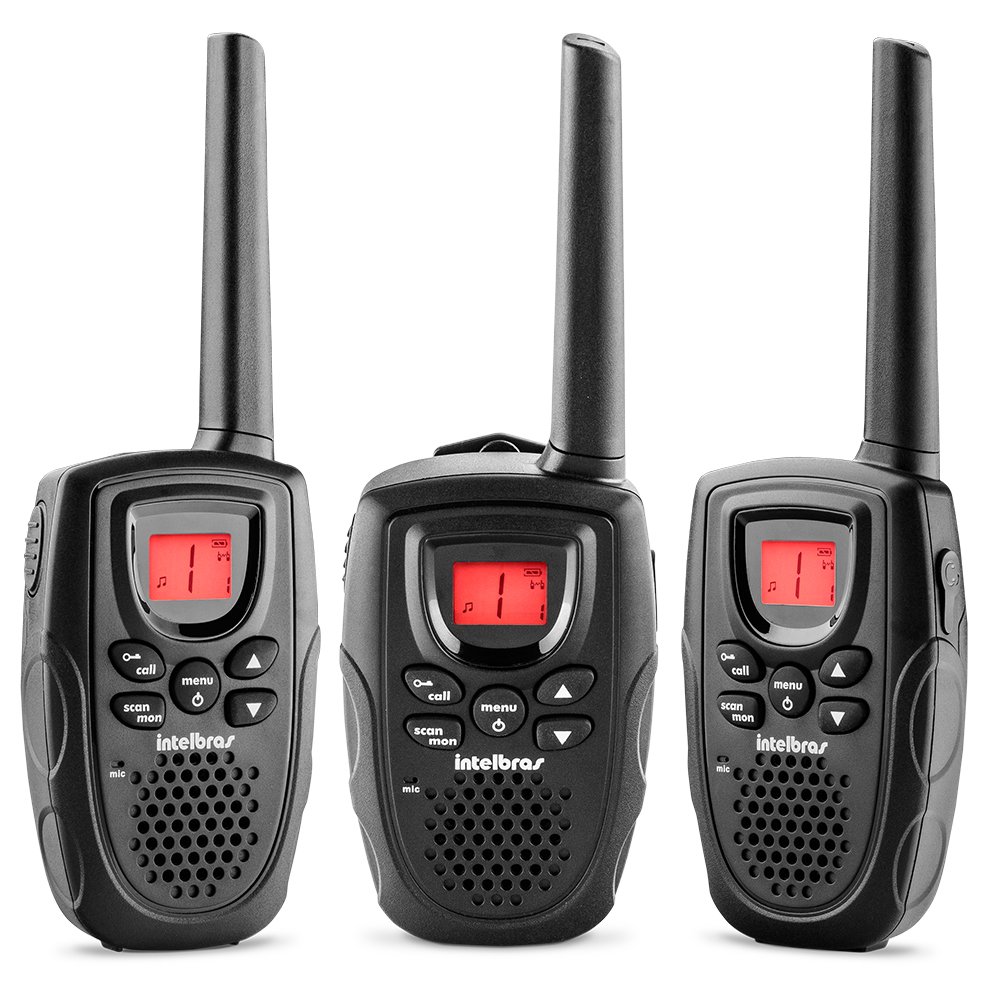
Figure 1: Front view of the Intelbras RC 5003 Radio Communicator, showing the display, speaker, microphone, and main control buttons.
Key Components:
- Antenna: For transmitting and receiving signals.
- Speaker: Outputs received audio.
- Luminous Display: Shows channel, battery level, and other status indicators.
- Power/Volume Knob: Turns the unit on/off and adjusts volume.
- Channel Up/Down Buttons: Selects operating channels.
- PTT (Push-to-Talk) Button: Press and hold to transmit, release to listen.
- Menu Button: Accesses settings and features.
- USB Charging Port: For connecting the USB cable for charging.
5. Setup
5.1. Battery Installation
The Intelbras RC 5003 comes with rechargeable batteries pre-installed. If you need to replace them, ensure the radio is off, open the battery compartment cover on the back, insert the new batteries according to the polarity markings, and close the cover securely.
5.2. Charging the Batteries
Before initial use, fully charge the radio communicator's batteries.
- Connect the USB cable to the charging port on the radio communicator.
- Connect the other end of the USB cable to the provided power adapter.
- Plug the power adapter into a standard electrical outlet.
- The display will indicate charging status. A full charge takes approximately 6 hours.
- Disconnect the charger once charging is complete.
6. Operating Instructions
6.1. Power On/Off and Volume Adjustment
- To Power On: Rotate the Power/Volume knob clockwise until you hear a click.
- To Power Off: Rotate the Power/Volume knob counter-clockwise until you hear a click.
- To Adjust Volume: Rotate the Power/Volume knob clockwise to increase volume and counter-clockwise to decrease volume.
6.2. Channel Selection
The RC 5003 operates on 26 channels within the frequency range of 462.5625 MHz to 467.7125 MHz.
- Press the Menu button to enter channel selection mode.
- Use the Channel Up/Down buttons to select your desired channel (1-26).
- Press the PTT button or wait a few seconds for the selection to be confirmed.
- Ensure all radios in your group are set to the same channel for communication.
6.3. Transmitting and Receiving
- To Transmit: Press and hold the PTT button. Speak clearly into the microphone. Release the PTT button to finish transmitting.
- To Receive: Ensure the PTT button is not pressed. The radio will automatically receive transmissions on the selected channel.
6.4. VOX Function (Voice Operated Exchange)
The VOX function allows hands-free transmission by detecting your voice.
- Press the Menu button repeatedly until the VOX setting appears on the display.
- Use the Channel Up/Down buttons to select a sensitivity level (1-3, where 3 is most sensitive).
- Press the PTT button or wait to confirm the setting.
- When VOX is active, the radio will transmit automatically when you speak.
6.5. Call Tones
The RC 5003 offers 10 different call tones to alert other users.
- Press the Menu button repeatedly until the Call Tone setting appears.
- Use the Channel Up/Down buttons to cycle through the 10 available tones.
- Press the PTT button or wait to confirm your selection.
- To send a call tone, briefly press the Call button (if available, or refer to specific button mapping in your device).
6.6. Battery Level Indicator
The luminous display includes an indicator for the current battery level. Recharge the device when the indicator shows low battery to ensure uninterrupted communication.
7. Maintenance
7.1. Cleaning
- Wipe the radio communicator with a soft, damp cloth.
- Do not use harsh chemicals or abrasive cleaners.
- Ensure the device is dry before charging or storing.
7.2. Storage
- Store the device in a cool, dry place when not in use.
- For long-term storage, ensure batteries are partially charged (around 50%) to prolong their lifespan.
8. Troubleshooting
| Problem | Possible Cause | Solution |
|---|---|---|
| Radio does not power on. | Low or depleted battery. | Charge the battery for at least 6 hours. |
| Cannot transmit or receive. | Incorrect channel selected. | Ensure all radios are on the same channel. |
| Out of range. | Move closer to the other radio communicator. | |
| Poor audio quality. | Low battery. | Recharge the battery. |
| Obstructions or interference. | Move to an open area or away from sources of interference. | |
| VOX not activating. | VOX sensitivity too low. | Increase VOX sensitivity level (1-3). |
9. Specifications
- Model: RC 5003
- Channels: 26
- Frequency Range: 462.5625 MHz to 467.7125 MHz
- Call Tones: 10
- VOX Function: Yes, with 3 sensitivity levels
- Display: Luminous
- Battery Indicator: Yes
- Charging: USB cable, approximately 6 hours for full charge
- Dimensions (H x W x D): 19.6 x 6.65 x 2.7 cm (approximate)
- Weight: 300 g (approximate)
- Power Source: Rechargeable batteries (included)
10. Warranty and Support
For warranty information, technical support, or service inquiries, please refer to the warranty card included with your product or visit the official Intelbras website. Keep your proof of purchase for warranty claims.
Intelbras Official Website: www.intelbras.com.br


