
1. Introduction
Thank you for choosing the Multilaser TC190 2.4 GHz Wireless Keyboard with Integrated Touchpad. This device is designed to provide a convenient and efficient input solution for your PC or Smart TV, combining a full keyboard with a multi-touch touchpad. This manual will guide you through the setup, operation, and maintenance of your new keyboard to ensure optimal performance and longevity.
2. Safety Information
- Keep the device away from water, moisture, and extreme temperatures.
- Do not attempt to disassemble or repair the device yourself. Refer all servicing to qualified personnel.
- Use only specified batteries (if applicable) and dispose of them properly.
- Avoid dropping or subjecting the device to strong impacts.
- Clean the device with a soft, dry cloth. Do not use liquid cleaners or aerosols.
3. Package Contents
Please check the package contents carefully. If any items are missing or damaged, contact your retailer.
- Multilaser TC190 Wireless Keyboard with Integrated Touchpad
- USB 2.4 GHz Receiver
- User Manual
- (Batteries may or may not be included depending on the region/retailer)
4. Product Overview
Familiarize yourself with the components of your Multilaser TC190 keyboard.
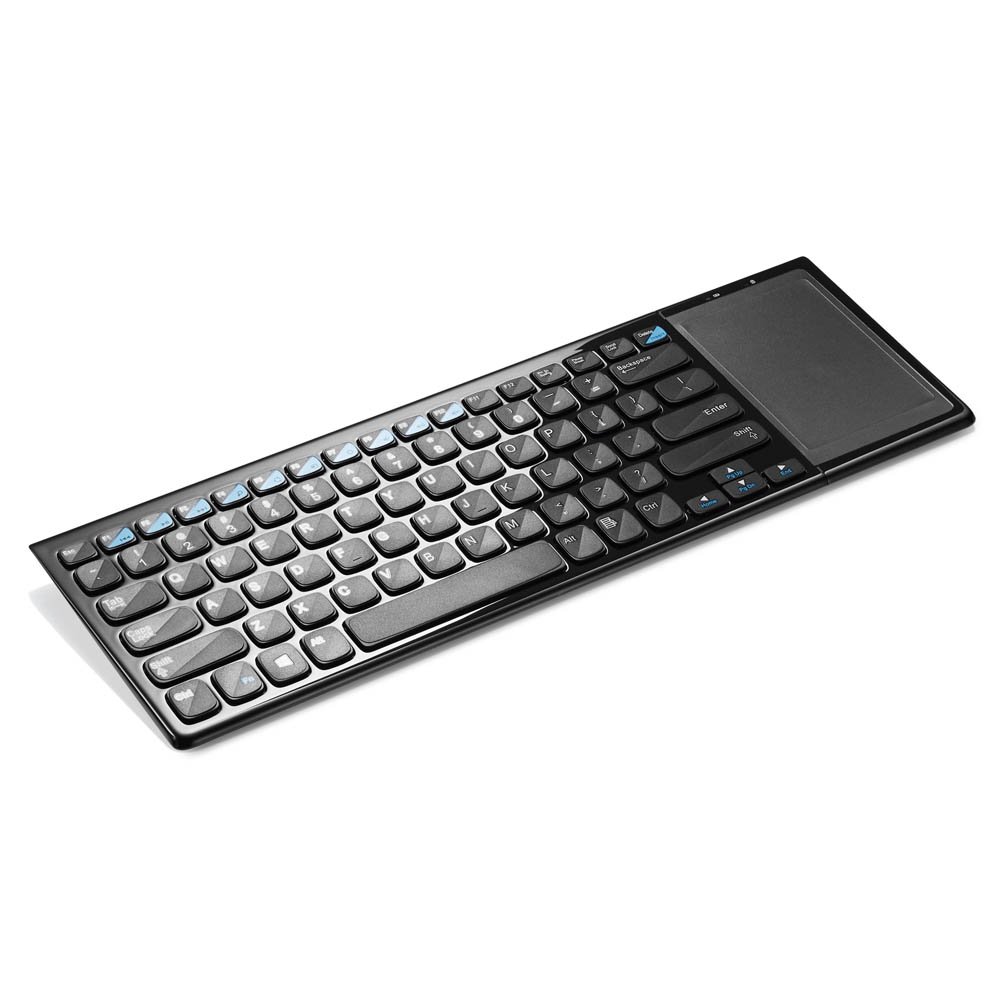
Figure 1: Multilaser TC190 Wireless Keyboard with Integrated Touchpad. This image shows the full keyboard layout with the touchpad located on the right side, indicating its compact design and integrated functionality.
- Keyboard Layout: Standard QWERTY layout with multimedia function keys.
- Integrated Touchpad: Located on the right side, supporting multi-touch gestures.
- USB Receiver Compartment: Usually located in the battery compartment for storage.
- Power Switch: On/Off switch to conserve battery life.
- Battery Compartment: For inserting required batteries.
5. Setup
- Install Batteries: Open the battery compartment cover on the back of the keyboard. Insert the required batteries (typically AAA, refer to the compartment for exact type and polarity). Close the cover securely.
- Connect USB Receiver: Locate the USB 2.4 GHz receiver, usually stored inside the battery compartment. Plug the USB receiver into an available USB port on your PC or Smart TV.
- Power On: Slide the power switch on the keyboard to the "ON" position.
- Automatic Connection: The keyboard should automatically connect to your device within a few seconds. No additional drivers are typically required for most operating systems.
6. Operating Instructions
6.1. Keyboard Functions
The Multilaser TC190 features a standard keyboard layout. Use the keys as you would with any conventional keyboard for typing text, navigating menus, and executing commands.
- Function Keys (Fn): Some keys may have secondary functions (e.g., volume control, media playback) accessible by pressing the Fn key simultaneously with the desired function key.
- Multimedia Keys: Dedicated multimedia keys (if present) allow quick access to media controls.
6.2. Touchpad Functions
The integrated multi-touch touchpad replaces a traditional mouse. Below are common gestures:
- Single Finger Tap: Left-click.
- Two Finger Tap: Right-click.
- Single Finger Drag: Move the cursor.
- Two Finger Scroll: Scroll up or down in documents and web pages.
- Pinch to Zoom: Use two fingers to zoom in or out (application dependent).
7. Maintenance
- Cleaning: Use a soft, lint-free cloth to wipe the keyboard and touchpad. For stubborn dirt, slightly dampen the cloth with water or a mild, non-abrasive cleaner. Ensure no liquid enters the device.
- Battery Replacement: When the keyboard's performance degrades or it stops responding, replace the batteries. Always use fresh batteries of the correct type.
- Storage: If storing the keyboard for an extended period, remove the batteries to prevent leakage. Store in a cool, dry place.
8. Troubleshooting
| Problem | Possible Solution |
|---|---|
| Keyboard is unresponsive. |
|
| Touchpad is not working correctly. |
|
| Connection issues / Lag. |
|
9. Specifications
| Feature | Detail |
|---|---|
| Brand | Multilaser |
| Model | TC190 |
| Connectivity | 2.4 GHz Wireless (USB Receiver) |
| Compatible Devices | PC, Smart TV |
| Keyboard Description | Multimedia |
| Special Features | Wireless, Integrated Multi-touch Touchpad |
| Power Source | Battery Powered |
| Item Weight | 800 Grams |
10. Warranty and Support
Multilaser products are manufactured to high-quality standards. For information regarding warranty terms and conditions, please refer to the warranty card included with your product or visit the official Multilaser website. For technical support or customer service, please contact Multilaser customer support through their official channels.
Official Website: www.multilaser.com.br (Please check for your regional website)