
ECONTROLLY NS-RC03A-13
ECONTROLLY NS-RC03A-13 / NS-RC02A-12 Replacement Remote Control User Manual
For Insignia LED LCD TVs
1. Introduction
This user manual provides detailed instructions for the ECONTROLLY NS-RC03A-13 and NS-RC02A-12 replacement remote control. This remote is designed to function as a direct replacement for original Insignia TV remotes, offering seamless operation without the need for programming.
1.1. Compatible Insignia TV Models
This remote control is compatible with a wide range of Insignia LED LCD TV models, including but not limited to:
- NS-19E320A13, NS-22E340A13, NS-24E340A13, NS-24L240A13
- NS-32D120A13, NS-32E320A13, NS-32E320A13A, NS-32E321A13, NS-32E440A13, NS-32L120A13, NS-32L121A13, NS-32L240A13
- NS-39D240A13, NS-39E340A13, NS-39E480A13, NS-39L240A13
- NS-40L240A13, NS-40L240A13A
- NS-42D240A13, NS-42E440A13, NS-42E470A13, NS-42E480A13, NS-42L260A13
- NS-46E340A13, NS-46E480A13, NS-46E480A13A, NS-46E481A13, NS-46L240A13
- NS-50L240A13
- NS-55E480A13, NS-55E480A13A, NS-55L260A13, NS-55L260A13A
- NS-65D260A13
- Other compatible models include NS-RC6NA-14, RC-201-0A, NS-RC05A-11.
2. Safety Information
- Do not expose the remote control to direct sunlight, heat sources, or extreme temperatures.
- Avoid dropping the remote control or subjecting it to strong impacts.
- Do not immerse the remote control in water or any other liquid.
- Keep batteries out of reach of children. If swallowed, seek immediate medical attention.
- Dispose of used batteries according to local regulations. Do not incinerate batteries.
3. Setup
3.1. Battery Installation
The remote control requires two (2) AAA batteries (not included) for operation. No programming or pairing is required; simply install the batteries to begin use.
- Locate the battery compartment cover on the back of the remote control.
- Press down on the tab and slide the cover downwards to open the compartment.
- Insert two new 1.5V AAA alkaline batteries, ensuring the positive (+) and negative (-) terminals match the markings inside the compartment.
- Slide the battery compartment cover back into place until it clicks securely.

Image: Back of the remote control with the battery compartment open, illustrating correct battery placement.
Once batteries are installed, the remote is ready for immediate use with your compatible Insignia TV.
4. Operating Instructions
This section describes the functions of the buttons on your ECONTROLLY replacement remote control.
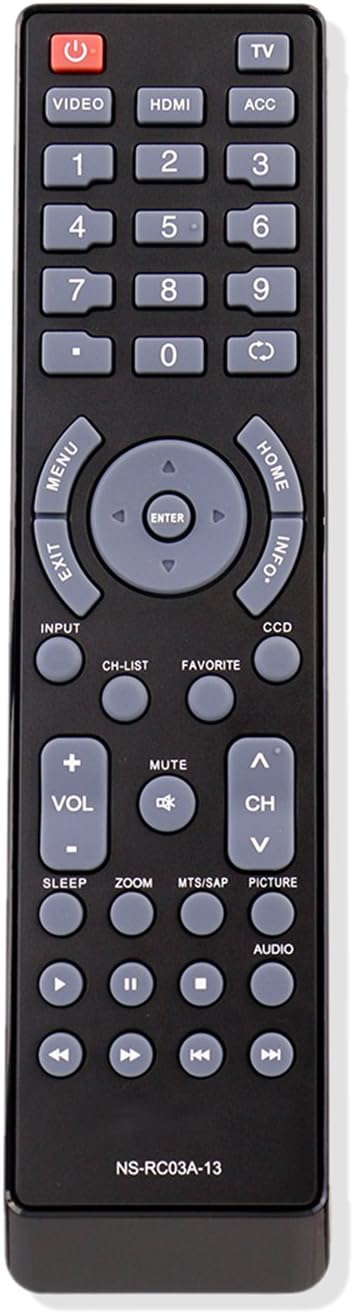
Image: Front view of the remote control, displaying all functional buttons.
4.1. Button Functions
| Button | Function |
|---|---|
| POWER (Red) | Turns the TV on or off. |
| TV | Switches to TV mode. |
| VIDEO | Selects video input source. |
| HDMI | Selects HDMI input source. |
| ACC | Accesses accessory functions (if applicable). |
| 0-9 (Number Buttons) | Direct channel selection. |
| MENU | Opens the TV's main menu. |
| EXIT | Exits the current menu or on-screen display. |
| HOME | Accesses the TV's home screen or smart features. |
| INFO | Displays program information. |
| Navigation (Up/Down/Left/Right/ENTER) | Navigates through menus and confirms selections. |
| INPUT | Cycles through available input sources. |
| CH-LIST | Displays the channel list. |
| FAVORITE | Accesses favorite channels. |
| CCD | Activates Closed Captioning. |
| VOL +/- | Adjusts the volume level. |
| CH ^/v | Changes the channel up or down. |
| MUTE | Mutes or unmutes the TV audio. |
| SLEEP | Sets the sleep timer. |
| ZOOM | Adjusts the screen zoom level. |
| MTS/SAP | Selects Multi-channel Television Sound (MTS) or Secondary Audio Program (SAP). |
| PICTURE | Accesses picture settings. |
| AUDIO | Accesses audio settings. |
| Playback Controls (Rewind, Play/Pause, Fast Forward, Previous, Stop, Next) | Controls media playback (e.g., for connected DVD players or USB media). |
5. Maintenance
5.1. Cleaning the Remote Control
To maintain the remote control's appearance and functionality:
- Wipe the surface with a soft, dry cloth.
- For stubborn dirt, lightly dampen the cloth with water or a mild, non-abrasive cleaner.
- Do not use harsh chemicals, solvents, or abrasive cleaning pads.
5.2. Battery Replacement
Replace batteries when the remote control's response becomes sluggish or stops functioning. Refer to Section 3.1 for battery installation instructions. Always replace both batteries at the same time with new ones of the same type (AAA alkaline).
6. Troubleshooting
If you experience issues with your remote control, refer to the following table for common problems and solutions.
| Problem | Possible Cause | Solution |
|---|---|---|
| Remote not responding. | Dead or incorrectly installed batteries. | Replace batteries with new AAA alkaline batteries, ensuring correct polarity. |
| Remote has short range. | Weak batteries; obstruction between remote and TV. | Replace batteries. Ensure a clear line of sight to the TV's IR receiver. |
| Certain buttons not working. | Button stuck or internal issue; TV model incompatibility for specific functions. | Check if the button is physically stuck. While this remote is broadly compatible, some specific TV models might have unique functions not mapped to standard buttons. |
| TV not responding to remote. | TV's IR sensor blocked or faulty; remote's IR emitter faulty. | Ensure TV's IR sensor is clear. Test the remote by pointing it at a smartphone camera; you should see a light flash from the remote's emitter when a button is pressed. If not, the remote may be faulty. |
7. Specifications
| Feature | Detail |
|---|---|
| Model Numbers | NS-RC03A-13, NS-RC02A-12 (Replacement) |
| Brand | ECONTROLLY |
| Compatibility | Various Insignia LED LCD TVs |
| Power Source | 2 x AAA Batteries (not included) |
| Control Type | Infrared (IR) |
| Operating Distance | Approximately 8-10 meters (26-33 feet) |
| Material | ABS Environmental Protection Material |
| Dimensions | 5 x 1 x 0.2 inches (approximate) |
| Item Weight | 1 ounce (without batteries) |
8. Warranty and Support
ECONTROLLY products are designed for reliability and performance. For specific warranty information or technical support, please refer to the product packaging or contact your retailer. Keep your purchase receipt as proof of purchase for any warranty claims.
For general inquiries or assistance, please visit the ECONTROLLY brand page on Amazon or contact customer service through your purchase platform.
Related documentsNS-RC03A-13

Ask a question about this manual
Ask about setup, troubleshooting, compatibility, parts, safety, or missing instructions. Manuals+ will review the question and use this page’s manual context to help answer it.