
Benetech GM605
Benetech GM605 Wood Moisture Tester
Model: GM605
User Instruction Manual
1. Introduction
The Benetech GM605 is a DC resistance (probe type) wood moisture tester designed for accurate measurement of moisture content. It offers selection among four wood types and an 'other' material type, making it widely applicable for testing moisture in wood, bamboo products, paper articles, and traditional Chinese medicinal materials, particularly those with wood fiber construction.

Image: Front view of the Benetech GM605 Wood Moisture Tester, showing its LCD display and control buttons.
2. Product Features
- Selection among 4 types of wood and other material for precise measurements.
- Reading lock function to hold the displayed value.
- Review of maximum moisture reading.
- Review of minimum moisture reading.
- Battery volume alert to indicate low power.
- Large, non-parallax LCD with legible display for easy reading.
- Automatic and manual power-off options to conserve battery life.
- Measuring range: 0% to 41% moisture content.
- Operating temperature range: -10℃ to 40℃.
- Operating humidity range: 20%RH to 90%RH.
3. Components and Controls
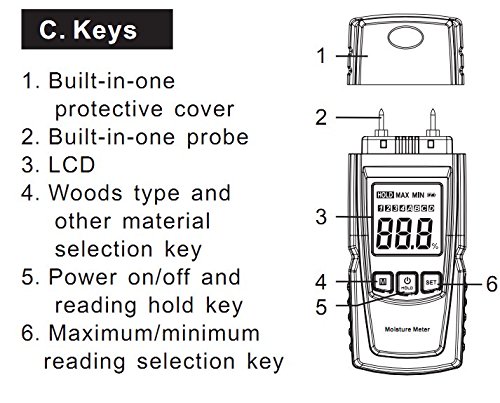
Image: Diagram illustrating the key components and controls of the GM605 Wood Moisture Tester.
- Built-in Protective Cover: Protects the probes when not in use.
- Built-in Probe: The two pins used to penetrate the material for moisture measurement.
- LCD Display: Shows moisture readings, wood type selection, and other indicators.
- 'M' (Mode) Key: Used for selecting among 4 wood types and other material.
- 'HOLD' Key: Functions as the power on/off button and also to hold the current reading.
- 'SET' Key: Used for selecting maximum/minimum reading review.
4. Setup
4.1 Battery Installation
The GM605 Wood Moisture Tester requires two 1.5V AAA batteries (not included). To install the batteries:
- Locate the battery compartment cover on the back of the device.
- Slide or unclip the cover to open the compartment.
- Insert two AAA batteries, ensuring correct polarity (+ and -) as indicated inside the compartment.
- Replace the battery compartment cover securely.
4.2 Initial Checks
Before first use, ensure the protective cover is removed from the probes. Press and hold the 'HOLD' button to power on the device. The LCD display should illuminate and show a reading, typically 0.0% in air.
5. Operating Instructions
5.1 Power On/Off
- Power On: Press and hold the 'HOLD' button for approximately 2 seconds.
- Power Off: Press and hold the 'HOLD' button for approximately 2 seconds. The device also features an automatic power-off function after about 10 minutes of inactivity to save battery.
5.2 Selecting Wood Type
The GM605 allows selection among 4 wood types (A, B, C, D) and an 'other' material type to improve measurement accuracy. Refer to the wood type chart (usually provided separately or in a more detailed manual) for specific wood species corresponding to each type.
- Press the 'M' (Mode) button repeatedly to cycle through the wood types (A, B, C, D) and the 'other' material setting.
- The selected wood type will be indicated on the LCD display.
5.3 Taking a Measurement
- Ensure the device is powered on and the correct wood type is selected.
- Carefully insert the two probes into the material you wish to measure. Ensure both probes penetrate the material sufficiently and are fully in contact.
- The moisture content percentage will be displayed on the LCD.
- For consistent results, take multiple readings in different spots of the material.
5.4 Reading Lock (HOLD Function)
- While a measurement is being displayed, briefly press the 'HOLD' button.
- The current reading will be frozen on the display, indicated by a 'HOLD' icon.
- Press the 'HOLD' button again to release the reading and return to live measurement mode.
5.5 Reviewing Max/Min Readings
- After taking measurements, press the 'SET' button to review the maximum moisture reading recorded during the current session. An 'MAX' icon will appear.
- Press the 'SET' button again to review the minimum moisture reading recorded. A 'MIN' icon will appear.
- Press 'SET' a third time to exit the review mode and return to live measurement.
6. Specifications
| Parameter | Value |
|---|---|
| Measuring Range | 0% ~ 41% |
| Moisture Error Precision | ±2% (Wood type 1) |
| Operating Temperature Range | -10℃ ~ 40℃ |
| Operating Humidity Range | 20%RH ~ 90%RH |
| Automatic Power Off Time | Approximately 10 minutes |
| Length of Probe | 9.8 mm |
| Dimensions (L*W*H) | 135.6 mm * 55 mm * 29.4 mm |
| Power Supply | 2 x 1.5V AAA Batteries (Not Included) |
| Display | LCD |
7. Maintenance
- Cleaning: Wipe the device with a soft, dry cloth. Do not use abrasive cleaners or solvents.
- Storage: When not in use, store the tester in a dry, cool place, away from direct sunlight and extreme temperatures. Always replace the protective cover over the probes to prevent damage and injury.
- Battery Replacement: Replace batteries promptly when the low battery indicator appears on the display to ensure accurate readings and prevent battery leakage. Remove batteries if the device will not be used for an extended period.
- Probe Care: Ensure the probes are clean and free from debris. Bent or damaged probes can affect accuracy and should be handled with care.
8. Troubleshooting
| Problem | Possible Cause | Solution |
|---|---|---|
| Device does not power on. | Dead or incorrectly installed batteries. | Check battery polarity; replace with new AAA batteries. |
| Inaccurate or inconsistent readings. | Probes not fully inserted; incorrect wood type selected; probes dirty or damaged; material too dense/thin. | Ensure probes are fully inserted; verify wood type setting; clean probes; try different measurement points. |
| Display shows "LO" or low battery icon. | Low battery voltage. | Replace batteries immediately. |
| Device powers off unexpectedly. | Automatic power-off activated; low battery. | Power on again; replace batteries if low battery alert is present. |
9. Warranty and Support
For warranty information, technical support, or service inquiries regarding your Benetech GM605 Wood Moisture Tester, please contact the manufacturer or your point of purchase. Keep your purchase receipt as proof of purchase.
Manufacturer: Benetech
For further assistance, you may visit the official Benetech store on Amazon: Benetech Store
Related documentsGM605


Ask a question about this manual
Ask about setup, troubleshooting, compatibility, parts, safety, or missing instructions. Manuals+ will review the question and use this page’s manual context to help answer it.