
1. Introduction
Thank you for purchasing the BYINTEK BT140 WiFi Projector. This manual provides essential information for setting up, operating, and maintaining your projector. Please read it thoroughly before use to ensure proper functionality and to extend the lifespan of your device.
2. Safety Information
To prevent fire, electric shock, or injury, please observe the following safety precautions:
- Do not look directly into the projector lens when the lamp is on. The intense light can cause eye damage.
- Ensure proper ventilation. Do not block ventilation openings. Overheating can damage the projector.
- Place the projector on a stable, level surface to prevent it from falling.
- Keep the projector away from water, moisture, and flammable materials.
- Use only the power adapter supplied with the projector.
- Do not attempt to repair the projector yourself. Refer all servicing to qualified personnel.
- Unplug the projector from the power outlet during lightning storms or when unused for long periods.
3. Package Contents
Please check that all items are present:
- BYINTEK BT140 Projector
- Power Cable
- Remote Control
- AV Cable
- User Manual (this document)
Note: Specific accessories may vary slightly depending on the region or retailer.
4. Product Overview
Familiarize yourself with the projector's components and interfaces.
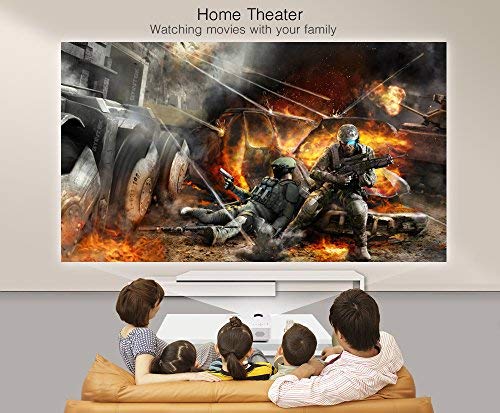
Image: Front view of the BYINTEK BT140 Projector, showing the lens and ventilation grilles.
Interfaces:
- HDMI: Connect to devices like laptops, Blu-ray players, gaming consoles.
- USB: Connect USB drives for media playback.
- SD Card Slot: Insert SD cards for media playback.
- AV: Connect to older devices using the included AV cable.
- VGA: Connect to computers with a VGA output.
- Audio Out: Connect external speakers or headphones.
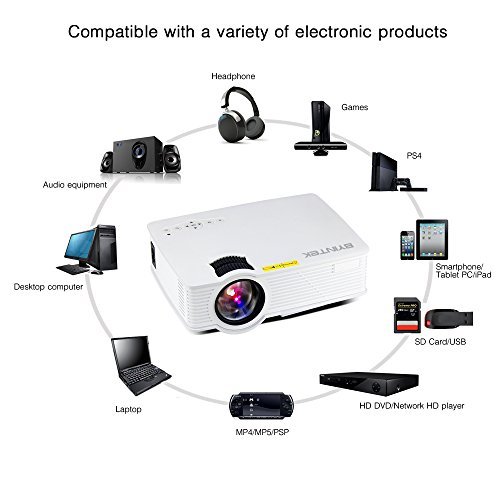
Image: Diagram illustrating various devices compatible with the BYINTEK BT140 Projector, including laptops, smartphones, tablets, gaming consoles (PS4, PSP), desktop computers, headphones, audio equipment, and HD media players, connected via HDMI, USB, SD, AV, and VGA ports.
5. Setup
5.1 Placement
Place the projector on a stable surface. The recommended projection distance is 1.5 to 2.5 meters for an optimal screen size of 50 to 80 inches. The projector supports image sizes from 34 to 100 inches.
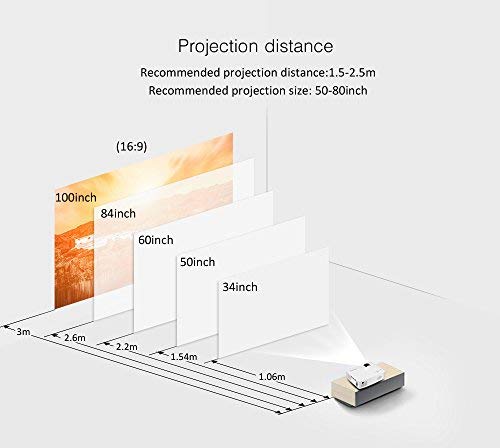
Image: Diagram showing recommended projection distances and corresponding screen sizes for the BYINTEK BT140 Projector, ranging from 34 inches at 1.06m to 100 inches at 3m.
5.2 Power Connection
- Connect the power cable to the projector's power input port.
- Plug the other end of the power cable into a wall outlet.
5.3 Connecting Devices
- HDMI: Connect an HDMI cable from your source device (e.g., laptop, game console) to the projector's HDMI port.
- USB/SD: Insert a USB drive or SD card into the respective port for direct media playback.
- AV/VGA: Use the appropriate cable to connect older devices.
5.4 Focus Adjustment
Rotate the focus ring on the projector lens until the projected image is clear and sharp.
5.5 Keystone Correction
If the projected image appears trapezoidal, adjust the keystone correction dial (usually located near the lens) to square the image. The projector supports vertical keystone correction of ±15 degrees.
5.6 Wireless Connection (Airplay/Miracast)
The BT140plus model includes a built-in wireless push module supporting Airplay and Miracast functionality for wireless connection to smartphones, tablets, and iPads. Refer to the on-screen instructions for pairing your device.
6. Operating Instructions
6.1 Powering On/Off
- Power On: Press the power button on the projector or the remote control.
- Power Off: Press the power button again. Confirm shutdown if prompted.
6.2 Input Source Selection
Use the "Source" button on the remote control or the projector's control panel to cycle through available input sources (HDMI, USB, SD, AV, VGA, Wireless).
6.3 Media Playback (USB/SD)
When a USB drive or SD card is inserted, the projector's multimedia interface will typically appear. Navigate through folders and select your desired media file (videos, photos, music) using the remote control.
- Supported Video Formats: RMVB/RM (Realvideo2.0/3.0/4.0), AVI (Xvid/H264), FLV (Sorenson H.263), MOV (H264), MP4 (MPEG4, AVC), MPG (MPG1)
- Supported Audio Formats: MP3, WMA, AAC, AC3
7. Maintenance
7.1 Cleaning the Lens
Use a soft, lint-free cloth or lens cleaning paper to gently wipe the projector lens. Avoid using abrasive cleaners or excessive force, which can scratch the lens.
7.2 Cleaning the Projector Body and Vents
Wipe the projector's exterior with a soft, dry cloth. Use a small brush or compressed air to clear dust from the ventilation openings to ensure proper airflow and prevent overheating.
7.3 Lamp Life
The BYINTEK BT140 uses an LED lamp with an estimated lifespan of 20,000 hours, significantly reducing the need for lamp replacement compared to conventional lamps.
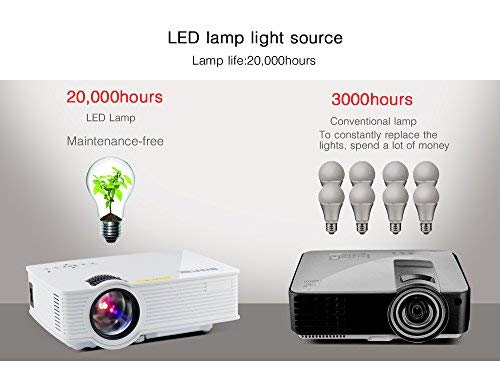
Image: Comparison showing the BYINTEK BT140's LED lamp with 20,000 hours lifespan versus conventional lamps with 3,000 hours lifespan, highlighting the maintenance-free aspect of LED technology.
8. Troubleshooting
If you encounter issues with your projector, refer to the following common problems and solutions:
| Problem | Possible Cause / Solution |
|---|---|
| No image on screen |
|
| Image is blurry |
|
| Image is trapezoidal |
|
| No sound |
|
| Remote control not working |
|
9. Specifications
Below are the technical specifications for the BYINTEK BT140 Projector:
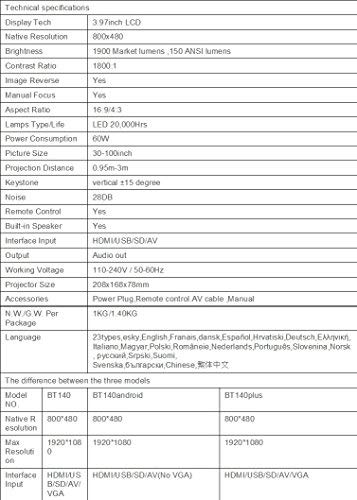
Image: Table detailing the technical specifications of the BYINTEK BT140 Projector, including display tech, resolution, brightness, contrast, aspect ratio, lamp life, power consumption, and interface inputs.
| Feature | Detail |
|---|---|
| Display Technology | 3.97" LCD |
| Native Resolution | 800 x 480 |
| Maximum Display Resolution | 1920 x 1080 (Support 1080P) |
| Brightness | 1900 Lumens (150 ANSI lumens) |
| Contrast Ratio | 1800:1 |
| Image Reverse | Yes |
| Manual Focus | Yes |
| Aspect Ratio | 16:9 / 4:3 |
| Lamp Type / Life | LED, 20,000 Hours |
| Power Consumption | 70W |
| Picture Size | 34-100 inches |
| Projection Distance | 0.95m - 3m |
| Keystone Correction | Vertical ±15 degrees |
| Noise Level | 28dB |
| Remote Control | Yes |
| Built-in Speaker | Yes |
| Interface Input | HDMI / USB / SD / AV / VGA |
| Audio Output | Audio out port |
| Working Voltage | 110-240V / 50-60Hz |
| Projector Size | 208 x 168 x 78mm |
| Net Weight | 950 Grams (1KG N.W./G.W. Per Package) |
| Connectivity Technology | Wi-Fi (for Airplay/Miracast) |
| Compatible Devices | Laptop, Smartphone, Tablet |
10. Warranty and Support
BYINTEK products are designed for reliability and performance. For warranty information or technical support, please refer to the warranty card included with your product or contact BYINTEK customer service through their official website or your retailer.
For further assistance, you may visit the BYINTEK Store on Amazon.


