
Enermax EGN1200P
ENERMAX PlatiGemini 1200W ATX 3.1 & ATX12VO Power Supply User Manual
Model: EGN1200P
1. Introduction
Thank you for choosing the ENERMAX PlatiGemini 1200W Power Supply. This unit is designed to provide stable and efficient power for high-performance computing systems, supporting both Intel ATX 3.1 and ATX12VO standards. It features 80 PLUS Platinum certification, a fully modular design with a native 600W 12V-2x6 connector, and advanced Dust-Free Rotation (D.F.R.) technology for enhanced longevity and maintenance. Please read this manual thoroughly before installation and operation to ensure proper usage and safety.

Image 1.1: ENERMAX PlatiGemini 1200W Power Supply Overview
2. Safety Information
WARNING: Improper installation or use can lead to serious injury or damage to your system. Always follow these safety guidelines:
- Ensure the power supply is disconnected from the AC power outlet before installation or maintenance.
- Do not open the power supply casing. High voltages are present inside, and there are no user-serviceable parts.
- Install the power supply in a well-ventilated area, away from heat sources, direct sunlight, and moisture.
- Use only the modular cables provided with this power supply. Using incompatible cables can damage the unit and connected components.
- Ensure all connectors are securely seated before powering on the system.
- This product is designed for use in personal computers. Do not use it for any other application.
3. Package Contents
Verify that all items are present in your package:
- ENERMAX PlatiGemini 1200W Power Supply Unit
- Modular Cable Set:
- 1x ATX Motherboard 24 (20+4)pin cable [60cm]
- 1x 12VO Motherboard 10pin cable [60cm]
- 2x CPU 4+4 Pin cables [70cm each]
- 1x 12V-2x6 12+4 pin (600W) cable [60cm]
- 3x PCIe 6+2 pin cables [65cm each]
- 8x SATA power cables [60cm each]
- 4x 4P Molex cables [60cm each]
- AC Power Cord
- Mounting Screws
- User Manual

Image 3.1: Fully Modular Cables Included
4. Key Features
- Dual-Standard Compatibility: Integrated with both Intel ATX 3.1 and ATX12VO standards for broad system compatibility.
- 80 PLUS Platinum Certified: Achieves up to 94% efficiency at typical load and 74% efficiency at 2% load, reducing energy waste and operating costs.
- Fully Modular Design: Allows for clean cable management and improved airflow within the PC case.
- Native 600W 12V-2x6 Connector: Directly supports high-power PCIe 5.0 graphics cards without the need for additional adapters.
- Industrial-Grade Components: Utilizes 100% Japanese 105°C-rated capacitors for superior stability, reliability, and extended lifespan.
- Semi-Fanless Technology: The fan remains off under 60% load, providing silent operation during low-power tasks.
- Dust-Free Rotation (D.F.R.) Technology: An innovative self-cleaning mechanism that reverses fan rotation to blow away accumulated dust, enhancing system longevity and reducing maintenance.
- Up to 235% Power Excursion: Designed to handle transient power spikes for high-end systems.

Image 4.1: PlatiGemini Feature Highlights
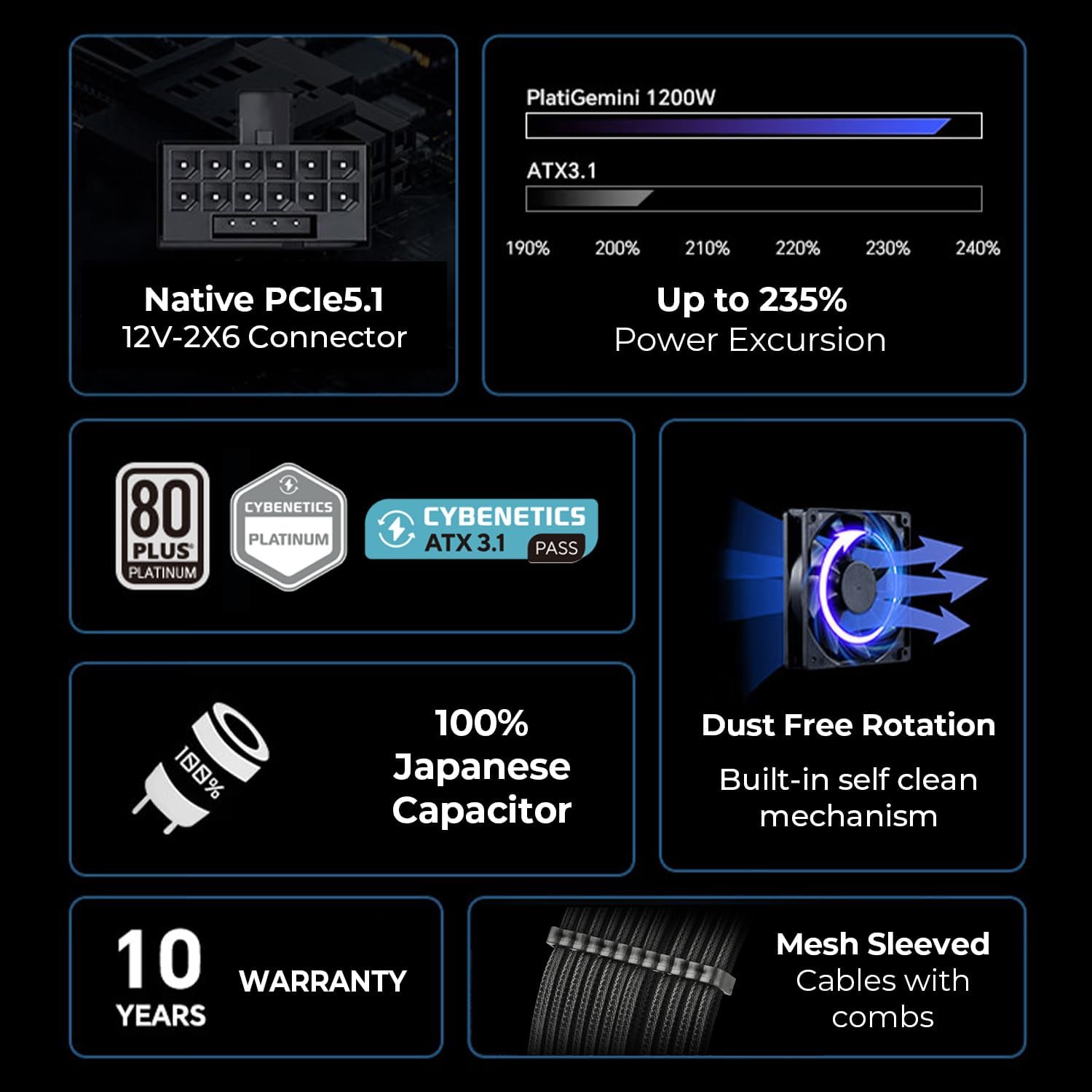
Image 4.2: Dual-Standard Compatibility (ATX 3.1 & ATX12VO)
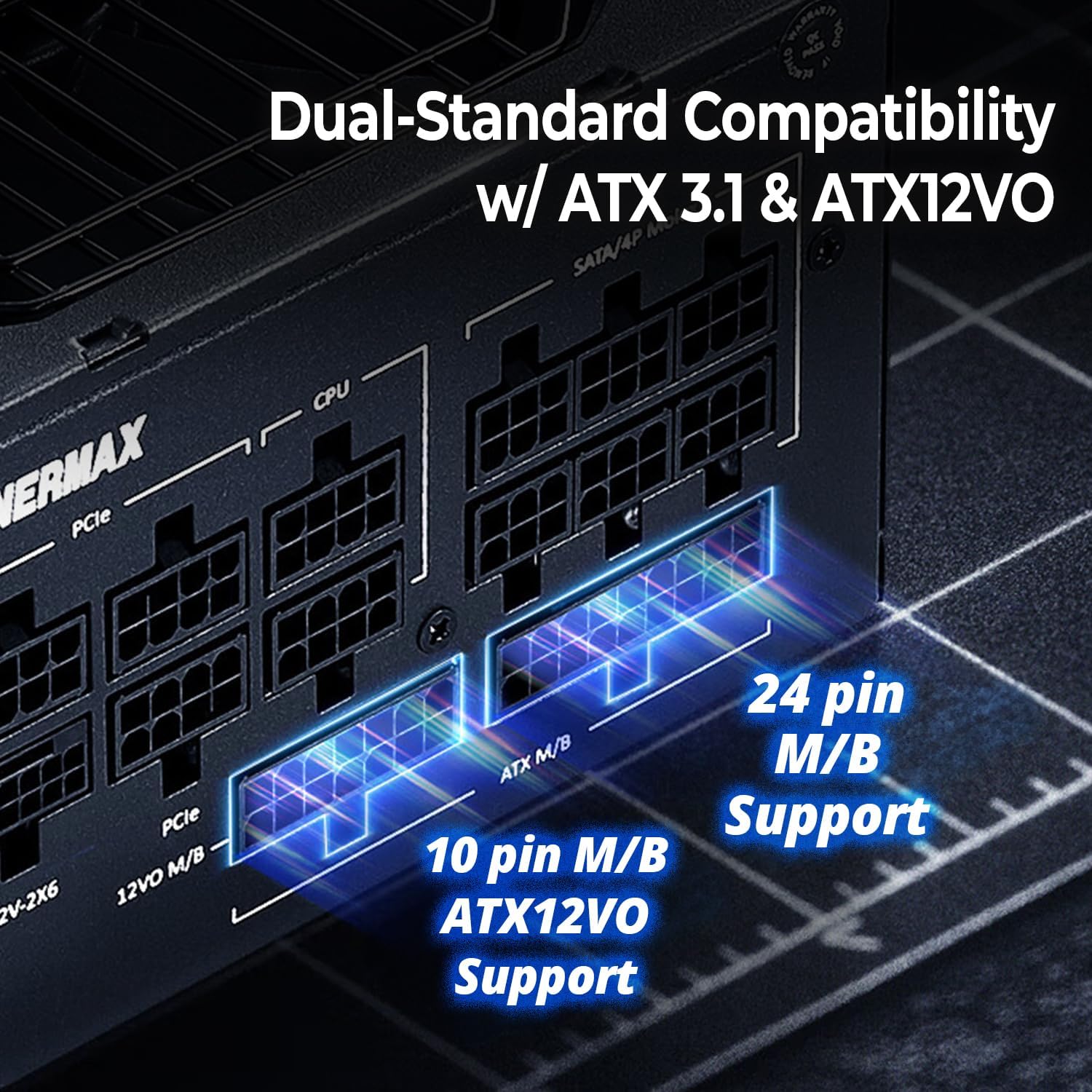
Image 4.3: 100% Japanese Industrial-Grade Capacitors

Image 4.4: Semi-Fanless Technology Fan Curve
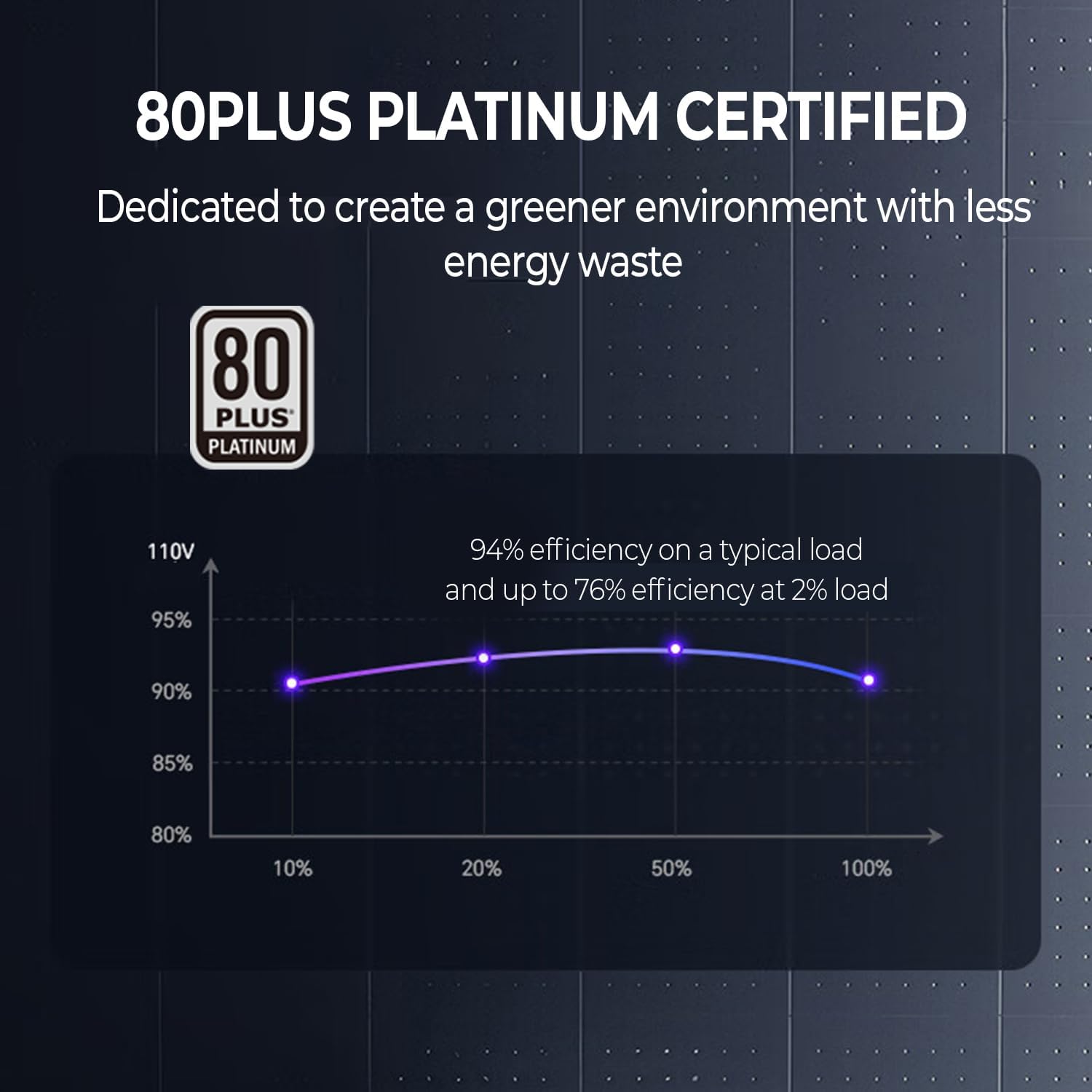
Image 4.5: 80 PLUS Platinum Efficiency
5. Setup & Installation
- Prepare Your System: Ensure your computer is powered off and unplugged from the wall outlet. Open your PC case to access the power supply mounting area.
- Mount the Power Supply: Insert the ENERMAX PlatiGemini 1200W into the power supply bay of your PC case. Secure it with the provided mounting screws.
- Connect Modular Cables: Identify the necessary cables for your motherboard, CPU, graphics card(s), and other peripherals. Connect them to the corresponding modular ports on the power supply. Ensure firm connections.
- For motherboards, use either the 24-pin ATX cable or the 10-pin ATX12VO cable, depending on your motherboard's standard.
- For PCIe 5.0 graphics cards, use the native 600W 12V-2x6 cable.
- Cable Management: Route the cables neatly to improve airflow and aesthetics within your case.
- Close the Case: Once all connections are secure and cables are managed, close your PC case.
- Connect AC Power: Plug the AC power cord into the power supply and then into a wall outlet.
Video 5.1: Installation and Features of PlatiGemini 1200W Power Supply. This video demonstrates the physical installation and highlights key features like ATX 3.1, ATX12VO, 12V-2x6 connector, power excursion, and D.F.R. technology.
6. Operating Instructions
6.1. Semi-Fanless Operation
The PlatiGemini 1200W features a semi-fanless mode. The power supply fan will remain off when the system load is below 60% and the internal temperature is low. This ensures silent operation during light workloads. The fan will automatically activate and adjust its speed as the load and temperature increase to maintain optimal cooling.
6.2. Dust-Free Rotation (D.F.R.) Technology
The D.F.R. function helps to prevent dust accumulation inside the power supply by reversing the fan's rotation direction for a short period. This self-cleaning mechanism can be activated in two ways:
- Upon Power On: When you power on your PC, the D.F.R. function will automatically activate for 20 seconds. The fan will spin in reverse (clockwise) to expel dust, then return to its regular counter-clockwise direction for another 20 seconds before stopping (if under 60% load) or continuing normal operation.
- Using the D.F. Switch Button: If the power supply is under 60% load and the fan is not spinning, press the D.F. Switch button on the power supply. The fan will spin clockwise for 20 seconds, then return to counter-clockwise for 20 seconds, and then stop. If the power supply is over 60% load or the fan is already spinning, pressing the D.F. Switch will immediately stop the fan, spin it clockwise for 20 seconds, and then return to its regular counter-clockwise direction.

Image 6.1: D.F. Switch Button
Video 6.2: ENERMAX Dust-Free Rotation (D.F.R.) Self-Cleaning Technology. This video explains how the D.F.R. function works to clean the power supply fan and its benefits.
7. Maintenance
The ENERMAX PlatiGemini 1200W power supply is designed for minimal maintenance thanks to its Dust-Free Rotation (D.F.R.) technology. This feature helps to keep the fan and internal components free from dust accumulation, which is crucial for maintaining optimal performance and extending the lifespan of the unit and other PC components.
- Regularly activate the D.F.R. function using the D.F. Switch button, especially if your PC operates in a dusty environment or if you notice increased fan noise.
- Periodically inspect the power supply's exterior for any visible dust buildup. While D.F.R. helps with internal cleaning, external surfaces may still require occasional wiping with a soft, dry cloth.
- Ensure adequate airflow around the power supply by keeping the PC case free of obstructions.
8. Troubleshooting
If you encounter issues with your ENERMAX PlatiGemini 1200W power supply, please refer to the following common troubleshooting steps:
- No Power: Ensure the AC power cord is securely plugged into both the power supply and the wall outlet. Check the power switch on the back of the PSU is in the 'ON' position. Verify all modular cables are correctly and firmly connected.
- System Instability/Crashes: This could be due to various factors. Ensure your system's power requirements do not exceed the PSU's capacity. Check all cable connections, especially to the motherboard and graphics card. If issues persist, test components individually if possible.
- Fan Not Spinning: The power supply features a semi-fanless mode, meaning the fan will not spin under low load (below 60%) or low temperature. This is normal operation. If the fan does not spin under heavy load or high temperature, ensure the D.F.R. switch is not stuck and contact support.
- Excessive Noise: While the D.F.R. technology helps, if you experience unusual or excessive fan noise, activate the D.F.R. function to clear any potential dust. If the noise persists, it may indicate an issue with the fan.
For further assistance, please contact ENERMAX customer support.
9. Specifications
| Feature | Specification |
|---|---|
| Model Name | PlatiGemini 1200W |
| Item Model Number | EGN1200P |
| Wattage | 1200 watts |
| Efficiency Certification | 80 PLUS Platinum |
| Form Factor | ATX |
| Power Supply Design | Full Modular |
| Compatible Standards | ATX 3.1, ATX12VO |
| PCIe Connector | Native 600W 12V-2x6 |
| Capacitors | 100% Japanese 105°C-rated |
| Cooling Method | Air (Semi-Fanless) |
| Item Weight | 7.3 pounds |
| Product Dimensions (L x W x H) | 5.91 x 5.91 x 3.39 inches |
10. Warranty & Support
The ENERMAX PlatiGemini 1200W power supply comes with a 10-year warranty, ensuring long-term reliability and peace of mind. For warranty claims, technical support, or any product-related inquiries, please contact ENERMAX USA directly.
ENERMAX USA Support: Visit Enermax USA Website
Please retain your proof of purchase for warranty service.
Related documentsEGN1200P


Ask a question about this manual
Ask about setup, troubleshooting, compatibility, parts, safety, or missing instructions. Manuals+ will review the question and use this page’s manual context to help answer it.