
MOMENTUM MOCAM-720-01
Momentum Axel WiFi Stick Up Security Cloud Cam User Manual
Model: MOCAM-720-01
Product Overview
The Momentum Axel WiFi Stick Up Security Cloud Cam is a versatile indoor surveillance solution designed for home, baby, pet, garage, and nanny monitoring. It offers high-definition video, two-way audio, night vision, and smart alerts to keep you connected to your space from anywhere.

Front view of the Momentum Axel WiFi Stick Up Security Cloud Cam, showcasing its compact design and camera lens.
Key Features
- Free 24-Hour Video Cloud Storage: Lifetime access to recordings at no cost, available in Full HD 720p via the Momentum App.
- Live Streaming & Monitoring: View live HD video feeds, take screenshots, and utilize multiple zoom functions through the Momentum App (iOS 9.0+ and Android 5.0+).
- Mobile Alerts & Notifications: Receive instant alerts on your smartphone or tablet when motion or sound is detected.
- Infrared Night Vision: Built-in IR allows clear viewing in low-light conditions, ensuring continuous monitoring day and night.
- Two-Way Audio: Communicate with anyone in your home using the built-in speaker and microphone.
- Adjustable Motion Zones: Customize detection areas to reduce false alerts.
- MicroSD Card Support: Supports up to 128GB for local recording, ensuring continuous recording even if network connectivity is lost.
- Versatile Placement: Features a magnetic base with an adjustable head for flexible mounting options.
Visual Features Overview
A diagram highlighting key features of the Momentum Axel camera, including Live HD Video Feed, Night Vision, Sound & Motion Detection, Magnetic Base, 128 SD Card Slot or Cloud Storage, 2-Way Audio, and 110 Degree Viewing Angle.

A smartphone screen showing a live HD video feed from the camera, demonstrating remote monitoring capabilities.

An image illustrating the ability to view multiple camera feeds simultaneously, useful for monitoring different areas like a nursery, pet area, or living room.

The camera shown in two different placements, highlighting its magnetic base and adjustable head for versatile installation on surfaces or walls.
Setup Guide
1. Unboxing and Initial Connection
Carefully remove the camera and all accessories from the packaging. Connect the camera to a power source using the provided USB cable and power adapter. The camera will power on automatically.

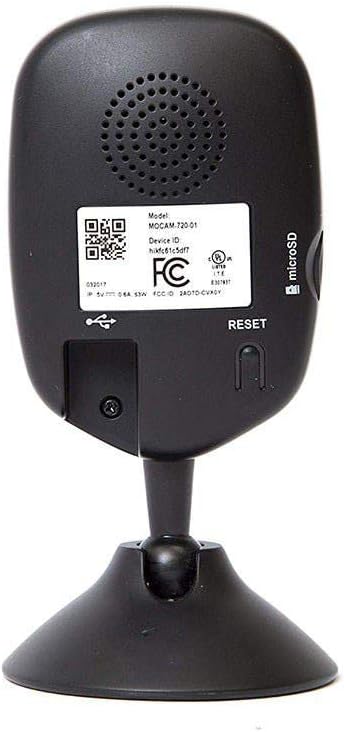
Rear view of the camera, showing the USB power input and the recessed reset button. The speaker grille is also visible.
2. App Download and Account Creation
Download the "Momentum App" from the Apple App Store (for iOS 9.0+) or Google Play Store (for Android 5.0+). Follow the on-screen instructions to create a new account or log in if you already have one.
3. Adding Your Camera
Within the Momentum App, select the option to add a new device. The app will guide you through connecting your camera to your home Wi-Fi network. Ensure your Wi-Fi network is 2.4GHz for optimal compatibility.
4. MicroSD Card Installation (Optional)
For local storage and continuous recording, insert a MicroSD card (up to 128GB) into the designated slot on the side of the camera. Ensure the camera is powered off before inserting or removing the card.
Operating Instructions
Live View and Recording
Once connected, open the Momentum App to access the live video feed from your camera. You can initiate manual recordings, take snapshots, and use the digital zoom feature directly from the app interface.
Motion and Sound Detection
Configure motion and sound detection settings within the app. You can adjust sensitivity levels and define specific motion zones to minimize unwanted alerts. When an event is detected, you will receive push notifications on your mobile device.
Two-Way Audio Communication
Utilize the two-way audio feature to listen to your camera's surroundings or speak through the camera's built-in speaker. This is ideal for communicating with family members, pets, or deterring intruders.
Night Vision
The camera automatically switches to infrared night vision in low-light conditions, providing clear black-and-white video footage. Ensure no obstructions block the camera's view, especially at night.
Official Product Video: Overview and Features
This video provides a comprehensive overview of the Momentum Axel WiFi Stick Up Security Cloud Cam, demonstrating its easy setup, live HD video monitoring, night vision capabilities, and two-way audio features. It highlights how the camera discreetly blends into various environments and can be managed remotely via the free Momentum app.
Maintenance
- Cleaning: Use a soft, dry cloth to clean the camera lens and body. Avoid abrasive cleaners or solvents that could damage the surface.
- Placement: Ensure the camera is placed in a stable location, away from direct sunlight, heat sources, and excessive moisture.
- Software Updates: Regularly check the Momentum App for available firmware updates to ensure optimal performance and security.
Troubleshooting
Camera Not Connecting to Wi-Fi
- Ensure your Wi-Fi network is 2.4GHz. The camera does not support 5GHz networks.
- Check that the camera is within range of your Wi-Fi router.
- Verify your Wi-Fi password is entered correctly in the app.
- Try restarting your Wi-Fi router and the camera.
Camera Offline
- Check the power connection to the camera.
- Verify your internet connection is active.
- If the camera frequently goes offline, consider its placement relative to your router or potential Wi-Fi interference.
Resetting the Camera
If you encounter persistent issues or need to reconfigure the camera, you can perform a factory reset. Locate the recessed "RESET" button on the back of the camera (as shown in the setup section image). Use a small, pointed object (like a paperclip) to press and hold the button for approximately 30 seconds until the camera indicates a reset (e.g., a light change or audible prompt).
App Functionality Issues
- Ensure your Momentum App is updated to the latest version.
- Clear the app's cache or reinstall the app if problems persist.
- Check your phone's notification settings to ensure alerts from the Momentum App are enabled.
Specifications
| Feature | Detail |
|---|---|
| Model Number | MOCAM-720-01 |
| Indoor/Outdoor Usage | Indoor |
| Compatible Devices | Smartphone (iOS, Android) |
| Connectivity Protocol | Wi-Fi (2.4GHz) |
| Mounting Type | Wall Mount, Magnetic Base |
| Video Capture Resolution | 720p, 1080p |
| Effective Video Resolution | 720 Pixels |
| Color | Black |
| Item Dimensions (L x W x H) | 2.56 x 3.42 x 5.51 inches |
| Item Weight | 5 ounces (0.31 Pounds) |
| Field Of View | 110 Degrees |
| Low Light Technology | Night Color (Infrared Night Vision) |
| Zoom Type | Digital Zoom |
| Alert Type | Audio and Motion |
| Control Method | App |
| Power Consumption | 10 watts |
| UPC | 851489004283 |
Warranty and Support
For detailed warranty information and further technical assistance, please refer to the official user guide provided by Momentum. You can access the PDF version of the user guide via the following link:
Download Official User Guide (PDF)
For additional product information and support, visit the official Momentum Store on Amazon:
Related documentsMOCAM-720-01


Ask a question about this manual
Ask about setup, troubleshooting, compatibility, parts, safety, or missing instructions. Manuals+ will review the question and use this page’s manual context to help answer it.