1. Setup
1.1 Package Contents
Before beginning, please verify that all items are present in your package:
- 1 x BaoFeng UV-5R Two-Way Radio
- 1 x 7.4V 1800mAh Li-ion Battery Pack
- 1 x Antenna
- 1 x Earphone Mic/Headset
- 1 x Belt Clip
- 1 x Hand Strap
- 1 x Adapter
- 1 x Desktop Charger
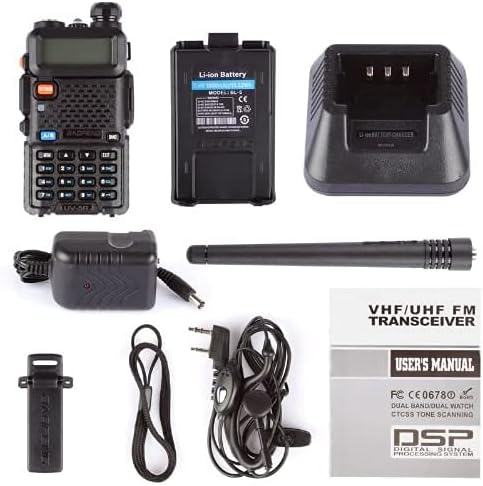
Figure 1.1: Contents included in the Baofeng UV-5R package.
1.2 Battery Installation
To install the Li-ion battery:
- Align the battery pack with the grooves on the back of the radio.
- Slide the battery upwards until it clicks securely into place.

Figure 1.2: The Baofeng UV-5R radio and its removable Li-ion battery.
1.3 Antenna Attachment
Screw the antenna clockwise into the connector on the top of the radio until it is finger-tight. Do not overtighten.

Figure 1.3: The Baofeng UV-5R radio with its antenna properly attached.
1.4 Charging the Battery
Place the radio with the battery installed into the desktop charger. Ensure the charging indicator light illuminates. A full charge typically takes several hours. The indicator light will change color when charging is complete.

Figure 1.4: The Baofeng UV-5R radio being charged in its desktop charger.
2. Operating Instructions
2.1 Controls Overview
Familiarize yourself with the main controls and their functions:

Figure 2.1: Front and top view of the Baofeng UV-5R with key components labeled.
- Flashlight: Located on top, activated via SK-side key2.
- Knob (On/Off/Volume): Rotates to power on/off and adjust volume.
- LCD Display: Shows frequency, channel, and status icons.
- VFO/MR Button: Toggles between Frequency Mode (VFO) and Channel Mode (MR).
- LED Indicator: Illuminates for transmit (red) or receive (green).
- SP. & MIC: External speaker and microphone jack.
- A/B Button: Switches between the upper (A) and lower (B) frequency displays for independent operation.
- Keyboard: Used for direct frequency input, menu navigation, and function activation.
- SK-side key1/CALL: Configurable side key, often used for radio or alarm functions.
- PTT Key (Push-to-Talk): Press and hold to transmit, release to receive.
- SK-side key2/MONI: Configurable side key, often used for flashlight or monitor function.
- Speaker: Audio output.
- Microphone: Audio input for transmission.
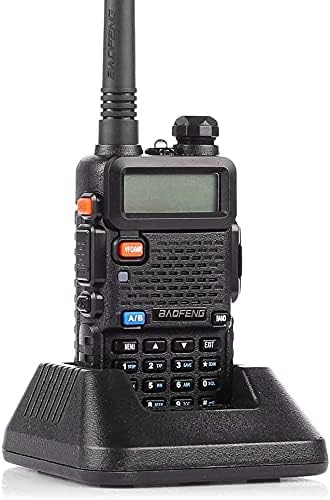
Figure 2.2: Side view highlighting the PTT and programmable side keys.
2.2 Basic Operation
Power On/Off and Volume: Rotate the top knob clockwise to power on and increase volume. Rotate counter-clockwise to decrease volume and power off.
Channel/Frequency Selection:
- In Frequency Mode (VFO), directly input frequencies using the keypad.
- In Channel Mode (MR), use the UP/DOWN arrow keys to scroll through programmed channels.
- Press the A/B button to select which of the two displayed frequencies is active for transmission.
Transmitting and Receiving:
- To transmit, press and hold the PTT (Push-to-Talk) button on the left side of the radio. Speak clearly into the microphone.
- Release the PTT button to return to receive mode.
FM Radio Function: The radio includes an FM broadcast receiver. Consult the full user manual for detailed instructions on activating and using this feature.
Flashlight: Press the SK-side key2/MONI button briefly to turn the LED flashlight on or off.

Figure 2.3: The integrated LED flashlight on the Baofeng UV-5R.
Keypad Lock: To prevent accidental key presses, press and hold the # key to lock or unlock the keypad.
VOX Function: Voice Operated Transmit (VOX) allows hands-free transmission. This feature can be enabled and adjusted through the radio's menu. Refer to the full manual for VOX level settings (0-9 grades selectable).
CTCSS/CDCSS: Continuous Tone-Coded Squelch System (CTCSS) and Continuous Digital Coded Squelch System (CDCSS) are used to filter out unwanted signals. These can be programmed for specific channels via the menu.
2.3 Programming
The Baofeng UV-5R can be programmed manually via the keypad or more efficiently using a computer with compatible software (e.g., CHIRP) and a programming cable (sold separately). PC programming allows for quick setup of multiple channels, frequencies, and advanced settings.
3. Maintenance
3.1 Battery Care
- Avoid fully discharging the Li-ion battery frequently to prolong its lifespan.
- Charge the battery in a well-ventilated area.
- If the radio will not be used for an extended period, remove the battery and store it in a cool, dry place.
3.2 Cleaning
Use a soft, damp cloth to clean the radio's exterior. Do not use harsh chemicals or abrasive cleaners. Ensure the radio is powered off and the battery is removed before cleaning.
3.3 Storage
Store the radio in a dry, dust-free environment away from direct sunlight and extreme temperatures. Protect the antenna and connectors from damage.
4. Troubleshooting
This section addresses common issues you might encounter with your Baofeng UV-5R radio.
| Problem | Possible Cause | Solution |
|---|---|---|
| Radio does not power on | Low or dead battery; improperly installed battery; faulty power knob. | Charge the battery fully. Ensure battery is correctly installed. Check power knob for damage. |
| Cannot transmit | Incorrect frequency/channel; PTT button not pressed; low battery; busy channel lock-out (BCLO) active. | Verify frequency/channel. Press PTT firmly. Charge battery. Disable BCLO in menu if necessary. |
| Poor reception or no audio | Antenna loose or damaged; squelch level too high; incorrect frequency/channel; out of range. | Check antenna connection. Adjust squelch level. Verify frequency/channel. Move closer to transmitting station. |
| Keypad unresponsive | Keypad lock is active. | Press and hold the # key to unlock the keypad. |
If you continue to experience issues, please refer to the comprehensive user manual (PDF) available online or contact customer support.
5. Specifications
| Feature | Specification |
|---|---|
| Frequency Range | 144-148MHz (VHF), 420-450MHz (UHF) |
| Number of Channels | 128 |
| Battery Type | 7.4V 1800mAh Li-ion Battery |
| Dimensions (H x W x D) | 1.26 x 2.05 x 3.94 inches (radio body only) |
| Item Weight | 1.08 pounds |
| Maximum Talking Range | 5 Kilometers (under optimal conditions) |
| Voltage | 4 Volts |
| Water Resistance Level | Not Water Resistant |

Figure 5.1: Baofeng UV-5R dimensions.
6. Warranty
Based on available information, there is no explicit manufacturer's warranty provided for this product. Please refer to your point of purchase for any return or exchange policies.
7. Support
For further assistance or detailed information, you may refer to the official user guide PDF:


