1. Product Overview
The Pro'sKit CP-367A is a self-adjusting insulation stripper designed for efficient and precise removal of insulation from various wire types. It automatically adjusts to the wire size, simplifying the stripping process for both solid and stranded wires.
This tool is suitable for wires ranging from AWG 24 to AWG 10 (0.2 to 6.0 mm²), making it versatile for a wide range of electrical and electronic applications. It also features an integrated wire cutter and an adjustable stop for consistent strip lengths.
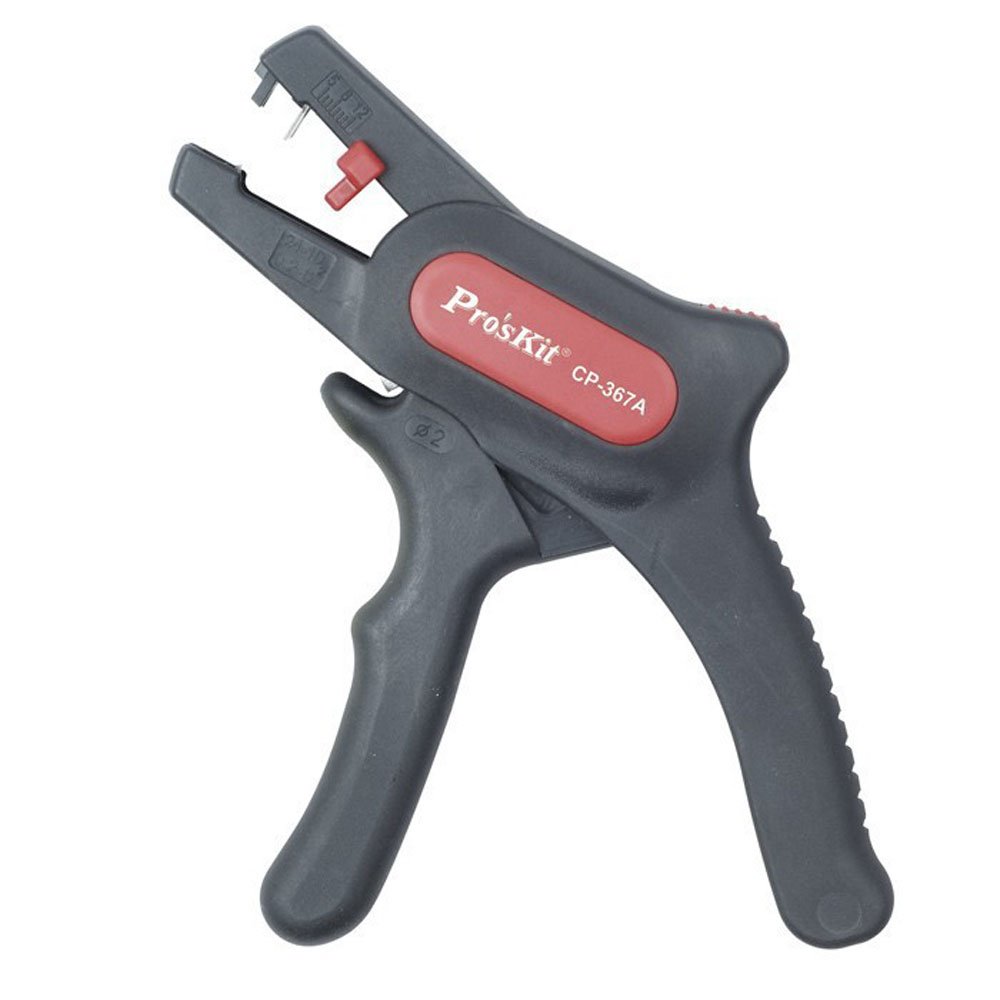
Image: The Pro'sKit CP-367A Self-Adjusting Insulation Stripper. This tool features a black body with ergonomic handles, a red self-adjusting mechanism, and a red adjustable stop for setting strip length. The Pro'sKit brand name and model number CP-367A are visible on the side.
2. Safety Information
- Always wear appropriate personal protective equipment, such as safety glasses, when using this tool.
- Ensure the power is disconnected from any electrical circuits before working with wires.
- Do not use the tool for purposes other than stripping or cutting wires.
- Keep fingers clear of the stripping jaws during operation.
- Store the tool in a dry, safe place, out of reach of children.
3. Setup and Adjustment
3.1 Adjusting Strip Length
- Locate the red adjustable stop on the side of the stripper.
- Slide the stop to the desired strip length. This ensures consistent insulation removal for multiple wires.
- For longer strips, the stop can be rotated out of the way or removed.
3.2 Tension Adjustment (if necessary)
The CP-367A is self-adjusting for most wire types. However, if you encounter issues with very soft or very hard insulation, a fine-tuning knob (if present on your model, typically near the pivot) can be used to adjust the stripping tension. Rotate clockwise to increase tension, counter-clockwise to decrease.
4. Operating Instructions
4.1 Stripping Wire Insulation
- Open the handles of the stripper completely.
- Insert the wire into the stripping jaws, ensuring the end of the insulation rests against the adjustable stop (if used).
- Squeeze the handles firmly and completely. The jaws will grip the insulation, cut it, and pull it away from the conductor.
- Release the handles to free the stripped wire.
4.2 Cutting Wires
The CP-367A includes an integrated wire cutter. Locate the cutting blades, typically positioned near the pivot point of the handles.
- Place the wire to be cut between the cutting blades.
- Squeeze the handles firmly until the wire is cleanly cut.
5. Maintenance
- Cleaning: Periodically clean the stripping jaws and other moving parts to remove any accumulated insulation debris. Use a dry cloth or a soft brush. Avoid using harsh chemicals that may damage the tool's materials.
- Lubrication: Apply a small amount of light machine oil to the pivot points and moving mechanisms occasionally to ensure smooth operation.
- Storage: Store the stripper in a clean, dry environment to prevent rust and corrosion.
- Inspection: Regularly inspect the stripping jaws for wear or damage. If the jaws appear dull or damaged, the tool may not strip wires effectively and might require replacement.
6. Troubleshooting
- Wire not stripping cleanly:
- Ensure the wire is fully inserted into the jaws.
- Squeeze the handles completely and firmly.
- Check for debris in the jaws.
- If applicable, adjust the tension knob (see Section 3.2).
- Wire conductor is nicked or damaged:
- The tension might be too high. If applicable, adjust the tension knob counter-clockwise.
- Ensure the wire is centered in the stripping jaws.
- Tool feels stiff or difficult to operate:
- Clean the tool and apply lubrication to moving parts (see Section 5).
7. Specifications
| Feature | Specification |
|---|---|
| Model | CP-367A |
| Wire Stripping Capacity | AWG 24-10 (0.2-6.0 mm²) |
| Functionality | Stripping, Cutting |
| Grip Type | Ergonomic |
| Item Weight | Approximately 1 pound |
| UPC | 760970441950 |
8. Warranty and Support
For information regarding the warranty period and terms for your Pro'sKit CP-367A Self-Adjusting Insulation Stripper, please refer to the documentation provided at the time of purchase or contact your retailer. You may also visit the official Pro'sKit website for the most current warranty and support information.
For technical assistance or inquiries, please contact Pro'sKit customer support through their official channels.


