
1. Introduction
Thank you for purchasing the Bushnell 202450 Custom Laser Rangefinder. This device is designed to provide accurate distance measurements for various outdoor activities. Featuring 4x magnification and a 21mm objective lens, it offers reliable performance for targets up to 600 yards. This manual provides detailed instructions for proper setup, operation, and maintenance to ensure optimal performance and longevity of your rangefinder.
2. Safety Information
- Laser Safety: This device emits invisible Class 1 laser radiation. Do not stare into the laser beam or view directly with optical instruments.
- Battery Handling: Use only the specified battery type. Do not mix old and new batteries. Dispose of batteries according to local regulations.
- Eye Protection: Always use caution when operating optical devices. Avoid pointing the rangefinder directly at the sun or other bright light sources, as this can cause permanent eye damage.
- Water Resistance: The device is water-resistant (IP54 rated), but it is not designed for submersion. Avoid prolonged exposure to heavy rain or water.
- Cleaning: Use a soft, clean cloth for cleaning lenses. Avoid abrasive materials.
3. Package Contents
Verify that all items are present in your package:
- Bushnell 202450 Custom Laser Rangefinder
- Carrying Case
- Neck Strap
- Lens Cleaning Cloth
- This User Manual
4. Product Overview
Familiarize yourself with the components of your Bushnell Custom Laser Rangefinder.
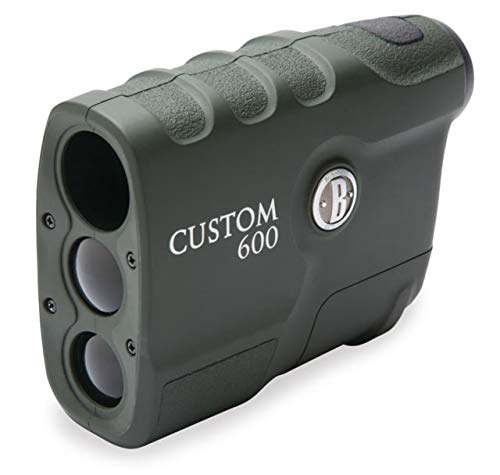
Figure 1: Front view of the Bushnell 202450 Custom Laser Rangefinder. This image shows the objective lens, the laser emitter/receiver, and the compact design of the device.
- Objective Lens: The front lens through which the laser is emitted and received.
- Eyepiece: The lens you look through to view the target and display.
- Power/Fire Button: Used to power on the device and take distance measurements.
- Battery Compartment: Located on the side or bottom, houses the battery.
- Strap Attachment Point: For securing the neck strap.
5. Setup
5.1 Battery Installation
The Bushnell 202450 Custom Laser Rangefinder requires one CR2 3-volt Lithium battery (not included).
- Locate the battery compartment cover, typically on the side or bottom of the unit.
- Twist or slide the cover to open the compartment.
- Insert one new CR2 3-volt Lithium battery, ensuring the positive (+) and negative (-) terminals are aligned correctly as indicated inside the compartment.
- Replace the battery compartment cover securely to ensure water resistance.
Figure 2: Illustration of the battery compartment. While the exact compartment location may vary, this image represents the general device where the battery would be inserted.
6. Operating Instructions
6.1 Powering On/Off
- To power on the device, press and release the Power/Fire Button. The display will activate.
- The device will automatically power off after approximately 10 seconds of inactivity to conserve battery life.
6.2 Taking a Measurement (Ranging)
- With the device powered on, look through the eyepiece.
- Aim the reticle (crosshairs) at your desired target.
- Press and release the Power/Fire Button. The distance to the target will be displayed instantly in yards.
- For continuous scanning, press and hold the Power/Fire Button while sweeping across multiple targets. The display will update distances as you move.
6.3 Display Indicators
The in-view display provides important information:
- Reticle: Used for aiming.
- Distance Reading: Displays the measured distance in yards.
- Battery Indicator: Shows remaining battery life.
- Laser Active Indicator: Appears when the laser is being fired.
7. Maintenance and Care
- Cleaning Lenses: Gently wipe lenses with the included lens cleaning cloth or a soft, lint-free cloth. Do not use abrasive cloths, paper towels, or tissues. For stubborn dirt, use a small amount of lens cleaning fluid on the cloth.
- Cleaning Body: Wipe the body of the rangefinder with a soft, damp cloth. Avoid harsh chemicals or solvents.
- Storage: Store the rangefinder in its protective carrying case in a cool, dry place when not in use. Remove the battery if storing for extended periods to prevent leakage.
- Avoid Extreme Temperatures: Do not expose the device to extreme heat or cold for prolonged durations.
8. Troubleshooting
| Problem | Possible Cause | Solution |
|---|---|---|
| Device does not power on. | Battery is dead or incorrectly installed. | Replace battery with a new CR2 3-volt Lithium battery, ensuring correct polarity. |
| Inaccurate or inconsistent readings. | Target is too small, too far, or non-reflective. Environmental conditions (fog, heavy rain). | Aim at a larger, more reflective target. Ensure clear line of sight. Ranging performance may be reduced in adverse weather. |
| Display is dim or flickering. | Low battery. | Replace the battery. |
| "E" or "Error" displayed. | Measurement out of range or laser blocked. | Ensure target is within 10-600 yards. Check for obstructions in the laser path. |
9. Specifications
| Model Name | 202450 |
| Magnification | 4x |
| Objective Lens | 21mm |
| Ranging Performance | 10-600 yards (reflective targets) |
| Accuracy | +/- 1 yard |
| Battery Type | CR2 3-volt Lithium (not included) |
| Water Resistance | IP54 (Water Resistant) |
| Material | Plastic |
| Color | Black |
10. Warranty and Customer Support
Your Bushnell 202450 Custom Laser Rangefinder is backed by a limited warranty. For specific warranty details, please refer to the warranty card included with your product or visit the official Bushnell website.
For technical support, service, or to inquire about replacement parts, please contact Bushnell Customer Service. Contact information can typically be found on the Bushnell website or on your product packaging.
Website: www.bushnell.com


