
1. Introduction
The Go Power! GP-800HD heavy-duty modified sine wave inverter is a versatile and economical solution designed for your mid-range power needs. It efficiently converts 12V DC battery power to 110V AC household power, making it ideal for powering various appliances. This manual provides essential information for safe installation, operation, and maintenance of your inverter.
2. What's in the Box
- Go Power! GP-800HD Heavy-Duty Modified Sine Wave Inverter - 800 Watt / 12V
- Two 10-foot cables (#4 AWG) with pre-lugged ends
- Installation Instructions
- Class T slow blow 110 amp inverter fuse (pre-installed or included for protection)
3. Product Overview

Figure 3.1: Front Panel
The front panel features two 110V AC outlets, USB ports for charging smaller devices, and a main ON/OFF power switch for easy control.

Figure 3.2: Rear Panel
The rear panel includes the 12V DC input terminals (positive and negative) for battery connection and a cooling fan to maintain optimal operating temperature.
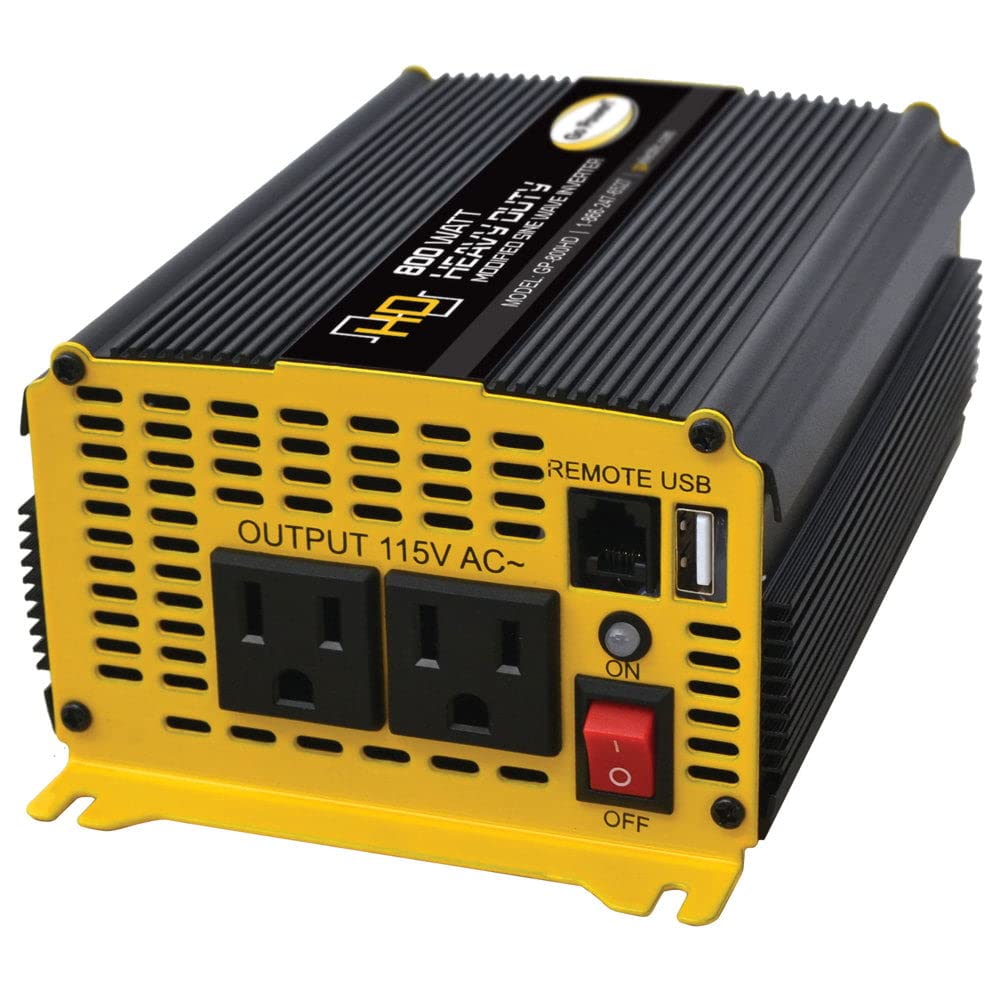
Figure 3.3: Side View
The side of the inverter features heat sink fins, crucial for dissipating heat and ensuring the unit's longevity and stable performance.
4. Setup
4.1 Safety Precautions
- Ensure the inverter is installed in a well-ventilated area, away from direct sunlight, heat sources, and flammable materials.
- Do not expose the inverter to water or excessive moisture.
- Always connect the inverter to a 12V DC battery system.
- Verify that the total wattage of all connected appliances does not exceed the inverter's 800W continuous output.
4.2 Connecting to the Battery
- Ensure the inverter's power switch is in the OFF position.
- Connect the red (#4 AWG) cable to the positive (+) terminal of the inverter and then to the positive (+) terminal of your 12V battery.
- Connect the black (#4 AWG) cable to the negative (-) terminal of the inverter and then to the negative (-) terminal of your 12V battery.
- Tighten all connections securely to prevent loose contacts and potential arcing.
4.3 Mounting the Inverter
The GP-800HD is designed for compact installation. Choose a flat, stable surface for mounting. Ensure there is adequate clearance around the unit for proper ventilation, especially around the cooling fan. Secure the inverter using appropriate fasteners (not included) through its mounting brackets.
5. Operating Instructions
5.1 Powering On/Off
- After connecting the inverter to the battery, press the ON/OFF switch on the front panel to power on the unit. An indicator light will illuminate.
- To power off, press the ON/OFF switch again. It is recommended to turn off the inverter when not in use to conserve battery power.
5.2 Connecting AC Appliances
- Plug your 110V AC appliances directly into the two AC outlets on the front panel.
- Ensure the total power consumption of all connected AC devices does not exceed 800 watts. The inverter has a 1600W surge capacity for brief power spikes.
- This is a modified sine wave inverter, suitable for most common electronics and appliances like lights, drills, and blenders. Some sensitive electronics may require a pure sine wave inverter.
5.3 Connecting USB Devices
- Connect your USB-powered devices (e.g., smartphones, tablets) to the available USB ports on the front panel.
- The USB ports provide convenient charging for small electronic devices.
6. Maintenance
- Cleaning: Keep the inverter clean and free from dust and debris. Use a dry cloth to wipe the exterior. Ensure the cooling fan vents are unobstructed.
- Connection Checks: Periodically inspect all battery and inverter connections to ensure they are tight and free from corrosion.
- Fuse Replacement: The inverter is protected by a Class T slow blow 110 amp fuse. If the inverter stops working due to an overload, the fuse may need replacement. Consult a qualified technician for fuse replacement.
- Storage: If storing the inverter for an extended period, disconnect it from the battery and store it in a cool, dry place.
7. Troubleshooting
| Problem | Possible Cause | Solution |
|---|---|---|
| No power output | Inverter switch OFF; Loose battery connections; Discharged battery; Blown fuse | Turn ON inverter; Check and tighten connections; Recharge/replace battery; Replace fuse (consult technician) |
| Low power output | Overloaded inverter; Low battery voltage | Reduce load; Recharge battery |
| Inverter shuts down | Overload protection; Over-temperature protection; Low/High battery voltage | Reduce load; Allow to cool; Check battery voltage and charge if necessary |
| Fan not operating | Normal operation (fan activates under load/temperature) | No action needed unless unit is overheating and fan is still off. |
8. Specifications
| Feature | Detail |
|---|---|
| Model | GP-800HD |
| Manufacturer Part Number | 80175 |
| Wattage (Continuous) | 800 watts |
| Wattage (Surge) | 1600 watts |
| Input Voltage | 12V DC |
| Output Voltage | 110V AC |
| Output Waveform | Modified Sine Wave |
| Item Weight | 2.56 pounds |
| Product Dimensions | 10.5 x 8 x 5 inches |
| Power Source | Battery Powered |
| Recommended Uses | Vehicle, Home, Outdoor, Emergency Backup |
9. Warranty and Support
For warranty information and technical support, please refer to the documentation included with your purchase or contact Go Power! directly. Protection plans may be available for extended coverage. Please retain your proof of purchase for any warranty claims.


