
1. Introduction
The ANEWISH T16 Mini Wireless Keyboard with Touchpad is a versatile input device designed for convenient control of various smart devices. Its compact, game-handle inspired design integrates a full QWERTY keyboard, a high-sensitive touchpad, and multimedia control buttons. This manual provides essential information for setting up, operating, and maintaining your T16 keyboard.
Key Features:
- Game Handle Design: Ergonomically shaped for comfortable use, similar to a game controller.
- 2.4GHz Wireless Connectivity: Connects to devices via a mini USB receiver with an operational range of up to 25 meters.
- High-Sensitive Touchpad: Functions as a mouse with multi-finger gesture support for navigation and control.
- Backlit Keyboard: Keys illuminate with a blue light for visibility in low-light conditions.
- Rechargeable Li-ion Battery: Built-in rechargeable battery for extended use.
- Power Saving Features: Automatically enters sleep mode after several minutes of inactivity to conserve battery life.
- Wide Compatibility: Supports Windows 2000/XP/7/10/Vista/CE, Linux, and Android operating systems. Compatible with Android TV Boxes, PCs, PS3, and PADs. Note: Not compatible with Fire TV or Fire Stick.
2. Package Contents
Please check the box for the following items:
- 1 x ANEWISH T16 2.4GHz Mini Wireless Keyboard with Touchpad
- 1 x USB Charging Cable
- 1 x User Manual
- 1 x USB Receiver (located in the battery compartment of the keyboard)

Image: The ANEWISH T16 keyboard, USB charging cable, user manual, and USB receiver laid out next to the product box.
3. Product Overview
The ANEWISH T16 keyboard is designed for intuitive control with a combination of a QWERTY keyboard, touchpad, and dedicated media buttons.
3.1 Components and Controls

Image: Top-down view and side view of the ANEWISH T16 keyboard, highlighting the charge port, switch button, left mouse button, right mouse button, low battery alarm, signal indicator, and charging status indicators. Dimensions are shown as 5.90 inches (length), 4.33 inches (width), and 0.70 inches (height).
- QWERTY Keyboard: Full keyboard layout for typing.
- Touchpad: High-sensitive area for mouse control.
- Media Control Buttons: Play/Pause, Volume Up/Down, Next/Previous track.
- Navigation Buttons: Directional pad for menu navigation.
- Charge Port: Micro USB port for charging the device.
- Switch Button: Power On/Off switch.
- Left/Right Mouse Buttons: Dedicated buttons for mouse clicks.
- Indicators: Low Battery Alarm, Signal Indicator, Charging Status.
3.2 Touchpad Gestures

Image: ANEWISH T16 keyboard with hands demonstrating touchpad gestures: Single tap for Left mouse click, Double click for Open Files, Double fingers click for Right Mouse click, and Double fingers drag for Roll Screen or Zoom in/out.
- Single Tap: Left mouse click.
- Double Click: Open files.
- Double Fingers Click: Right mouse click.
- Double Fingers Drag: Roll screen or zoom in/out.
3.3 DPI Sensitivity Adjustment
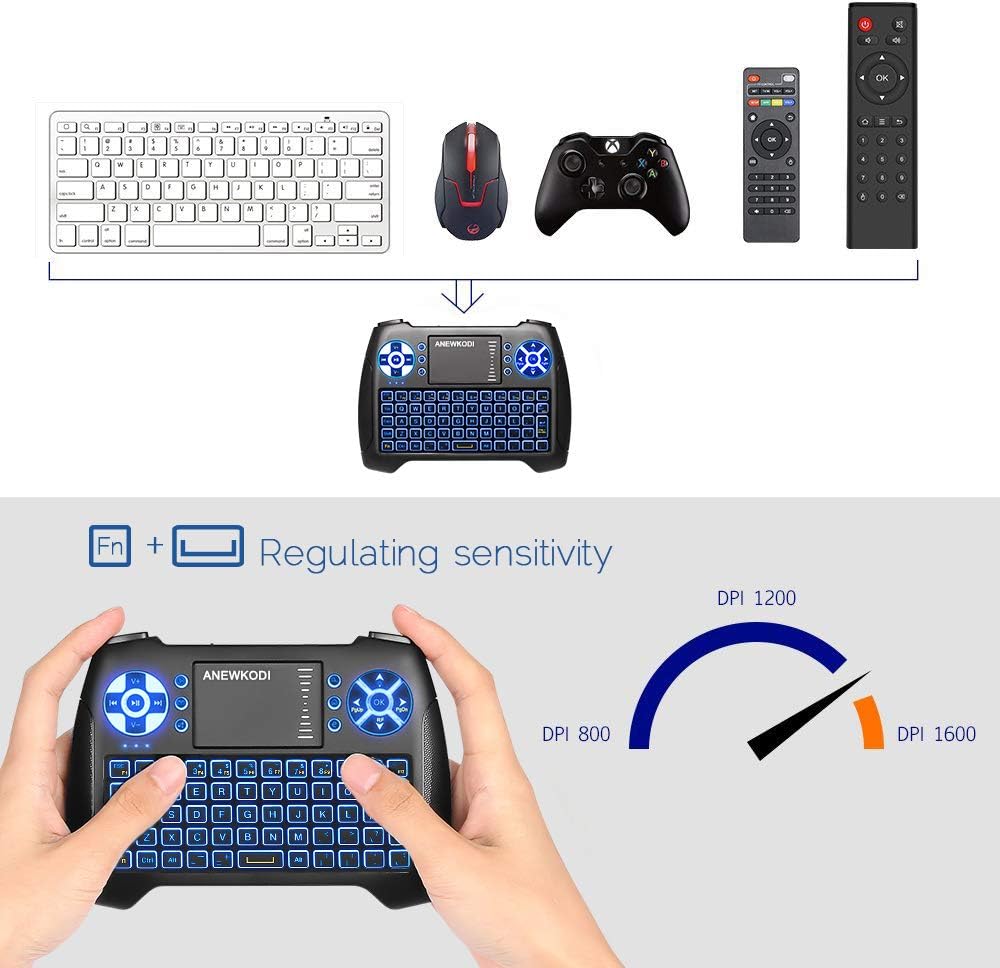
Image: ANEWISH T16 keyboard with hands demonstrating how to adjust DPI sensitivity by pressing 'Fn' and the touchpad. An arc graphic shows DPI settings of 800, 1200, and 1600.
To adjust the touchpad's DPI sensitivity, press the 'Fn' key and simultaneously move your finger across the touchpad. This allows you to cycle through different sensitivity levels (800, 1200, 1600 DPI) to suit your preference.
4. Setup Instructions
Follow these steps to connect your ANEWISH T16 Mini Wireless Keyboard:
- Locate the USB Receiver: The USB receiver is stored in the battery compartment on the back of the keyboard. Open the battery cover to retrieve it.
- Insert the Receiver: Plug the USB receiver into a standard USB port on your target device (e.g., Smart TV, PC, Android TV Box).
- Power On the Keyboard: Slide the power switch, located on the left top side of the keyboard, to the 'ON' position.
- Automatic Connection: The keyboard should automatically connect to your device. No additional drivers are typically required.

Image: The back of the ANEWISH T16 keyboard with the battery cover removed, showing the rechargeable Li-ion battery and the slot for the USB receiver. Text indicates 'Receiver' and 'Li-ion Battery'.
Important: Ensure your device has a standard USB port for compatibility. This keyboard is not compatible with Fire TV or Fire Stick.
Video: A demonstration of unboxing the ANEWISH T16 Mini Wireless Keyboard, showing its components and initial setup steps, including inserting the USB receiver and powering on the device.
5. Operating Instructions
5.1 Basic Usage
- Typing: Use the QWERTY keyboard for text input.
- Mouse Control: Use the touchpad for cursor movement and gestures as described in Section 3.2.
- Multimedia Control: Use the dedicated media buttons for playback, volume, and track control.
- Navigation: Use the directional pad for navigating menus and interfaces.
5.2 Backlight Function

Image: ANEWISH T16 keyboard with a finger pressing the 'Fn' key and another finger pressing the 'Up Arrow' key, demonstrating how to activate the blue backlight. The keyboard keys are illuminated.
To activate the blue backlight, press the 'Fn' key and the 'Up Arrow' key (located on the upper right directional pad) simultaneously. Repeat this action to turn off the backlight. The backlight allows for comfortable use in dark environments.
5.3 Compatibility and Range

Image: The ANEWISH T16 keyboard surrounded by various compatible devices including Android TV Box, X-Box, Smart TV, Projector, Desktop, Laptop, IPSTB, and HTPC, illustrating its broad compatibility via 2.4GHz wireless connection.
The T16 keyboard offers a reliable 2.4GHz wireless connection with an operating range of up to 25 meters, providing flexible control from a distance. It is compatible with a wide range of devices, including:
- Android TV Boxes
- Smart TVs
- PCs (Windows 2000, XP, 7, 10, Vista, CE)
- Laptops
- PS3
- Linux devices

Image: A user operating the ANEWISH T16 keyboard from a distance of 20 meters to control a smart TV displaying a movie selection interface. Text highlights '20 Meters Long Distance Control' and 'USB Receiver Plug and Play'.
6. Charging the Battery
The ANEWISH T16 keyboard features a built-in rechargeable lithium-ion battery. To charge the device:
- Connect the supplied USB charging cable to the Micro USB port on the keyboard.
- Plug the other end of the USB cable into a standard USB power source (e.g., computer USB port, USB wall adapter).
- The charging status indicator light will show when the device is charging.
The keyboard can be used while it is charging. The device is designed with power-saving features, including automatic sleep mode after several minutes of non-use, to maximize battery life.
7. Technical Specifications
| Feature | Specification |
|---|---|
| Brand | ANEWISH |
| Model Number | T16 |
| Connectivity | 2.4GHz Wireless (USB Receiver) |
| Number of Keys | 74 keys |
| Power Source | Built-in Lithium-ion Battery |
| Operating Voltage | 3.3V |
| Operating Current | 5mA |
| Charging Current | 300mA |
| Sleep Current | <1mA |
| Operating Range | Up to 25 meters (MAX) |
| Product Dimensions (LxWxH) | 5.8 x 4.2 x 0.7 inches |
| Item Weight | 5.1 ounces |
| Material | Plastic |
| Special Features | Backlit, Rechargeable |
| Keyboard Description | QWERTY |
| Keyboard Backlighting Color | Single Color (Blue) |
8. Maintenance
To ensure the longevity and optimal performance of your ANEWISH T16 keyboard:
- Keep the device clean by wiping it with a soft, dry cloth.
- Avoid exposing the keyboard to extreme temperatures, moisture, or direct sunlight.
- Do not disassemble the device, as this may void the warranty and cause damage.
- Store the USB receiver in its designated compartment when not in use to prevent loss.
9. Troubleshooting
If you encounter issues with your ANEWISH T16 keyboard, consider the following:
- No Connection: Ensure the USB receiver is securely plugged into a standard USB port on your device and the keyboard is powered on. Try plugging the receiver into a different USB port.
- Lagging or Unresponsive: Check the battery level. Recharge the keyboard if the battery is low. Ensure the keyboard is within the operational range (up to 25 meters) and there are no significant obstructions between the keyboard and the receiver.
- Backlight Not Working: Ensure the keyboard is powered on and the battery is charged. Activate the backlight by pressing 'Fn' + 'Up Arrow' simultaneously.
- Touchpad Issues: Adjust the DPI sensitivity as described in Section 3.2. Ensure your fingers are clean and dry when using the touchpad.
- Compatibility: Confirm your device meets the system requirements (e.g., standard USB port, supported OS). Remember, it is not compatible with Fire TV or Fire Stick.
10. Warranty and Support
ANEWISH offers an unconditional one-month money-back guarantee. If you are not satisfied with your wireless keyboard, please contact us for a solution.
For any questions or concerns regarding the use of your ANEWISH T16 Mini Wireless Keyboard, please contact our customer support team via buyer message or by asking a question. We are committed to providing comfortable customer service and will address your concerns promptly.