
1. Introduction
Thank you for choosing the Andoer Mini 49-LED Camera Video Light. This compact and versatile lighting solution is designed to enhance your photography and videography with bright, dimmable illumination. Featuring 49 high-quality LED beads, a 6000K color temperature, and a CRI of ≥90, it provides natural and soft white light. Its design includes multiple hot shoe bases for interlocking with other lights and a standard hot shoe mount with a 1/4-inch thread for broad compatibility with cameras and light stands.

Figure 1.1: Front view of the Andoer Mini 49-LED Camera Video Light.
2. Safety Information
Please read and understand all safety precautions before using this product to prevent damage or injury.
- Do not expose the device to water or excessive humidity.
- Avoid direct eye exposure to the LED light, as it can be very bright.
- Do not attempt to disassemble or modify the light. Repairs should only be performed by qualified personnel.
- Use only specified AA batteries. Ensure correct polarity when inserting batteries.
- Remove batteries if the light will not be used for an extended period.
- Keep out of reach of children.
3. Setup
3.1 Battery Installation
- Locate the battery compartment cover on the back of the light.
- Slide the cover open.
- Insert two (2) AA batteries, ensuring correct polarity (+/-) as indicated inside the compartment.
- Close the battery compartment cover securely.

Figure 3.1: Open battery compartment for AA battery installation.
3.2 Mounting the Light
The Andoer Mini 49-LED Camera Video Light offers versatile mounting options:
- On-Camera Hot Shoe: The light features a standard hot shoe mount at its base. Slide this mount into your camera's hot shoe slot and tighten the locking ring for a secure fit.
- 1/4-inch Thread: The hot shoe mount also includes a 1/4-inch thread, allowing it to be attached to light stands, tripods, or other accessories with a compatible screw.

Figure 3.2: The video light mounted on a DSLR camera's hot shoe.
3.3 Interlocking Multiple Lights
For enhanced lighting effects, multiple Andoer Mini 49-LED lights can be interlocked. The light is equipped with hot shoe bases on three sides (top, left, right).
- Mount the first light onto your camera or stand.
- Take a second light and slide its hot shoe mount into one of the hot shoe bases on the first light.
- Repeat for additional lights as needed.

Figure 3.3: Multiple lights interlocked for broader illumination.
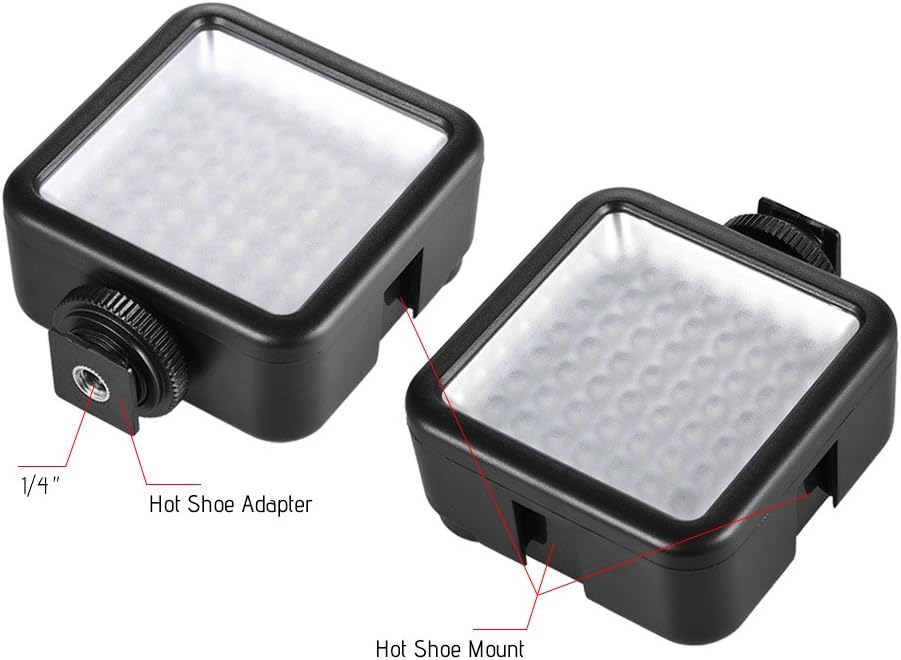
Figure 3.4: Detail of the hot shoe adapter and mount for interlocking.
4. Operating Instructions
4.1 Power On/Off and Brightness Adjustment
The light features a single rotary knob for both power control and brightness adjustment.
- Power On: Rotate the knob clockwise from the 'OFF' position. The light will turn on at its lowest brightness setting.
- Adjust Brightness: Continue rotating the knob clockwise to increase brightness from 0% to 100%. Rotate counter-clockwise to decrease brightness.
- Power Off: Rotate the knob counter-clockwise until it clicks into the 'OFF' position.

Figure 4.1: The ON/Dimmer rotary knob on the back of the light.

Figure 4.2: Visual representation of 0-100% dimmable brightness.
5. Maintenance
- Cleaning: Use a soft, dry cloth to clean the exterior of the light. Do not use abrasive cleaners or solvents.
- Storage: Store the light in a cool, dry place away from direct sunlight and extreme temperatures. Remove batteries if storing for extended periods.
- Battery Care: Replace batteries when the light output becomes dim or inconsistent. Dispose of used batteries responsibly according to local regulations.
6. Troubleshooting
| Problem | Possible Cause | Solution |
|---|---|---|
| Light does not turn on. | Batteries are dead or incorrectly inserted. | Check battery polarity. Replace with fresh AA batteries. |
| Light dims quickly or is inconsistent. | Low battery power. | Replace with fresh AA batteries. |
| Light is not securely mounted. | Mounting knob/ring is loose. | Ensure the hot shoe locking ring is tightened. |
7. Specifications
| Feature | Specification |
|---|---|
| Model | W49 |
| LED Quantity | 49 pieces |
| Power Output | 5.5W |
| Color Temperature | 6000K |
| CRI (Color Rendering Index) | ≥90 |
| Dimming Range | 0% - 100% |
| Power Source | 2 x AA batteries (not included) |
| Lifetime | Up to 50,000 hours |
| Mounting | Hot Shoe Mount, 1/4-inch Thread |
| Product Dimensions | 3.15 x 1.22 x 2.56 inches (8 x 3.1 x 6.5 cm) |
| Item Weight | 3.36 ounces (95.25 grams) |

Figure 7.1: Product dimensions.
8. Warranty Information
Specific warranty details for the Andoer Mini 49-LED Camera Video Light are typically provided at the point of purchase or within the product packaging. Please retain your proof of purchase for any warranty claims. For detailed warranty terms and conditions, please refer to the documentation included with your product or contact the seller/manufacturer directly.
9. Support
If you encounter any issues or have questions regarding your Andoer Mini 49-LED Camera Video Light that are not covered in this manual, please contact the retailer from whom you purchased the product. Alternatively, you may visit the official Andoer website for further support and contact information.