
Introduction
The Andoer L200 Telephoto Lens Support is designed to provide stable support for long and heavy camera lenses, reducing strain on the camera body and lens mount. Constructed from durable aluminum alloy, it features adjustable height and horizontal movement to accommodate various lens sizes and camera setups. It is compatible with Arca-Swiss type mounts and offers 1/4" and 3/8" threads for direct tripod mounting.
Product Features
- Telephoto Lens Support: Specifically designed for large lenses, with a wheel center diameter of 48mm (1.9 inches).
- Durable Construction: Made from CNC aluminum alloy with an oxidized surface treatment for enhanced durability.
- High Load Capacity: Capable of supporting heavy loads ranging from 6 kg to 10 kg (13.2 lbs to 22 lbs).
- Adjustable Design: Features adjustable height and horizontal movement to fit different lens configurations.
- Quick Release Plate: Equipped with a 1/4" screw quick release plate featuring non-slip rubber for secure attachment.
- Versatile Mounting: Includes both 1/4" and 3/8" threads on the bottom for direct mounting onto tripods or photography heads.
- Arca-Swiss Compatibility: The dual-sided neck is compatible with Arca-Swiss type mounts.
Package Contents
The package includes the following items:
- 1 x Andoer L200 Telephoto Lens Support
- 2 x Wrenches (for adjustments)
Note: Only the lens support and wrenches are included. Camera, lens, and tripod are for illustration purposes only and are not included.
Setup Instructions
Attaching to a Tripod
The Andoer L200 lens support can be mounted directly onto a tripod or a photography head. Locate the 1/4" or 3/8" threaded holes on the bottom of the lens support base plate.
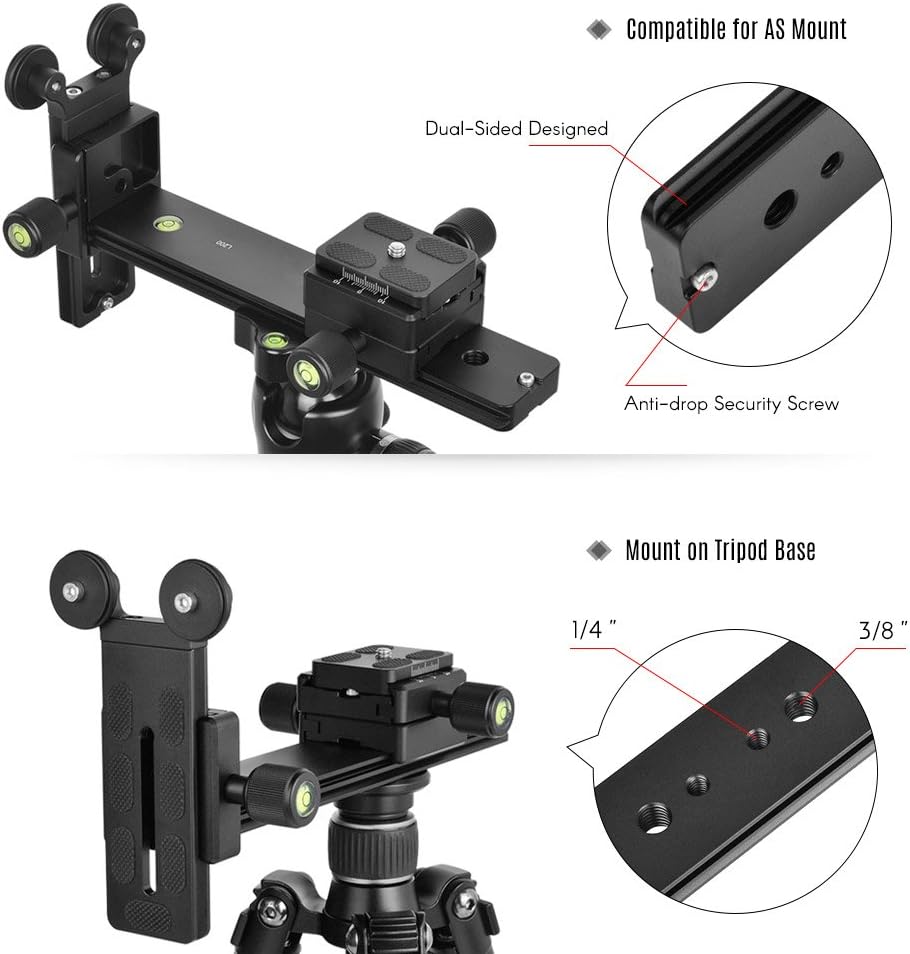
Image Description: A close-up view of the base plate of the Andoer L200 lens support, highlighting the 1/4" and 3/8" threaded holes for tripod attachment. This allows for direct mounting to various tripod systems.
Securely fasten the lens support to your tripod's quick release plate or directly to the tripod head using the appropriate screw size.
Mounting Camera and Lens
Attach your camera's quick release plate (if not already attached) to the camera body. Then, mount your camera and lens assembly onto the quick release clamp of the Andoer L200 lens support. Ensure the lens is positioned over the support wheels.

Image Description: The Andoer L200 telephoto lens support is shown mounted on a tripod, with a DSLR camera and a large telephoto lens attached. The lens rests on the support wheels, demonstrating proper setup for stability.
Operating Instructions
Adjusting Height
To adjust the vertical height of the lens support, loosen the locking knob on the vertical arm. Slide the arm up or down until the support wheels are aligned with the bottom of your telephoto lens. Tighten the locking knob securely to fix the height.

Image Description: A diagram illustrating the adjustable features of the Andoer L200 lens support. Arrows indicate vertical movement for height adjustment and horizontal movement for positioning the quick release plate.
Adjusting Horizontal Position
To adjust the horizontal position of the quick release plate, loosen the corresponding locking knob. Slide the plate along the base rail to achieve optimal balance for your camera and lens setup. Once balanced, tighten the locking knob firmly.
Refer to the image above for visual guidance on horizontal adjustment.
Using the Arca-Swiss Compatible Neck
The dual-sided neck of the lens support is compatible with Arca-Swiss type clamps. This allows for integration into existing Arca-Swiss systems for quick attachment and detachment.
Image Description: A detailed view of the dual-sided neck of the Andoer L200 lens support, showing its design for Arca-Swiss compatibility and an anti-drop security screw for added safety.
Maintenance
- Cleaning: Wipe the aluminum alloy body with a soft, dry cloth to remove dust and dirt. For stubborn marks, use a slightly damp cloth and then dry thoroughly. Avoid abrasive cleaners or solvents.
- Lubrication: Periodically check the moving parts and locking mechanisms. If any movement feels stiff, apply a small amount of silicone-based lubricant to the sliding surfaces and threads.
- Storage: Store the lens support in a dry, clean environment away from extreme temperatures and humidity.
- Inspection: Regularly inspect all screws and connections to ensure they are tight. Re-tighten any loose components using the provided wrenches.
Troubleshooting
| Problem | Possible Cause | Solution |
|---|---|---|
| Lens support feels unstable. | Loose connections; improper balance. | Ensure all locking knobs (height, horizontal, tripod mount) are securely tightened. Adjust the horizontal position to balance the camera and lens assembly. |
| Difficulty adjusting height or horizontal position. | Locking knobs are too tight; dirt/debris on sliding surfaces. | Loosen locking knobs sufficiently before attempting adjustment. Clean sliding surfaces and apply a small amount of lubricant if necessary. |
| Lens not resting properly on support wheels. | Incorrect height adjustment. | Adjust the vertical height of the support arm until the lens rests evenly and securely on the wheels. |
Specifications
| Brand | Andoer |
| Model | L200 |
| Material | Aluminum Alloy |
| Color | Black |
| Maximum Load Capacity | 6 - 10 kg (13.2 - 22 lbs) |
| Neck Size | 200 x 38 x 12 mm (7.9 x 1.5 x 0.5 inches) |
| Screw Type (Quick Release Plate) | 1/4" |
| Bottom Thread Type (Tripod Mount) | 1/4" and 3/8" |
| Plate Holder Size | 50 x 48 mm (2 x 1.9 inches) |
| Quick Release Plate Size | 50 x 38 x 10 mm (2 x 1.5 x 0.4 inches) |
| Base Plate Size | 100 x 38 x 10 mm (3.9 x 1.5 x 0.4 inches) |
| Wheel Center Distance | 48 mm (1.9 inches) |
| Wheel Diameter | 27 mm (1.1 inches) |
| Item Weight | 543 g (19.1 oz) |
| Folded Size | 22.7 x 11.5 x 6.4 cm (8.9 x 4.5 x 2.5 inches) |
| Water Resistance Level | Not Water Resistant |
Warranty and Support
Specific warranty information for the Andoer L200 Telephoto Lens Support is not provided in this manual. Please refer to the product packaging or the official Andoer website for detailed warranty terms and conditions.
For technical support or customer service inquiries, please contact Andoer customer support through their official channels. Contact information can typically be found on the manufacturer's website or included documentation.