
1. Introduction
The Google Nest Thermostat E is a smart, programmable thermostat designed to help manage your home's heating and cooling efficiently. It learns your preferred temperatures and adjusts automatically to save energy while maintaining comfort. This device can be controlled remotely via the Nest app and integrates with voice assistants like Amazon Alexa and Google Assistant.
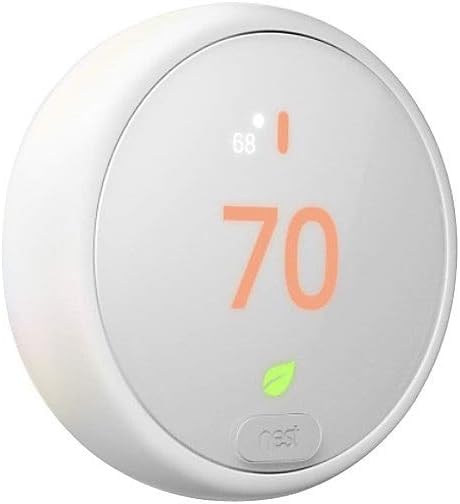
Image 1: Front view of the Google Nest Thermostat E, showing its frosted display and current temperature setting.
2. Setup and Installation
Installation of the Nest Thermostat E is designed to be straightforward, typically completed within 60 minutes. The package includes all necessary components for installation.
2.1 What's Included
- Nest Thermostat E Display
- Base plate
- Optional trim plate
- Mounting screws and labels
- Installation Guide
- Pro installation card
2.2 Compatibility
The Nest Thermostat E is compatible with approximately 95% of 24V heating and cooling systems. For specific compatibility details, refer to the included installation guide or the Google Nest support website.
2.3 Connectivity Requirements
To utilize all smart features, the thermostat requires a working internet connection and Wi-Fi. A smartphone or tablet running iOS or Android with the Nest app installed is also necessary for remote control and advanced settings.
3. Operating Instructions
The Nest Thermostat E offers various methods for controlling your home's temperature.
3.1 Manual Temperature Adjustment
Rotate the outer ring of the thermostat to manually adjust the target temperature. The display will show the new setting.
3.2 Nest App Control
Control your thermostat from anywhere using the Nest app on your smartphone or tablet. The app allows you to:
- Change the temperature
- Adjust schedules
- Monitor energy usage
- Receive alerts and reminders
3.3 Voice Control
Integrate your Nest Thermostat E with Amazon Alexa or Google Assistant-enabled devices to adjust the temperature using voice commands.
3.4 Smart Features
- Auto-Scheduling: The thermostat learns your preferred temperatures over time and creates an optimized schedule.
- Home/Away Assist: Automatically adjusts to an energy-saving Eco Temperature when no one is home, preventing heating or cooling of an empty house.
- Nest Leaf: A leaf icon appears on the display and in the app when you select a temperature that helps save energy.
- Energy History: Review your energy usage in the Nest app to understand consumption patterns and identify saving opportunities.
- HVAC Monitoring: The thermostat monitors your heating and cooling systems and can send alerts if potential issues are detected, along with maintenance reminders.
- Nest Temperature Sensor (Sold Separately): Compatible with Nest Temperature Sensors to ensure specific rooms maintain desired temperatures.

Image 2: The Nest Thermostat E mounted on a wall, showing a blue temperature display, indicating cooling mode.
4. Maintenance
The Nest Thermostat E requires minimal maintenance.
- Cleaning: Gently wipe the display and body with a soft, dry cloth. Avoid abrasive cleaners or solvents.
- HVAC System Alerts: Pay attention to any HVAC monitoring alerts or maintenance reminders provided by the thermostat to ensure your heating and cooling systems operate optimally. These alerts are informational and do not replace professional HVAC diagnostics.
5. Troubleshooting
If you encounter issues with your Nest Thermostat E, consider the following basic troubleshooting steps:
- No Power/Display Off: Ensure the thermostat is properly seated on its base and that your HVAC system has power. Check your circuit breaker if necessary.
- Wi-Fi Connectivity Issues: Verify your home Wi-Fi network is operational. Restart your router if other devices are also experiencing connectivity problems. Ensure the thermostat is within range of your Wi-Fi signal.
- Incorrect Temperature Readings: Ensure the thermostat is not exposed to direct sunlight, drafts, or heat sources that could affect its internal temperature sensor.
- System Not Responding: If your heating or cooling system is not responding to thermostat commands, check the wiring connections at the base of the thermostat and at your HVAC system.
For more detailed troubleshooting guides and support, please visit the official Google Nest support website.
6. Specifications
| Feature | Detail |
|---|---|
| Brand | |
| Model Name | Nest Thermostat E |
| Model Number | T4000ES |
| Controller Type | Amazon Alexa, Google Assistant, Nest App |
| Special Features | Auto-Scheduling, Programmable, Home/Away Assist, HVAC Monitoring |
| Color | White |
| Specific Uses | Heat Pump, Heating, Cooling |
| Connectivity Technology | Wi-Fi, Bluetooth |
| Power Source | Battery Powered (2 AAA batteries included) |
| Item Weight | 7.04 ounces (approx. 199.6 grams) |
| Material | Plastic |
| Shape | Round |
| Display Type | Digital, Frosted Display |
| Mounting Type | Wall Mount |
| Product Dimensions | 6.46 x 4.88 x 2.32 inches (approx. 16.4 x 12.4 x 5.9 cm) |
| UPC | 813917020593 |
7. Warranty and Support
The Google Nest Thermostat E comes with a manufacturer's warranty. For detailed information regarding warranty terms, conditions, and duration, please refer to the documentation included with your product or visit the official Google Nest support website.
7.1 Customer Support
For technical assistance, troubleshooting, or warranty claims, please visit the Google Nest Support website. You can find FAQs, community forums, and contact options for direct support.


