
1. Introduction
Thank you for choosing the Lawmate BA-2200 battery. This manual provides essential information for the safe and efficient use of your new battery. Please read these instructions carefully before use and retain them for future reference. This battery is designed as a replacement power source for Lawmate PV500 EVO, ECO, and LITE digital video recorders.
Safety Precautions
- Do not disassemble, crush, puncture, or short-circuit the battery.
- Do not expose the battery to high temperatures (above 60°C / 140°F) or direct sunlight.
- Do not dispose of the battery in fire or water.
- Keep the battery away from children.
- Use only the specified charger for this battery.
- If the battery shows signs of damage, swelling, or leakage, discontinue use immediately.
2. Product Overview
The Lawmate BA-2200 is a high-capacity 2200mAh lithium-ion battery designed to provide reliable power for your Lawmate PV500 series digital video recorders. It operates at 3.7 volts and offers approximately 3 hours of recording time, ensuring extended operational periods for your surveillance needs.
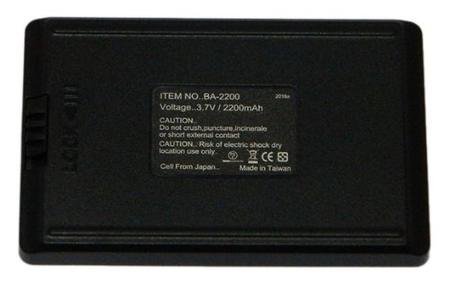
Image 1: Lawmate BA-2200 2200mAh Lithium Battery. This image displays the compact design of the BA-2200 battery, highlighting its label with capacity and voltage specifications.
Key Features:
- Capacity: 2200mAh
- Voltage: 3.7V
- Type: Lithium-ion (Li-ion)
- Estimated Recording Time: Approximately 3 hours (with compatible PV500 DVRs)
- Compatibility: Lawmate PV500 EVO, PV500 ECO, PV500 LITE Digital Video Recorders
3. Setup
Initial Charging
- Before first use, fully charge the BA-2200 battery.
- Connect the battery to the appropriate Lawmate charger (typically supplied with your PV500 series DVR).
- Observe the charging indicator on your charger or DVR. Charging status may vary by device model.
- Once the indicator shows a full charge, disconnect the battery from the charger.
Battery Installation
- Ensure your Lawmate PV500 series DVR is powered off before installing or removing the battery.
- Locate the battery compartment on your DVR. Refer to your DVR's specific manual for exact location and opening instructions.
- Insert the BA-2200 battery into the compartment, ensuring the contacts align correctly. Do not force the battery.
- Close the battery compartment securely.
4. Operating
Powering Your DVR
Once the BA-2200 battery is correctly installed, you can power on your Lawmate PV500 series DVR as per its operational instructions. The battery will provide the necessary power for recording and other functions.
Monitoring Battery Level
The battery level can typically be monitored through the display interface of your Lawmate PV500 series DVR. Consult your DVR's manual for specific instructions on checking battery status indicators.
Recharging
When the battery level is low, recharge it promptly to avoid interruption of operation. Follow the initial charging steps outlined in the 'Setup' section.
5. Maintenance
Storage
- Store the battery in a cool, dry place, away from direct sunlight and extreme temperatures.
- For long-term storage, it is recommended to store the battery with approximately 50% charge. Avoid storing it fully charged or completely depleted.
Cleaning
Wipe the battery's exterior and contacts with a clean, dry cloth if necessary. Do not use liquid cleaners or solvents.
Battery Longevity Tips
- Avoid frequent full discharges and recharges.
- Do not leave the battery connected to a charger indefinitely after it is fully charged.
- If the battery will not be used for an extended period, charge it to about 50% every few months.
6. Troubleshooting
Battery Not Charging
- Check connections: Ensure the battery is properly seated in the charger or DVR and that the charger is connected to a power source.
- Verify charger: Confirm you are using the correct charger for the Lawmate PV500 series.
- Inspect battery: Look for any visible damage to the battery or its contacts. If damaged, discontinue use.
Short Battery Life
- Full charge: Ensure the battery is fully charged before each use.
- Environmental factors: Extreme cold can reduce battery performance.
- Battery age: All rechargeable batteries degrade over time. If the battery is old, its capacity may have diminished.
Battery Overheating
- Immediately disconnect the battery from the device or charger.
- Allow the battery to cool down in a well-ventilated area.
- If overheating persists, discontinue use and contact support.
7. Specifications
| Feature | Specification |
|---|---|
| Model Number | BA-2200 |
| Battery Cell Composition | Lithium Ion |
| Battery Capacity | 2200 Milliamp Hours (mAh) |
| Voltage | 3.7V |
| Manufacturer | LAWMATE |
| Recommended Uses | Digital Video Recorders (PV500 EVO, ECO, LITE) |
8. Warranty and Support
Warranty Information
The Lawmate BA-2200 battery is covered by a manufacturer's warranty against defects in materials and workmanship. The specific terms and duration of the warranty may vary by region and retailer. Please retain your proof of purchase for warranty claims.
Customer Support
For technical assistance, warranty inquiries, or further information regarding your Lawmate BA-2200 battery, please contact your authorized Lawmate dealer or the Lawmate customer support service. Contact details can typically be found on the Lawmate official website or through your product retailer.