
Introduction
This manual provides essential instructions for the installation, operation, and maintenance of the iClebo Arte YCR-M05 Series Robot Vacuum Cleaner Side Brushes. These accessories are compatible with iClebo Arte models YCR-M05-10, YCR-M05-20, YCR-M05-30, and YCR-M05-50. Proper installation and regular maintenance ensure optimal cleaning performance and extend the lifespan of your robot vacuum cleaner.
Note: These side brushes are specifically designed for the iClebo Arte YCR-M05 Series and are not compatible with iClebo Omega Series models.
Product Overview

Image: A pair of iClebo Arte YCR-M05 Series side brushes, one marked 'L' for left and the other 'R' for right, showing their three-arm design.
The iClebo Arte YCR-M05 Series side brushes are crucial components that sweep debris from edges and corners into the robot vacuum's main cleaning path. Each set includes one left (L) and one right (R) brush, designed for specific installation points on the vacuum's underside.
Installation
Follow these steps to correctly install the side brushes on your iClebo Arte YCR-M05 Series robot vacuum cleaner:
- Prepare the Vacuum: Carefully flip over the robot vacuum cleaner to expose its underside.
- Identify Brush Positions: Locate the designated positions for the left and right side brushes. These are typically marked with 'L' and 'R' on the vacuum's body.
- Install Left Brush: Match the side brush marked 'L' to the 'L' marked position on the vacuum. Align the protruding part of the brush with the groove on the vacuum and push it in firmly until it clicks into place.
- Install Right Brush: Similarly, match the side brush marked 'R' to the 'R' marked position. Align the protruding part of the brush with the groove and push it in firmly.
Caution: Ensure the protruding part of the side brush matches the corresponding shape on the robotic vacuum cleaner's body for proper fit and function.

Image: The underside of an iClebo Arte YCR-M05 robot vacuum cleaner, with red circles highlighting the left and right side brush installation points. Hands are shown near the main brush compartment.
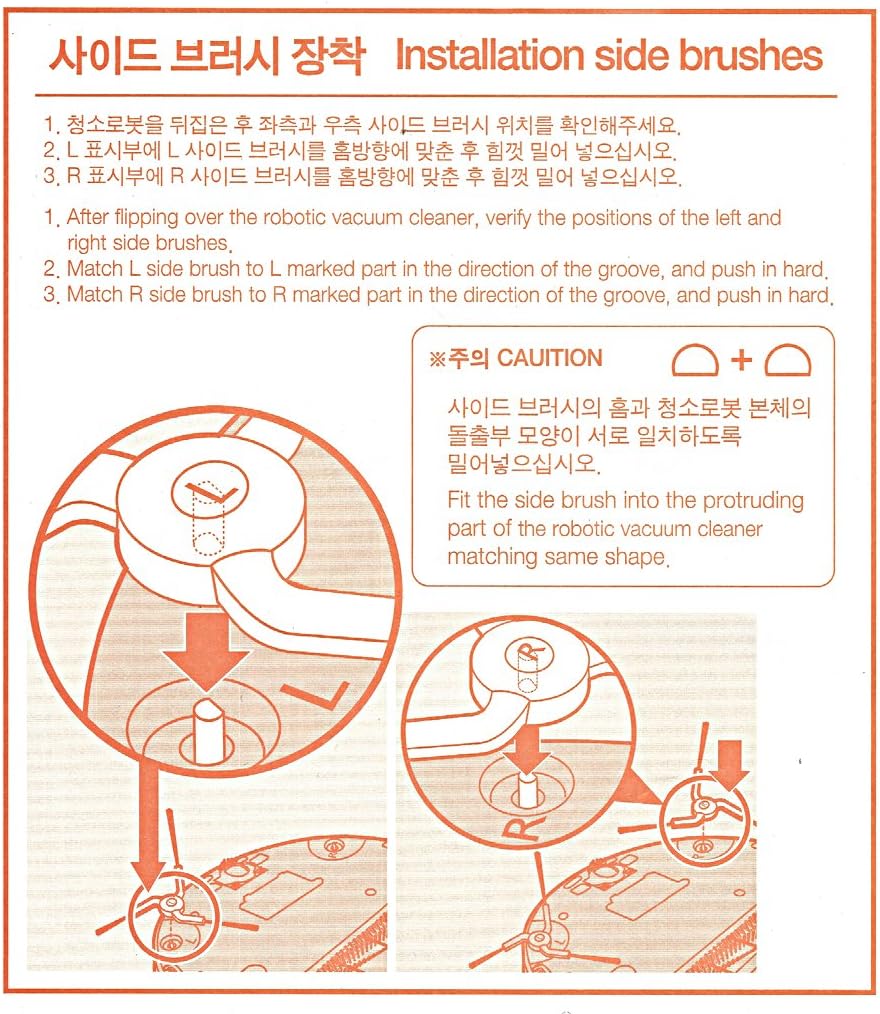
Image: A detailed diagram showing the correct alignment and insertion of the 'L' and 'R' side brushes into their respective slots on the robot vacuum, emphasizing matching the brush's protrusion with the vacuum's groove.
Operating Principles of Side Brushes
During operation, the side brushes rotate to sweep dust, dirt, and debris from edges, corners, and along walls into the path of the robot vacuum's main brush and suction inlet. This action ensures a more thorough cleaning coverage, especially in areas that the main brush might not directly reach.
Maintenance and Replacement
Regular inspection and timely replacement of consumables are essential for maintaining your iClebo Arte YCR-M05 robot vacuum's performance. The side brushes, like other components, are subject to wear and tear.
Side Brush Specific Maintenance:
- Cleaning: Periodically check the side brushes for tangled hair, threads, or other debris. Carefully remove any obstructions to ensure free rotation.
- Replacement: Replace side brushes if they become visibly damaged, warped, or if their bristles are excessively worn, as this can reduce cleaning effectiveness. There is no fixed replacement cycle; replace as necessary based on condition.
General Consumable Replacement Cycle:

Image: A table outlining the recommended replacement cycles for various iClebo Arte YCR-M05 robot vacuum consumables, including Hepa filter, Mop, Main Brush, Side Brush, Battery, and Blade.
| Kind | Recommended Replacement Cycle | Reference Contents |
|---|---|---|
| Hepa Filter | 4 weeks | Disposable. Not reusable. |
| Mop | 3 months | Or if badly soiled, please replace when worn out. |
| Main Brush | If necessary | If the brush is damaged or warped, replace it. |
| Side Brush | If necessary | If the brush is damaged or warped, replace it. |
| Battery | 1 year | Replace if charging time and cleaning time are shortened. (Battery warranty period is 6 months). |
| Blade | If necessary | Replace if torn, worn, or bent. |
Troubleshooting
If you experience issues with your side brushes, consider the following:
- Brushes Tangling: If brushes frequently tangle with hair or threads, pause the vacuum, flip it over, and carefully remove the tangled material. Regular cleaning can prevent this.
- Reduced Cleaning Performance: If the side brushes are not effectively sweeping debris, check for damage, warping, or excessive wear on the bristles. Replace them if necessary.
- Brush Not Rotating: Ensure the brush is correctly installed and fully pushed into its slot. Check for any debris obstructing its rotation mechanism.
Specifications
- Product Dimensions: 7.87 x 0.2 x 5.91 inches
- Item Weight: 0.458 ounces
- Manufacturer: Yujin Robot
- Compatible Models: iClebo Arte YCR-M05-10, YCR-M05-20, YCR-M05-30, YCR-M05-50
- Item Model Number: For YCR-M05 Series
Warranty and Support
While specific warranty details for these accessory brushes are not provided, the battery component of the iClebo Arte YCR-M05 series typically carries a 6-month warranty period.
For further assistance, technical support, or to inquire about replacement parts, please contact your retailer or the manufacturer, Yujin Robot, directly. Refer to your original robot vacuum cleaner manual for comprehensive support contact information.