
SCYAN D5
SCYAN D5 Fingerprint Touchscreen Keypad Deadbolt Lock User Manual
Model: D5
1. Introduction

Figure 1.1: Front view of the SCYAN D5 Fingerprint Touchscreen Keypad Deadbolt Lock, showcasing the fingerprint sensor, touchscreen keypad, and mechanical keyhole.
The SCYAN D5 deadbolt provides a secure and convenient locking solution utilizing advanced fingerprint and touchscreen technologies. This manual outlines the installation, setup, operation, and maintenance procedures for your D5 deadbolt lock.
Key Features:
- Multiple unlocking methods: Fingerprint, User Code, or Mechanical Key.
- Supports up to 100 unique fingerprints and 100 user codes.
- Integrated touch-active fingerprint sensor for quick access.
- Self-learning fingerprint technology improves recognition over time.
- Standard 12-key touchscreen for code entry.
- Memory function retains registered data even after power loss.
- Emergency 9V battery power option.
- Low battery alert system.
- Lockout feature for enhanced security.
2. Package Contents
Verify that all components are present before beginning installation.
- Front Unit (Exterior Assembly with Keypad and Fingerprint Sensor)
- Back Unit (Interior Assembly with Battery Compartment and Thumb Turn)
- Mechanical Keys (2)
- Deadbolt Latch
- Strike Plate
- Mounting Screws (Various sizes: M5x60, M4x40, M3x6, Bolt/Strike Screws)
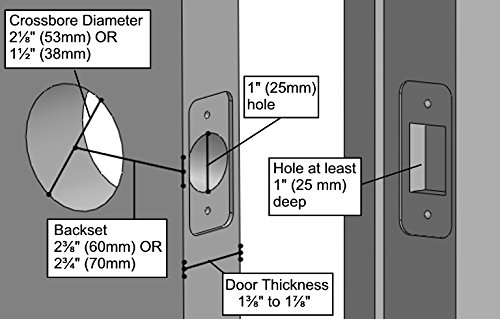
Figure 2.1: Diagram showing all included components of the SCYAN D5 deadbolt lock, including the touchscreen assembly, battery assembly, strike plate, key, bolt, and various screws.
3. Installation
3.1 Pre-installation Checks
Ensure your door meets the following specifications for proper installation:
- Door Thickness: Between 1-3/8 inches (35mm) and 1-7/8 inches (48mm).
- Backset: Adjustable to either 2-3/8 inches (60mm) or 2-3/4 inches (70mm).
- Crossbore Diameter: 2-1/8 inches (53mm) or 1-1/2 inches (38mm).
- Hole for Latch: At least 1 inch (25mm) deep.
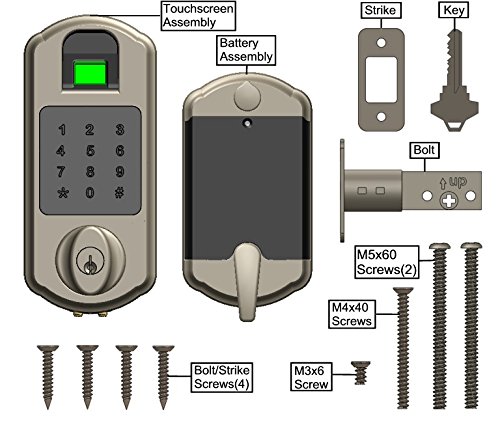
Figure 3.1: Diagram illustrating required door dimensions for installing the SCYAN D5 deadbolt, including crossbore diameter, backset, door thickness, and latch hole depth.
3.2 Installation Steps
- Prepare the Door: If necessary, drill holes according to the pre-installation checks.
- Install the Latch: Insert the deadbolt latch into the door edge. Ensure the "UP" marking on the bolt is facing upwards. Secure with the appropriate screws.
- Install the Exterior Assembly: Route the cable from the exterior unit through the crossbore hole. Position the exterior unit against the door, ensuring the spindle passes through the latch mechanism.
- Install the Interior Mounting Plate: Secure the interior mounting plate to the exterior assembly using the long M5x60 screws.
- Connect the Cable: Connect the cable from the exterior unit to the interior assembly.
- Install the Interior Assembly: Mount the interior assembly onto the mounting plate, aligning it properly. Secure with the M4x40 screws.
- Install Batteries: Open the battery cover on the interior assembly and insert 4 AA alkaline batteries (not included), observing polarity.
- Install Strike Plate: Install the strike plate on the door frame, aligning it with the deadbolt latch. Secure with the remaining screws.
- Test Operation: Manually test the deadbolt with the mechanical key and the thumb turn to ensure smooth operation.
4. Setup and Programming
The D5 lock system is managed using a Programming Code or an Administrator Fingerprint. Refer to the detailed programming instructions in the full manual for specific steps.
4.1 Administrator Setup
- Initial Programming Code: The lock comes with a default programming code. Change this immediately after installation for security.
- Administrator Fingerprint: Enroll an administrator fingerprint for easier access to programming functions.
4.2 User Management
- Adding Fingerprint Users: Up to 100 unique fingerprints can be enrolled. The lock's self-learning ability will improve recognition with each use.
- Adding User Codes: Up to 100 user codes (4-12 digits) can be programmed. The system supports partial code matching, allowing prefixes and suffixes.
- Deleting Users: Individual fingerprints or user codes can be deleted directly from the keypad.
5. Operating the Lock
5.1 Unlocking
- Fingerprint: Place a registered finger on the sensor. The lock will unlock with a single touch.
- User Code: Enter a valid user code on the touchscreen keypad, then press the '#' key.
- Mechanical Key: Insert the mechanical key into the keyhole and turn to unlock. This serves as an override key.
5.2 Locking
- Manual Locking: Rotate the thumb turn on the interior assembly to extend the deadbolt. Note that this is not a motorized deadbolt; manual rotation is required after the clutch engages. This design allows unlocking even if the bolt is jammed.
5.3 Lockout Feature
When the lockout feature is activated, external access via fingerprint, code, or even the mechanical key is prevented. This provides enhanced security against tampering or forced entry. Refer to the full manual for instructions on how to activate and deactivate this feature.
6. Maintenance
6.1 Battery Replacement
- The lock is powered by 4 AA alkaline batteries (not included).
- A low battery alert will indicate when batteries need replacement. Replace all four batteries simultaneously.
- In case of complete power loss, a 9V battery can be temporarily attached to the external terminals for emergency power to unlock the deadbolt.
6.2 Cleaning
Clean the touchscreen and fingerprint sensor with a soft, dry cloth. Avoid abrasive cleaners or solvents that could damage the finish or electronic components.
7. Troubleshooting
- Lock Not Responding: Check battery levels. If batteries are depleted, use the 9V emergency power option or the mechanical key.
- Fingerprint Not Recognized: Ensure your finger is clean and dry. Try re-enrolling your fingerprint if issues persist. The self-learning feature improves recognition over time.
- User Code Not Working: Verify the code entered is correct. Ensure the lockout feature is not active.
- Lock Jammed: The D5 deadbolt is designed for manual rotation after clutch engagement. If the bolt is physically jammed, this design allows for manual unlocking, unlike fully motorized deadbolts. Inspect for obstructions in the door frame or latch mechanism.
- Settings Lost After Power Outage: The D5 features a memory function, so registered fingerprints and user codes should not be lost due to power run-out or system reset.
8. Specifications
| Model: | D5-SN |
| Unlocking Methods: | Fingerprint, User Code, Mechanical Key |
| Fingerprint Capacity: | Up to 100 |
| User Code Capacity: | Up to 100 (4-12 digits) |
| Door Thickness: | 1-3/8" to 1-7/8" (35mm to 48mm) |
| Adjustable Backset: | 2-3/8" (60mm) or 2-3/4" (70mm) |
| Operating Temperature: | -4°F to 151°F (-20°C to 66°C) |
| Power Source: | 4 AA Alkaline Batteries (not included) |
| Emergency Power: | 9V Battery Terminal |
| Material: | Zinc Alloy |
| Dimensions (L x W x H): | 3 x 3 x 7 inches (approximate exterior unit) |
| Weight: | 3.6 Pounds |
9. Warranty and Support
9.1 Warranty Information
The SCYAN D5 Fingerprint Touchscreen Keypad Deadbolt Lock comes with a one-year limited manufacturer's warranty. This warranty covers defects in materials and workmanship under normal use. Please retain your proof of purchase for warranty claims.
9.2 Customer Support
For technical assistance, troubleshooting, or warranty inquiries, please contact SCYAN customer support. Refer to the product packaging or the official SCYAN website for the most current contact information.
Related documentsD5


Ask a question about this manual
Ask about setup, troubleshooting, compatibility, parts, safety, or missing instructions. Manuals+ will review the question and use this page’s manual context to help answer it.