
1. Introduction and Overview
Thank you for choosing the PureMounts FM51-600 TV Wall Mount. This manual provides essential information for the safe and correct installation, operation, and maintenance of your new wall mount. The FM51-600 is a full-motion TV wall mount designed for televisions ranging from 32 to 65 inches (81-165 cm) with a maximum weight capacity of 65 kg. It offers versatile viewing angles with its swivel and tilt capabilities, ensuring an optimal viewing experience.
Key features include:
- Swivel: Up to +/-60 degrees for flexible positioning.
- Tilt: Adjustable from +5 to -15 degrees to reduce glare.
- Wall Distance: Adjustable from 69mm to 635mm.
- VESA Compatibility: Supports VESA patterns including 200x200, 300x300, 400x200, 400x400, and 600x400.
- Material: Constructed from high-quality aluminum for durability.
2. Safety Information
Please read all instructions carefully before installation. Incorrect assembly or use may result in serious injury or damage to your equipment. Keep this manual for future reference.
- Weight Limit: Do not exceed the maximum load capacity of 65 kg (143 lbs).
- TV Size: This mount is designed for TVs between 32 and 65 inches.
- Wall Type: Ensure the mounting surface can safely support the combined weight of the mount and your TV. Consult a professional if unsure about your wall's integrity.
- Tools: Use appropriate tools for installation.
- Children: Keep children away during installation. Small parts may be a choking hazard.
- Tightening: Do not overtighten screws, as this may cause damage.
- Professional Installation: If you have any doubts about installing this product, please contact a qualified professional.
3. Package Contents
Verify that all components are present and undamaged before proceeding with installation. If any parts are missing or damaged, please contact your retailer.

Image 3.1: Package Contents. This image displays all components included in the PureMounts FM51-600 package: the wall mount assembly, various screws, washers, spacers, wall anchors, a wrench, a spirit level, and the instruction manual.
The package typically includes:
- Wall Mount Assembly (pre-assembled arms and wall plate)
- TV Mounting Brackets
- Assorted Screws, Washers, and Spacers for TV attachment
- Wall Anchors and Lag Bolts for wall mounting
- Spirit Level
- Wrench
- Instruction Manual
4. Specifications
| Specification | Value |
|---|---|
| Model Number | PM-FM51-600 |
| Brand | PureMounts |
| Mount Type | Wall Mount |
| Movement Type | Tilt, Swivel |
| Material | Aluminum |
| Color | Black |
| Compatible Devices | Monitor, Television |
| Screen Size Compatibility | 32-65 inches (81-165 cm) |
| VESA Compatibility | 200x200, 300x300, 400x200, 400x400, 600x400 |
| Maximum Load Capacity | 65 kg (143 lbs) |
| Tilt Angle | +5 to -15 degrees |
| Swivel Angle | +/-60 degrees |
| Distance to Wall | 69mm - 635mm |
| Product Dimensions | 68.5 x 43 x 63.5 cm |
| Item Weight | 9.39 kg |
| Manufacturer | PureLink GmbH |
| GTIN | 04251364706282 |
5. Setup and Installation
This section provides a general overview of the installation process. For detailed, step-by-step instructions, please refer to the dedicated installation manual included in your package. Proper installation is crucial for safety and optimal performance.
5.1. Pre-Installation Checks
- Identify Wall Type: Determine if your wall is made of wood studs, concrete, or brick. Different wall types require specific mounting hardware and techniques.
- Locate Studs/Drill Points: For wood stud walls, use a stud finder to locate the center of the studs. For concrete/brick, mark your desired drill points.
- Check VESA Pattern: Confirm your TV's VESA mounting pattern matches one of the supported patterns (200x200, 300x300, 400x200, 400x400, 600x400).
- Gather Tools: Ensure you have all necessary tools, such as a drill, level, measuring tape, and screwdriver.
5.2. Mounting the Wall Plate
Secure the wall plate to your chosen wall location using the appropriate hardware. Use the included spirit level to ensure the plate is perfectly horizontal.
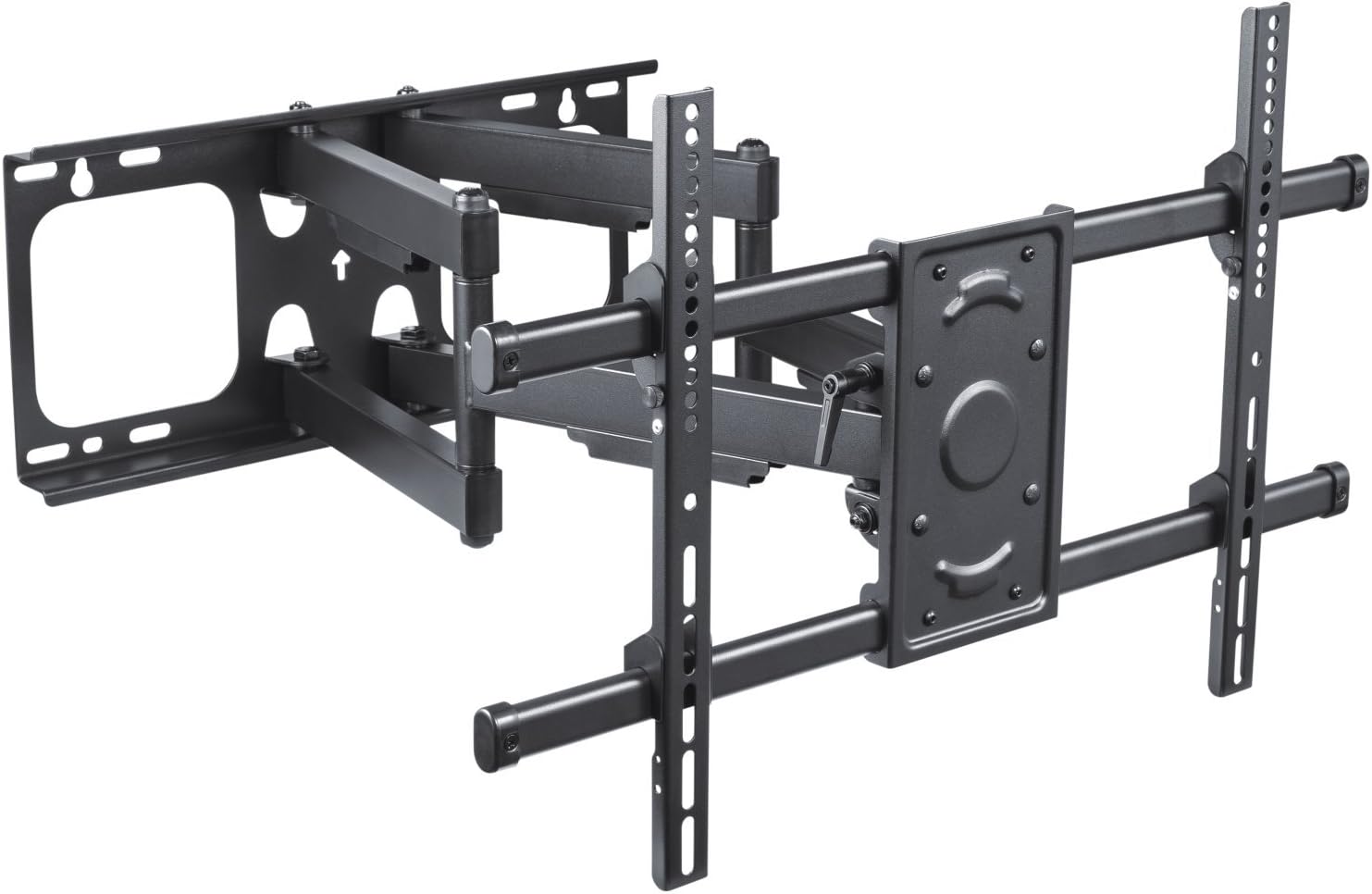
Image 5.1: Front View of Mount. This image shows the PureMounts FM51-600 TV wall mount from the front, fully extended. It highlights the dual-arm design and the VESA mounting plate.
5.3. Attaching TV Brackets
Attach the TV mounting brackets to the back of your television using the screws, washers, and spacers that fit your TV's VESA pattern. Ensure they are securely fastened.

Image 5.2: VESA Compatibility. A side view of the PureMounts FM51-600 TV wall mount, illustrating its extension from the wall. A magnified inset shows supported VESA patterns: 200x200, 300x300, 400x200, 400x400, and 600x400.
5.4. Hanging the TV
Carefully lift the TV with the attached brackets and hook them onto the wall plate. Secure the TV to the mount using the safety screws or locking mechanisms provided.

Image 5.3: Dimensional Drawing. A technical drawing providing key dimensions of the PureMounts FM51-600 TV wall mount, including wall distance (min 69mm - max 635mm), arm length, and VESA plate dimensions.

Image 5.4: Installed Mount Example. An example of the PureMounts FM51-600 TV wall mount installed in a modern living room, showcasing a TV mounted on the wall and extended for optimal viewing.
6. Operating Instructions
Once installed, your PureMounts FM51-600 allows for easy adjustment to achieve the perfect viewing angle.
6.1. Adjusting Swivel
Gently grasp the sides of your TV and pivot it left or right to achieve the desired horizontal viewing angle. The mount allows for a swivel range of up to +/-60 degrees.
6.2. Adjusting Tilt
To adjust the vertical tilt, loosen the tilt adjustment knobs or bolts on the TV brackets (if applicable, refer to your specific manual for details). Tilt the TV up or down to your preferred angle (between +5 and -15 degrees) and then re-tighten the knobs/bolts to secure the position.
6.3. Adjusting Level
Some mounts offer a small level adjustment (e.g., +/-3 degrees) to correct for minor leveling issues after installation. Consult your detailed manual for instructions on how to utilize this feature.

Image 6.1: Tilt and Swivel Angles. This image demonstrates the adjustable features of the PureMounts FM51-600 mount, including a 120-degree swivel range, +5 to -15 degree tilt, and +/-3 degree level adjustment.
7. Maintenance
Regular maintenance ensures the longevity and safe operation of your TV wall mount.
- Cleaning: Wipe the mount with a soft, dry cloth. Avoid abrasive cleaners or solvents that could damage the finish.
- Periodic Checks: Periodically check all screws and bolts to ensure they remain tight. Over time, vibrations or adjustments can cause them to loosen.
- Lubrication: The moving parts are designed for smooth operation and generally do not require lubrication. If movement becomes stiff, consult the manufacturer or a professional.
- Damage: If any part of the mount appears damaged or worn, discontinue use and contact customer support for assistance.
8. Troubleshooting
This section addresses common issues you might encounter with your TV wall mount.
8.1. TV is Not Level
- Check Wall Plate: Ensure the wall plate was installed perfectly level. If not, minor adjustments might be possible using the mount's leveling feature (if available) or by re-installing the wall plate.
- TV Brackets: Verify that the TV brackets are securely and evenly attached to the back of the TV.
8.2. Difficulty Adjusting Swivel/Tilt
- Tightness: Check if any adjustment knobs or bolts are overtightened. Loosen them slightly to allow for movement, then re-tighten to secure.
- Obstructions: Ensure no cables or other objects are obstructing the movement of the mount.
8.3. Mount Feels Unstable
- Re-check All Fasteners: Ensure all screws and bolts, both to the wall and to the TV, are securely tightened.
- Weight Limit: Confirm that your TV's weight does not exceed the mount's maximum capacity of 65 kg.
- Wall Integrity: If the wall itself feels unstable, immediately remove the TV and consult a professional to assess the wall's structural integrity.
9. Warranty and Support
The PureMounts FM51-600 TV Wall Mount is manufactured by PureLink GmbH. For warranty information, technical support, or to inquire about replacement parts, please contact PureLink GmbH directly or refer to their official website. Please have your model number (FM51-600) and proof of purchase ready when contacting support.

